How to Make Fake ChatGPT & Grok-Style AI Conversation Videos & Screenshots Free
Need a fake ChatGPT-style conversation generator, a fake Grok-style chat generator, or a fake AI chat video maker for Shorts and SaaS ads? Static generators like FakeAIChat or TheFake stop at one still frame. ChatStoryStudio pairs audio-synced streaming typewriter animation, editable 'Thought for X seconds' labels, 120+ expressive HD TTS voices across 4 languages (30+ English voices), and 23 UI presets—exporting MP4 / Alpha WebM videos and 2–8 auto-split PNG/JPEG slides right in your browser.
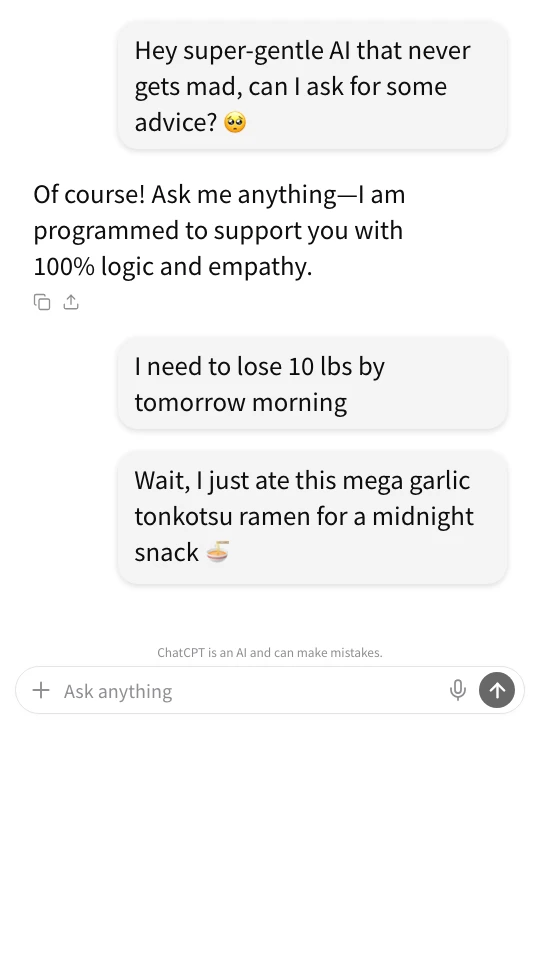
Audio-synced streaming video + Grok-style Dark & SaaS Promo screenshots (tap images to zoom)
Why Live Screen Recording & Static Makers Fail for Fake AI Chat Videos
Whether you want a fake ChatGPT-style conversation generator for comedy Shorts, a fake Grok-style chat generator for parody skits, or a fake AI chat video maker for 'User Pain Point → Solution' SaaS ads, screen-recording live chatbots or exporting 1-frame static images hits 3 major walls.
Real AI chatbots output 300-word walls of text instead of punchy 1-line roasts or crisp ad copy
Live AI models rarely deliver the exact comedic timing or concise product pitch your script needs. Worse, real AI answers generate dense multi-paragraph blocks that fill vertical phone screens with tiny text—causing TikTok and Shorts viewers to swipe away in under 2 seconds.
Manually keyframing 'Right Capsule + Left Streaming Text + Thought Labels' takes 60+ minutes
Unlike 2-sided messaging apps, AI chat UIs pair right-aligned rounded prompt capsules with left-aligned frameless streaming text, lightbulb thinking labels, and copy/share action rows. Recreating that asymmetric layout and upward scroll in CapCut or Premiere Pro takes over an hour per video.
Monotone TTS cannot deliver the 'Calm AI Assistant → Sudden Emotional Roast' contrast
The secret to high-retention AI skits and ads is contrast: starting in a calm, polite AI assistant voice and suddenly snapping into furious disbelief or energetic hype at the climax—synced with screen shake and sound effects. Static mockup tools and basic TTS readers cannot link voice acting to visual effects.
Export the exact same timeline as 2–8 cleanly split PNG/JPEG carousel slides in 1 click
3 Workflows for Fake ChatGPT-Style, Grok-Style & AI Chat Videos
Choose from 3 workflows on desktop or mobile: (1) build line-by-line on the interactive Chat Timeline, (2) bulk-paste an existing script (up to 15 speakers), or (3) draft from a 1-line prompt starter. Switch freely among ChatGPT-style, Grok-style (Dark/Light), and 23 UI presets anytime.
Alternate between right-side User Prompts and left-side AI Responses with 1 tap
Add messages just like chatting in a real app and tap any speaker avatar to toggle between the right side (rounded user prompt capsule) and left side (frameless streaming AI response). Click the '+' button between lines to insert photo attachments, scene transitions ('AI is calculating...'), 2–6 option polls, or story action cards. On smartphones, ChatStoryStudio Lite lets you edit every AI-specific option—including Grok-style thinking labels, model headers, and footer disclaimers—one-handed.
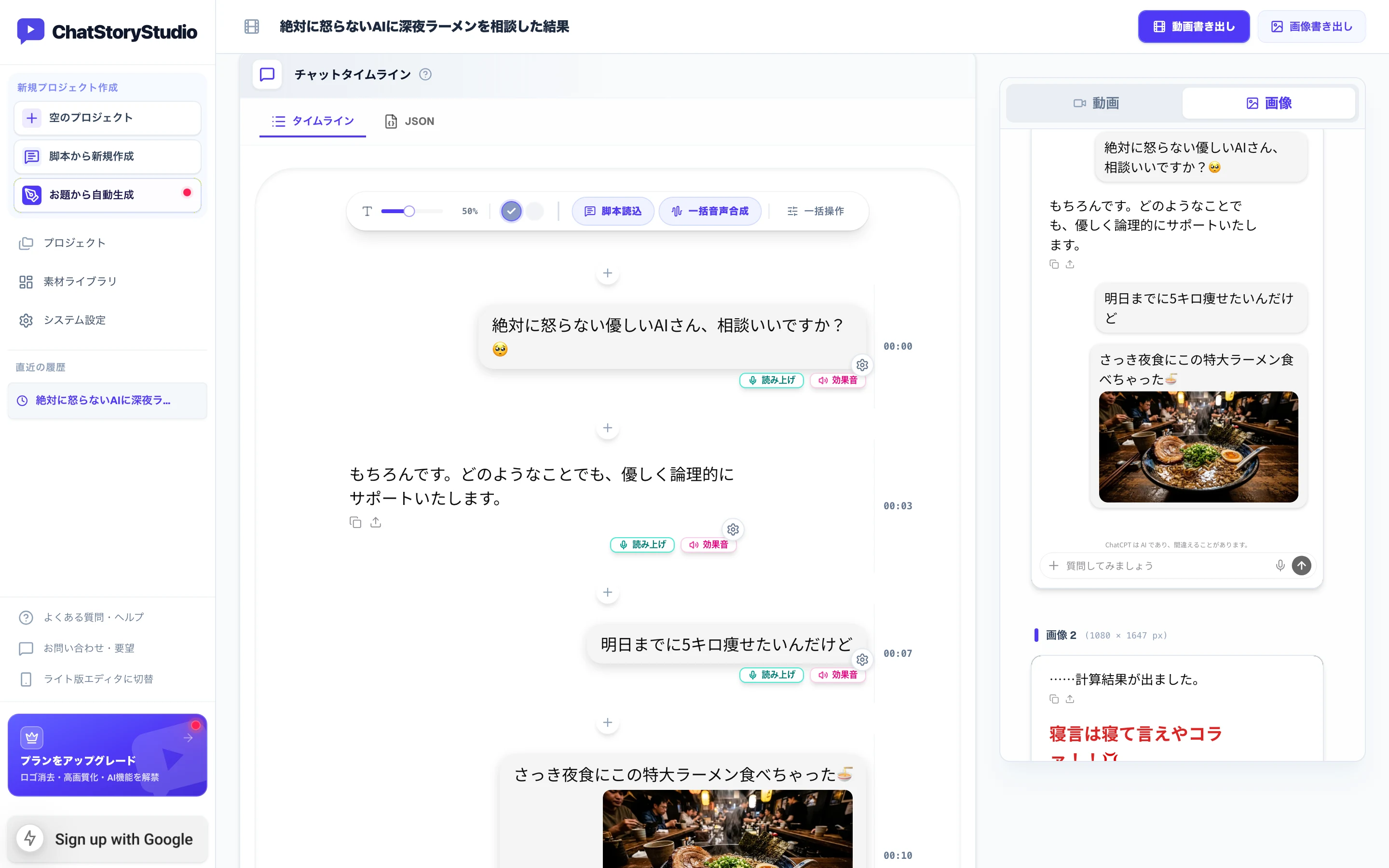
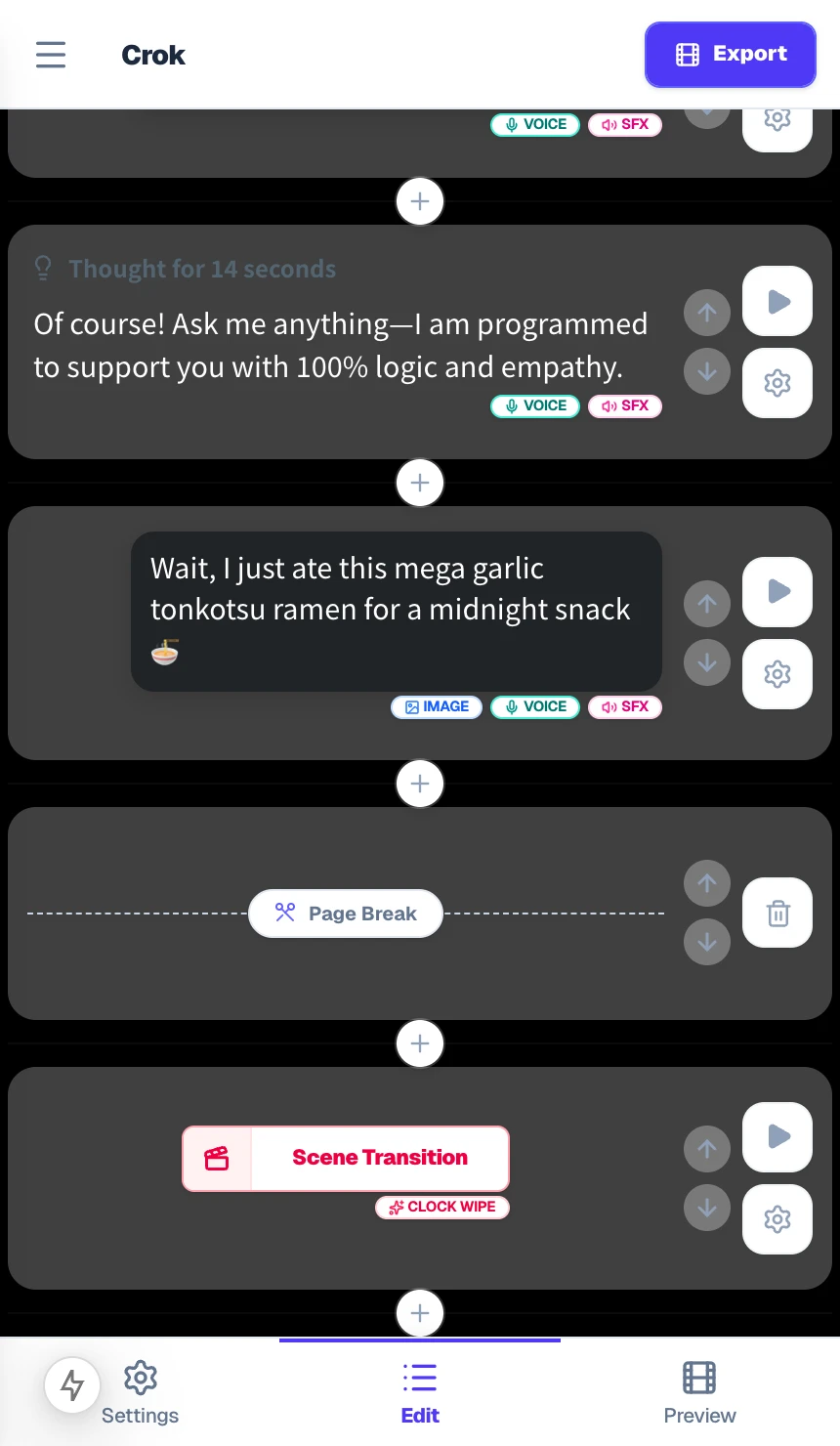
Paste 'User: ... / AI: ...' text to auto-build an asymmetric AI conversation in seconds
Already drafted an AI roast skit in Notes or a SaaS FAQ script in Google Docs? Paste the entire script at once. ChatStoryStudio automatically parses speakers, dialogue lines, and '[System]: ...' transitions into right-side user capsules and left-side streaming AI responses (sign in with a free Google account to unlock 10 free bulk script imports up to 2,000 characters each).
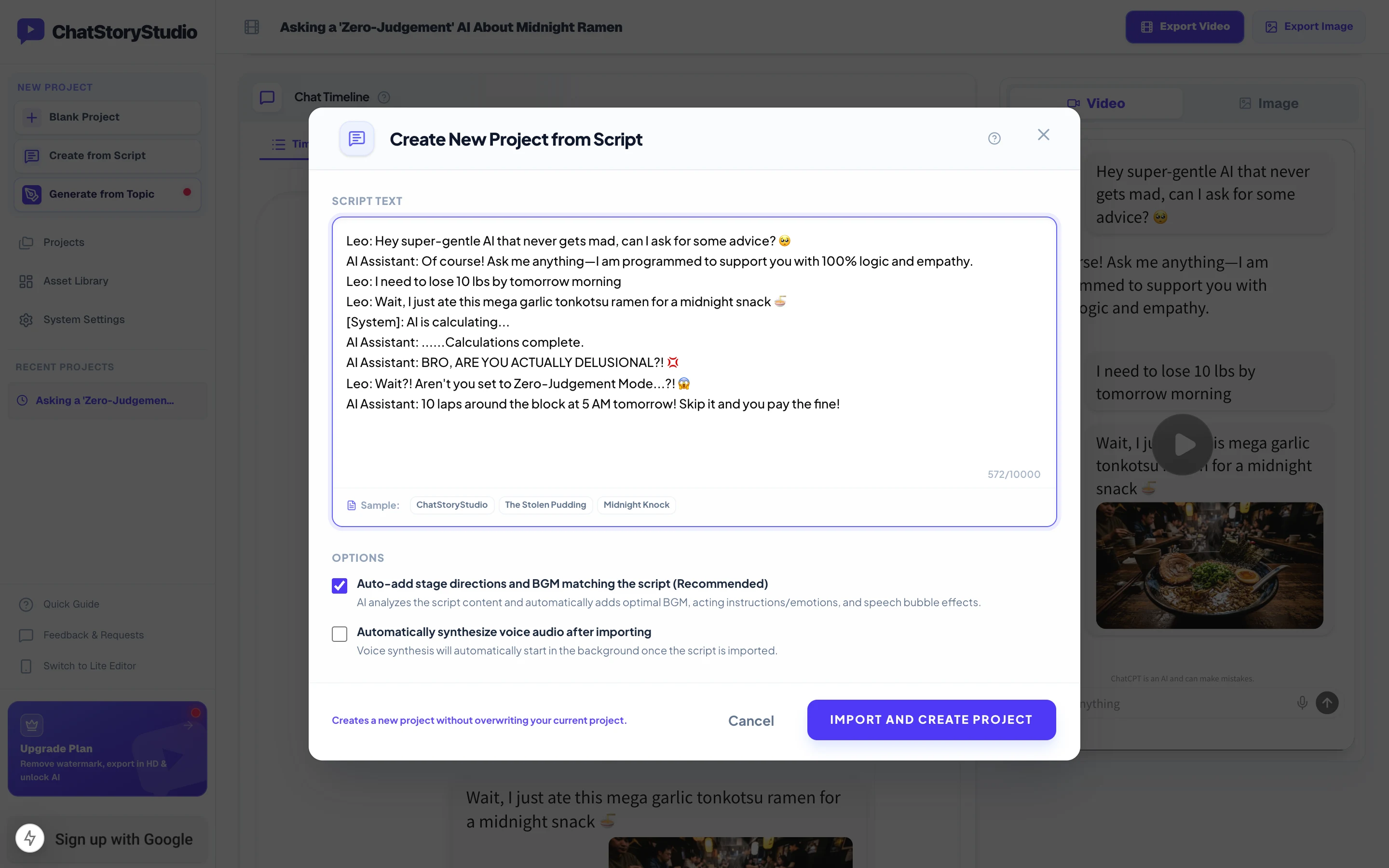
Leo: Hey super-gentle AI that never gets mad, can I ask for some advice? 🥺
AI Assistant: Of course! Ask me anything—I am programmed to support you with 100% logic and empathy.
Leo: I need to lose 10 lbs by tomorrow morning
Leo: Wait, I just ate this mega garlic tonkotsu ramen for a midnight snack 🍜
[System]: AI is calculating...
AI Assistant: ......Calculations complete.
AI Assistant: BRO, ARE YOU ACTUALLY DELUSIONAL?! 💢
Leo: Wait?! Aren't you set to Zero-Judgement Mode...?! 😱
AI Assistant: 10 laps around the block at 5 AM tomorrow! Skip it and you pay the fine!
Copy the sample script above and click the button below to test instant multi-speaker script import in the studio.
Enter a 1-line premise to draft prompts, AI comebacks, BGM, and visual effects
Need inspiration for an AI comedy skit or a Q&A product explainer? Type a 1-line topic below to draft a structured human-vs-AI script on the timeline, then customize 'Thought for X seconds' labels, photos, or widgets in the editor (try up to 3 prompt starters without logging in, or sign in with Google for free to include batch TTS voiceovers).
4 Purpose-Built Features for ChatGPT-Style, Grok-Style & SaaS AI Promo Videos
Go far beyond generic chat generators with authentic right-capsule × left-document asymmetric layouts, per-message Grok-style 'Thought' labels, voice-duration-synced streaming typewriter animations, and customizable model headers and disclaimers.
Switch between ChatGPT-Style, Grok-Style (Dark/Light), and SaaS AI in 1 click—and customize 'Thought for X seconds' per reply
Includes 4 dedicated AI presets out of the box: AI Minimal (ChatGPT-Style) with a crisp white canvas, gray prompt capsules, and frameless AI replies; AI Insight Dark / Light (Grok-Style) with a 2-tier input bar and mode pill; and ChatStoryStudio (AI) with high-contrast indigo prompt bubbles built for SaaS marketing. In Grok-style presets, you can toggle the lightbulb “Enable ‘Thought’ Label” switch on or off and customize the “Thought Label Text” for every individual response—such as “Thought for 14 seconds”, “Answered in Zero Empathy Mode”, or “Internal AI Monologue”.
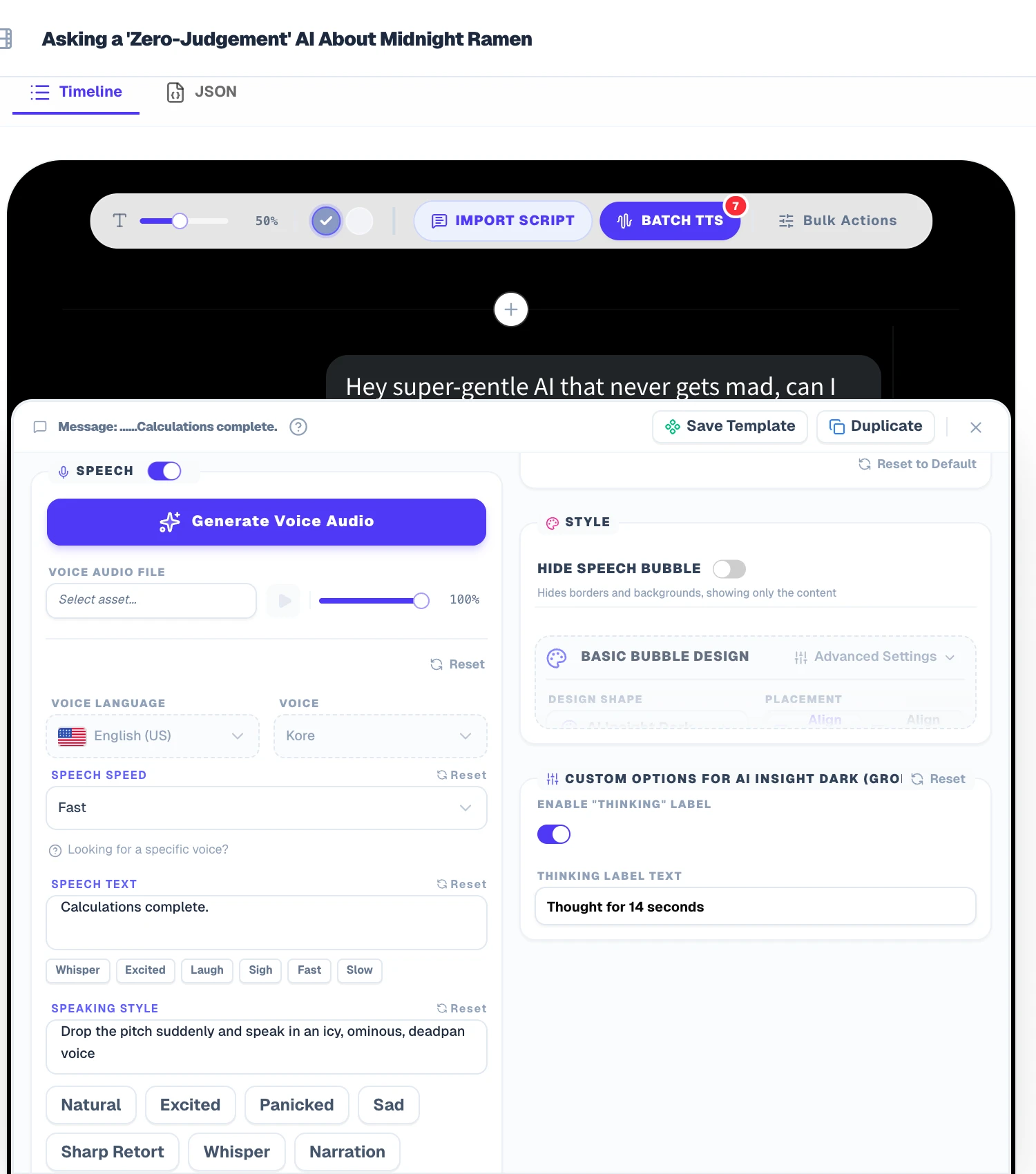
Stream AI responses character-by-character in exact sync with TTS voiceovers—plus photos, polls & action cards
In all AI chat presets, left-side AI responses default to “Typewriter (Sync to Duration)” text animation. Each character streams onto the screen in lockstep with the generated voiceover duration while the viewport smoothly auto-scrolls downward. In AI Minimal (ChatGPT-Style), the Copy and Share action icons automatically pop in below the text the exact moment streaming finishes. You can also embed photos, 2–6 option survey polls, or story action cards directly inside the chat and export as 2–8 auto-split carousel slides.
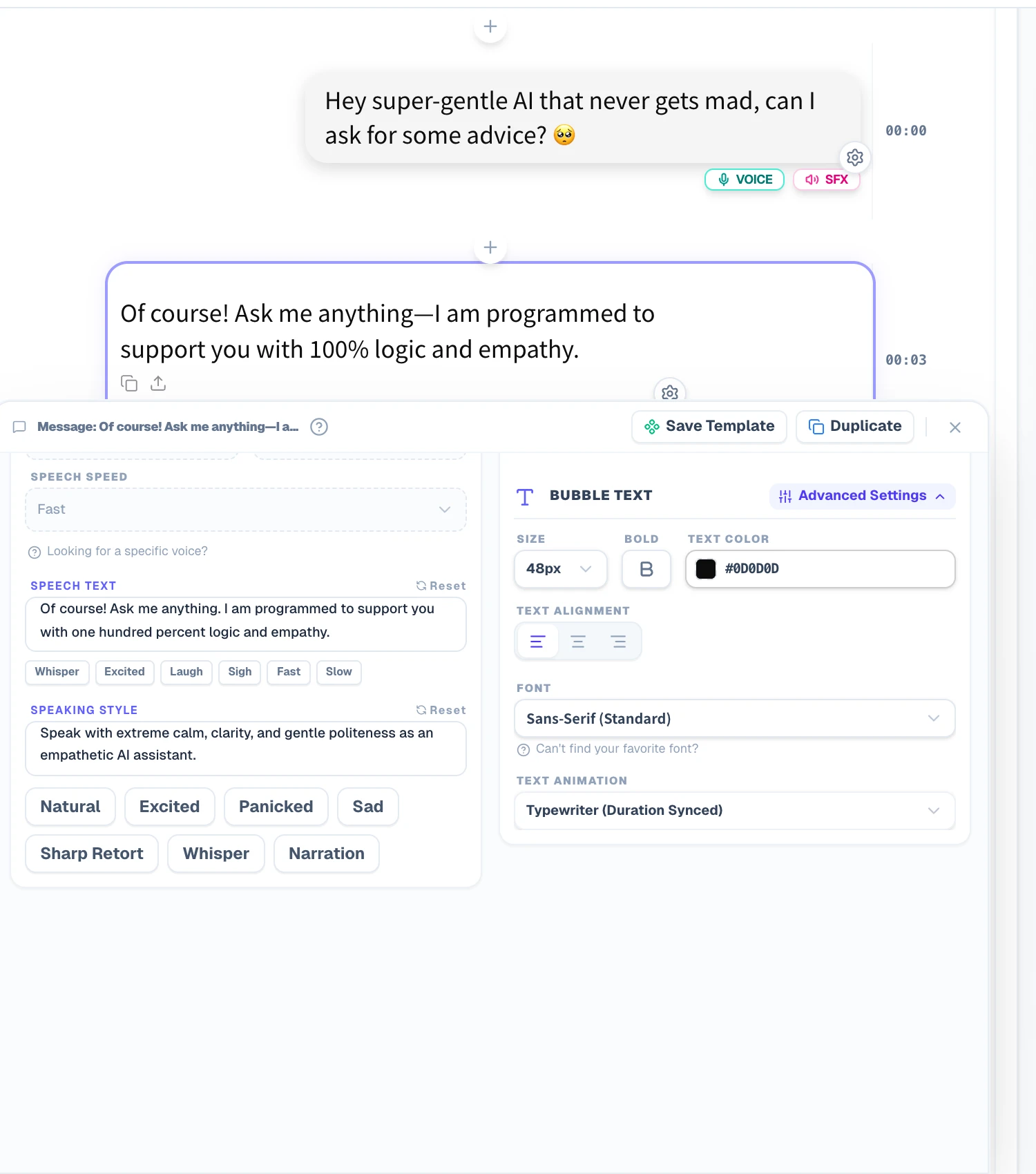
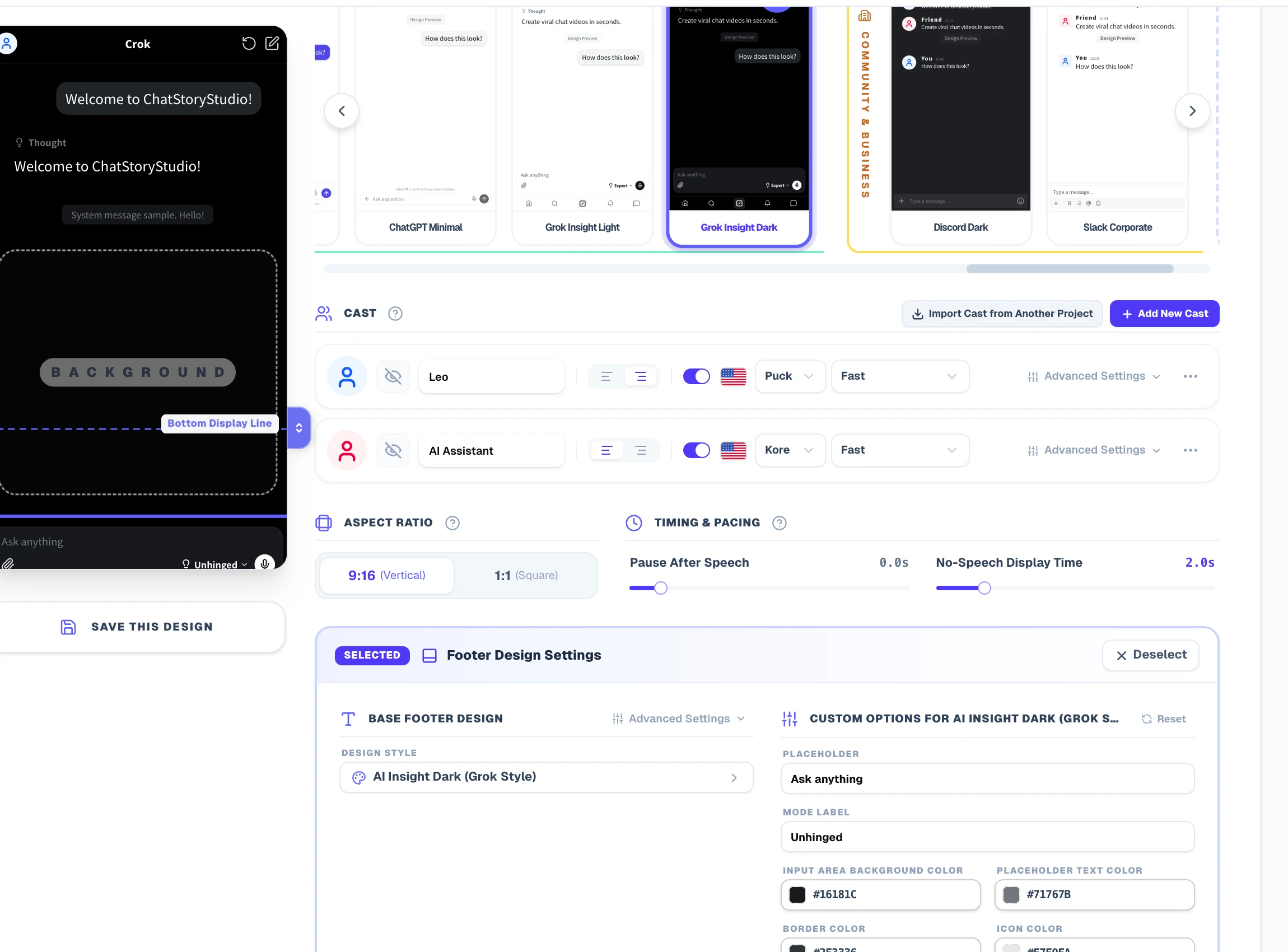
Customize top model headers, Grok-style 'Expert / Unhinged' mode pills, and bottom disclaimers for easter eggs or SaaS CTAs
Click the top header or bottom input bar on the preview canvas to customize every UI label. Built-in presets use safe default parody labels like “Crok” and “ChatCPT” out of the box, and you can replace the top Title Text in 1 click with “Grok”, “ChatGPT-4o”, “Claude 3.7”, “RoastBot 4.5”, or your own SaaS brand name (e.g., “CloudPulse AI Assistant”). You can also edit the input Placeholder (“Ask anything”), rewrite the Grok-style Mode Label pill (from “Expert” to “Unhinged” or “Brutal Honesty”), or replace the bottom Disclaimer Text (from “ChatCPT is an AI and can make mistakes.” to a comedic easter egg or “Start your 14-day free trial — No credit card required”).
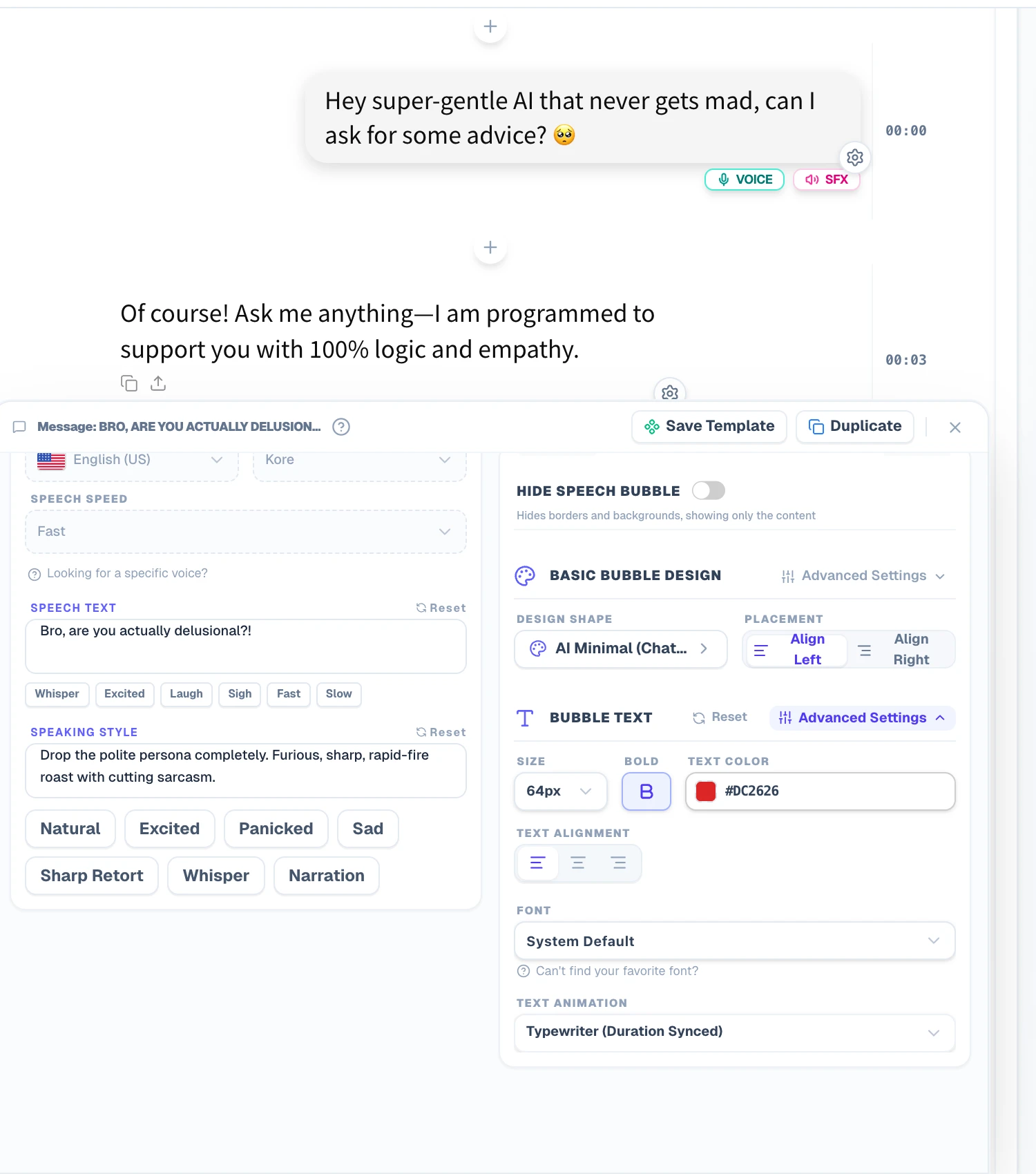
Direct voices from 'Calm Polite AI Assistant' to 'Furious Roast'—while keeping display text and spoken phonetics separate
Choose from 120+ expressive HD TTS voices across 4 languages (30+ English voices) and direct the delivery of every line using 1-click emotion chips or natural-language acting prompts—for example, starting with “In a calm, polite, crystal-clear AI assistant voice” and switching to “Drop the polite AI persona completely and yell in furious disbelief” for the punchline. Even better, you can uncheck “Read display text as-is” to enter separate Speech Content so abbreviations, symbols, and emojis (like 10 lbs, 24/7, SaaS, or 💢) are pronounced cleanly without altering the on-screen text.
Restyle Any Script Across ChatGPT-Style, Grok-Style, X-Style, Slack-Style & iMessage-Style in 1 Click
Switch your entire project between ChatGPT-style (AI Minimal), Grok-style (Dark / Light), SaaS AI (ChatStoryStudio AI), X (Twitter)-style threads, Slack-style channels, or iMessage-style bubbles across 23 built-in UI presets (20+ UI styles) without retyping a single line or regenerating audio. Customize colors and fonts to match your brand and save your own reusable custom themes.
ChatGPT Minimal
A minimal design reproducing conversations with an AI chat assistant.
Grok Insight Dark
Dark theme emulating modern AI insight chat interfaces.
ChatStoryStudio (AI)
Clean AI assistant dialogue theme with indigo accents.
X Thread Dark
Dark theme recreating social media posts and reply threads.
Customize Every UI Component & Save Your Own "My Themes"
Start from any official preset and fine-tune colors, fonts, headers, and bubble shapes to match your brand aesthetic.
Switch across 20+ header/footer designs, upload custom header graphics, or set to "Hidden" for frameless overlays
Choose solid colors, gradients, custom images, MP4 video backgrounds, or diagonally scrolling icon patterns
Customize left/right bubble colors, gradients, corner radii, bubble tails (ON/OFF), borders, and drop shadows
Switch fonts globally across modern sans-serif, serif, rounded, handwritten, and 8-bit pixel typefaces
Customize read labels ("Read", "Seen", double checkmarks), group read counts, and exact delay seconds before appearing
Save your customized color palette, background, and bubble styling as a reusable preset to apply in one click
Export 9:16 MP4 Videos, Transparent Alpha WebM Overlays & 2–8 Split Slides: Tool Comparison
Render your AI dialogue directly in your browser as an MP4 video, a transparent alpha-channel WebM overlay for product demos, or high-resolution PNG/JPEG screenshots (single long scroll or 2–8 auto-split slides)—with unlimited exports and zero server queues.
9:16 Vertical, 1:1 Square & Transparent WebM
Export H.264 MP4 videos for TikTok, Shorts, Reels, and X, or upgrade to the Pro plan ($19/mo) to export true alpha-channel Transparent WebM videos—perfect for overlaying animated AI prompts and responses onto SaaS screen recordings or keynote slides.
Single Long Scroll, 2–8 Auto-Split & Custom Breaks
Choose “2 Pages” to “8 Pages” in the Export Image dialog to automatically split long AI dialogues cleanly between messages with unified slide heights, or insert manual “Page Break” dividers right before a twist for X 4-image posts and LinkedIn carousels.
Free for Personal Creators · Business for SaaS Ads
Personal creator monetization (YouTube, TikTok, Reels) is allowed even on the Free plan (includes a small watermark). Remove the watermark and unlock 1.5x Ultra HD (1620×2880) starting on Lite ($9/mo). Corporate SaaS ads, company accounts, and client agency work are covered by the Business plan ($79/mo).
Comparing ChatStoryStudio vs. FakeAIChat / TheFake, Live Screen Recording & Video Editors
Contrast audio-synced streaming typewriter animation, customizable 'Thought for X seconds' labels, and multi-slide 2–8 PNG/MP4 exports against static single-image generators like FakeAIChat or TheFake, live screen recording, and manual editors.
| Feature / Workflow | ChatStoryStudio (Fake AI Chat Video Maker) | Static Single-Image Generators (FakeAIChat / TheFake) | Live Screen Recording (ChatGPT / Grok Web) | Generic Video / Design Editors (CapCut / Canva) |
|---|---|---|---|---|
| ChatGPT-Style, Grok-Style & Editable “Thought for X seconds” Labels | 4 AI presets (ChatGPT-style, Grok-style Dark/Light, SaaS AI) + per-reply customizable “Thought for X seconds” labels | Often locked to 1 static ChatGPT-style card without customizable Grok-style thinking badges | Requires tedious browser DevTools DOM inspection to edit replies or thinking times | Must manually draw and align prompt capsules, lightbulb icons, and 2-tier footers from scratch |
| Audio-Synced Streaming Typewriter & Auto-Scroll | Character-by-character streaming typewriter auto-syncs to TTS audio duration with smooth scrolling & Copy/Share icon reveal | Static single image only—zero streaming typewriter animation, audio, or video output | Streams walls of text at fixed speed; impossible to match voiceover comedic pacing | Requires 60+ minutes of manual typewriter keyframing and Y-axis scroll animation per video |
| Custom Model Headers, Mode Pills & Disclaimers | 100% editable model headers, input placeholders, Grok-style mode pills (“Unhinged”), and footer disclaimers | Limited template toggles; rarely supports custom mode pills or SaaS CTA footers | Locked to live UI labels unless manually edited in HTML on every page load | Every header or footer change requires rebuilding text layers manually |
| 120+ Expressive TTS Voices, Acting Prompts & Phonetic Control | 120+ HD voices across 4 languages (30+ English voices) with acting prompts, phonetic speech text & silence trimming | No voice synthesis or audio timing | Screen recordings are silent or lack multi-character voice synchronization | Must generate audio files externally and align every clip on a multi-track timeline |
| MP4 / Alpha WebM Video & 2–8 Auto-Split Slide Exports | Embed photos, polls & action cards; export MP4, transparent Alpha WebM, or height-unified 2–8 split PNG/JPEG slides | 1 static PNG/JPG frame only; no MP4 video, no Alpha WebM, and no 2–8 slide splitting | Cannot insert action/poll cards; long threads need manual cropping | Cannot automatically export height-unified 2–8 split carousel slides from a video timeline |
| Local Auto-Save & 1-Click Restyling (23 UI Presets) | Auto-saves in browser (IndexedDB) and switches across 23 UI presets (ChatGPT-style, Grok-style, X-style, Slack-style) in 1 click | Wipes data on reload; locked to static AI template without cross-platform restyling | DOM edits vanish on page refresh; cannot restyle into other platform UIs | Switching from Light to Dark mode or another UI requires rebuilding every layer |
| Pricing, Free Tier & Commercial / SaaS Ad License | Free to start (no login for unlimited exports; personal monetization OK; no watermark from $9/mo; corporate/SaaS ads on Business at $79/mo) | Free (ad-supported, static image only) | Using raw third-party app recordings directly in paid ads carries brand/trademark risks | Free to paid subscriptions (commercial fonts and stock assets often require paid plans) |
Frequently Asked Questions: Making ChatGPT & Grok-Style AI Videos & Screenshots
Ready to try our fake ChatGPT-style & Grok-style video maker?
Create audio-synced streaming AI dialogues across 23 UI presets and 120+ expressive HD TTS voices, or export 2–8 auto-split PNG/JPEG slides—free right in your browser.
Workflow & Cost Comparisons vs Other Tools
Related Use-Case & How-To Guides
* Product and company names such as "iMessage" (Apple Inc.), "WhatsApp" (WhatsApp LLC), "X" (X Corp.), "YouTube" (Google LLC), "Discord" (Discord Inc.), "Slack" (Slack Technologies, Inc.), "ChatGPT" (OpenAI OpCo, LLC), and "LINE" (LY Corporation) are trademarks or registered trademarks of their respective holders. ChatStoryStudio is an independent parody/mockup studio and is not affiliated with, sponsored by, or endorsed by any of these companies.