ChatStoryStudio vs Crayo.ai, Vsub & StoryTok: Free Fake Text Story Video Maker (No Paywall)
ChatStoryStudio is a free fake text video generator & chat story studio that lets you create and export unlimited 9:16 MP4 videos and 2–8 split carousel images for $0 with no $19–$29/mo export paywall (Free includes a small top-right watermark, removed in Lite; requires browser internet connection). While multi-template suites like Crayo.ai ($19–$79/mo), Vsub.io ($29–$99/mo), and StoryTok bundle Reddit stories and automated templates, they restrict exports to paid tiers or burn cloud credits on revisions. ChatStoryStudio renders directly in your browser with zero re-render fees, up to 15-speaker group chats, 23+ UI styles, 120+ expressive HD TTS voices (30+ English), and Alpha WebM overlays.
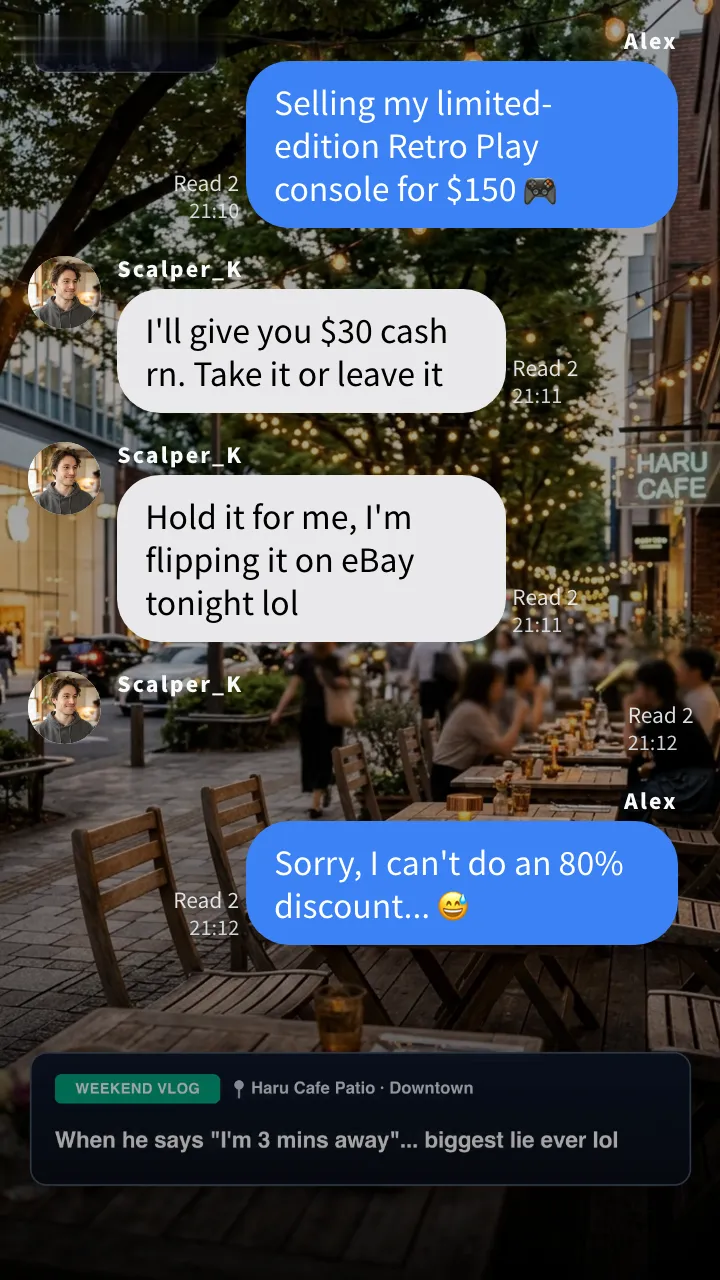
▲ Export standalone 9:16 MP4 videos for $0 with zero credit cost on re-renders (left), restyle into 23+ UI styles like Discord-style or YouTube comment-style Dark (top right), or layer frameless Alpha WebM overlays over your own footage (bottom right).
3 Bottlenecks of Making Fake Text Story Videos in Paywalled SaaS Generators
Crayo.ai, Vsub.io, and StoryTok are convenient multi-format suites, but making fake text story videos inside a paywalled cloud-credit dashboard creates three costly bottlenecks for daily creators.
Hitting a paywall after building your draft—plus cloud credit drain on every re-render
Crayo.ai offers no free trial (plans start at $19/mo for 250 workflow credits with a strict no-refund policy), Vsub.io requires a paid subscription ($29/mo Starter) when you try to export your draft, and StoryTok uses paid plans/credits for production exports. Because cloud rendering happens remotely, fixing one typo drains monthly render credits.
Locked into 2-speaker blue bubbles and the same stock parkour loop
Crayo, Vsub, and StoryTok workflows mainly focus on 2-speaker left/right bubbles (1 basic iMessage-style frame in Crayo, or 4 chat skins in Vsub) without 15-speaker group chats, in-chat story staging cards, missed call logs, interactive polls, or 1-click restyling into Discord-style, X-style, or YouTube comment-style threads.
Can’t export transparent overlays for CapCut/Premiere or separate slang from TTS
Cloud faceless generators flatten the chat box directly onto a background video as an opaque MP4, making it impossible to export a clean alpha-channel transparent chat overlay for your own NLE timeline. In addition, whatever text you type into the bubble is read literally by TTS—so internet slang (rn, ngl, fr) or prices look unnatural if spelled out phonetically inside the bubble.
Verdict: When to Use Crayo.ai / Vsub.io / StoryTok vs ChatStoryStudio (10-Point Matrix)
Here is a transparent breakdown of when an all-in-one faceless SaaS suite makes sense versus when a free fake text video studio without an export paywall saves you money and unlocks higher retention.
Running a multi-format faceless channel (Reddit stories, AI image shorts & streamer clips) in one cloud dashboard
Crayo.ai, Vsub.io, and StoryTok are built as Swiss-Army-knife automation suites for TikTok and YouTube Shorts channels that rotate across multiple faceless video templates every week.
- You primarily make Reddit story narrations, AI-generated image slideshows, or auto-captioned podcast clips and only occasionally post a simple 2-person text story
- You want pre-bundled stock gameplay footage (like Minecraft parkour or Subway Surfers loops) and server rendering on older devices
Free fake text video exports ($0) for quick 3-line hooks or 15-speaker group dramas with 23+ UI styles
ChatStoryStudio is 100% specialized for fake text, DM, comment-thread, and AI-dialogue storytelling—handling quick 3-line clips and full multi-speaker productions with direct browser rendering (online connection required; no offline mode).
- You want to start and export unlimited 9:16 MP4 videos and 2–8 split carousel images for $0 without an export paywall (Free adds a small top-right watermark)
- You need up to 15 speakers, missed calls, story staging cards, 2–6 option polls, clock-wipe transitions, and 23+ UI styles (iMessage-style, WhatsApp-style, Discord-style, X-style, YouTube comment-style)
- You want watermark-free 1.5x Ultra HD exports at $9/mo (Lite) or Alpha WebM overlays + MP4 video backgrounds at $19/mo (Pro)—with 120+ expressive HD TTS voices (30+ English)
| Comparison Criteria | ChatStoryStudio | Crayo.ai | Vsub.io |
|---|---|---|---|
| 1. Free Plan & Video Export Paywall | $0 Forever Free (No Login or Card Required)Unlimited MP4 & split-PNG exports (with top-right watermark; requires online browser). Free Google login unlocks 2,000 TTS credits, 10 script imports & 3/day prompt starters | No Free Plan / No Free TrialRequires paid subscription ($19+/mo) to generate and export videos; strict no-refund policy | Workspace Preview OnlyExporting production videos requires purchasing a monthly credit subscription ($29+/mo) |
| 2. Paid Plans & Monthly Cost (2026) | Lite: $9/mo · Pro: $19/mo · Business: $79/moLite removes watermark + 1.5x Ultra HD (1620×2880) + 2,000 TTS credits/mo; Pro adds 60,000 TTS credits/mo, alpha WebM & MP4 video BG | Hobby: $19/mo · Clipper: $39/mo · Pro: $79/moHobby includes 250 workflow credits/mo (~25 min of video); Clipper 1,000 credits; Pro 3,000 credits | Starter: $29/mo · Pro: $49/mo · Premium: $99/moStarter includes 5,000 credits/mo (max 2-min video); Pro 10,000 credits (max 10-min) |
| 3. Credit Cost When Re-Exporting or Fixing Typos | 0 Credits per Export (Direct Browser Encoding)Video rendering is 100% free & unlimited. Existing TTS lines are cached—fixing 1 line only re-synthesizes that single bubble | Consumes Workflow CreditsEvery cloud render/export deducts from your monthly workflow credit quota | Consumes Cloud Render CreditsCredits are deducted for both voiceover generation and cloud video rendering |
| 4. Chat & Social UI Design Themes | 23 UI Presets (23+ UI Styles) + Full Custom StylingiMessage-style, WhatsApp-style, LINE-style, X (Twitter)-style threads & DMs, Discord-style, Slack-style, YouTube comment-style, ChatGPT-style / Grok-style, RPG-style & frameless | 1 Basic iMessage-Style TemplateLight/Dark mode toggle only; no Discord-style, X-style thread, YouTube comment-style, or AI chat UIs | 4 Basic Chat SkinsiMessage-style, WhatsApp-style, Instagram DM-style, and Tinder-style (Light/Dark toggle) |
| 5. In-Chat Interactive Widgets & VFX | Action Cards, Call Logs, Polls & 14+ Screen VFX1-tap action/gift cards, missed/ended calls, 2–6 option polls, clock-wipe transitions, confetti, screen shake & zoom | Text & Image Bubbles OnlyNo action cards, missed call widgets, or interactive poll bars | Text & Image Bubbles OnlySupports left/right messages and image inserts; no action, call, or poll widgets |
| 6. Script Creation Workflows & Group Cast | 3 Workflows · Up to 15 Speakers + Group Read Counts① Manual Chat Timeline, ② Bulk “Name: Message” script paste (up to 15 speakers), ③ 1-line prompt starter (with auto-staging) | Manual Entry or Basic PromptDesigned around 2-person (left/right) exchanges without per-member group read progression | Manual, CSV Import or PromptPrimarily 2-speaker left/right dialogue layout |
| 7. Expressive TTS, Slang Phonetics & Acting Prompts | 120+ Expressive HD TTS Voices (30+ English) + Phonetic & Acting OverridesDisplay “rn ngl 😂” in the bubble while Speech Text reads “right now, not gonna lie”, plus per-line natural-language Speaking Style prompts & auto silence trimming | Built-in Cloud VoicesReads bubble text directly; no separate phonetic Speech Text field per bubble | ElevenLabs / Cloud VoicesHigh-quality voices, but reads displayed bubble text directly without separate phonetic override |
| 8. Gameplay / Vlog Backgrounds & Alpha WebM Export | Custom MP4 Video BG + True Alpha-Channel WebM (Pro)Upload your own MP4 background or export a frameless transparent WebM overlay (with Content Anchor Ratio slider) for CapCut / Premiere Pro | Built-in Stock Gameplay Loops / MP4Flattens chat over stock gameplay as an opaque MP4; no transparent alpha-channel WebM export | Built-in Background Video / MP4Exports flattened MP4 video; no frameless alpha-channel WebM export for external NLEs |
| 9. Multi-Slide Carousel Image Export (TikTok Photo / IG / X) | 1-Click 2–8 Page Auto-Split & “Match Max” Unified HeightRepurpose the exact same video project into height-unified PNG/JPEG carousel slides in 1 click | Video Export OnlyNo multi-page auto-split image export for carousel posts | Video Export OnlyNo multi-slide image carousel splitter |
| 10. Other Faceless Templates (Reddit, Image Shorts, Auto-Clips) | 100% Dedicated to Chat, Social Thread & Dialogue UIsDoes not include streamer auto-clipping or Reddit card generators—focused entirely on best-in-class chat storytelling | Included in SuiteIncludes Reddit stories, image slideshow videos, split-screen clips & auto-captions | Included in SuiteIncludes Reddit stories, image shorts, Would-You-Rather & Veo video tools |
4 Dedicated Upgrades That Make Fake Text Story Videos Faster, Cheaper & Higher-Retention
See how direct browser video rendering, 23+ UI styles, 15-speaker group chats, interactive widgets, and transparent WebM exports work inside the actual Desktop and Mobile editors.
No $19–$29/mo Paywall to Export—And Zero Credit Deduction When You Edit & Re-Render
In cloud SaaS tools, nothing is more frustrating than spending 15 minutes typing a script only to hit a mandatory subscription paywall when you click Export—or losing monthly workflow credits because you spotted a typo after rendering. ChatStoryStudio encodes videos directly inside your browser, so exporting 1080×1920 MP4 videos and 2–8 split PNG carousels is 100% free and unlimited even without an account. Plus, you can edit and export seamlessly on both Desktop (Windows / Mac) and Mobile (iPhone / Android via ChatStoryStudio Lite) with automatic local browser saving so your project never disappears on refresh.
▲ Inserting a bubble, photo, or widget mid-conversation automatically recalculates scroll positions and timestamps in milliseconds—with zero re-render fee.
▲ Build, voice, and save MP4 videos directly to your iPhone or Android Photos app without installing an app.
Restyle iMessage-Style Chats into Discord-Style or YouTube Comment-Style in 1 Click—Plus Action Cards & Missed Calls
When thousands of faceless channels use the exact same basic iMessage-style template, viewers scroll past in the first 2 seconds. ChatStoryStudio lets you keep your exact dialogue and voiceover while switching between iMessage-style (Soft Blue), WhatsApp-style, Discord-style Dark, X (Twitter)-style threads, YouTube comment-style Dark, and ChatGPT-style UIs. Even better, you can insert 1-tap story action/gift cards, missed voice/video call logs, 2–6 option animated polls, and clock-wipe time jumps to create visual pattern interrupts that boost watch-through rates.
Clean iMessage-style blue/gray bubbles with group avatars, timestamps, and customizable read receipts.
Convert the exact same story into a dark-mode comment section with parent/reply thread lines and sort tabs in one click.
Customize header/footer visibility, Content Anchor Ratio, action cards, missed calls, and 2–6 option polls directly in the studio inspector.
Display "100% ready rn ngl 😂" in the Bubble While TTS Reads Natural Spoken English
In basic chat video templates, whatever you type into the message bubble is sent verbatim to the TTS engine—so abbreviations like rn, ngl, fr, or imo get spelled out robotically unless you ruin the visual realism of your text bubble. ChatStoryStudio gives every message an independent Speech Text (phonetic override) field and a Speaking Style (acting prompt) field across 120+ expressive HD TTS voices in 4 languages (including 30+ English voices).
1. Separate Display Text from Spoken Phonetics
Keep authentic Gen-Z texting shorthand (rn, ngl 😂, 24/7) inside the visual bubble while entering “right now”, “not gonna lie”, or “twenty-four seven” in the Speech Text box for flawless pronunciation.
2. Per-Bubble Speaking Style & Auto Silence Trimming
Direct each line’s delivery with one-click emotion chips (Whisper, Excited, Laugh, Sigh, Fast, Slow) or custom natural-language prompts in Speaking Style. Leading and trailing silence is automatically trimmed so fast-paced arguments never drag.
▲ Message Inspector: Configure Voice Language, Voice actor, Speech Speed, phonetic Speech Text, and Speaking Style acting prompts in one panel.
Ditch Reused Stock Parkour Clips: Use Custom MP4 Video Backgrounds or Export True Alpha WebM Overlays
Relying on the exact same stock Minecraft or GTA gameplay loops bundled inside cloud SaaS tools makes your Shorts look repetitive across feeds. With ChatStoryStudio, you can upload your own original gameplay or vlog MP4 as a direct background, or hide the top/bottom bars and export a true alpha-channel transparent WebM video (using the Content Anchor Ratio slider to keep the bottom 20–25% clear for captions or facecam) to layer inside CapCut, Premiere Pro, or DaVinci Resolve.
▲ Hide Header/Footer and set Content Anchor to 76% so bubbles never cover your bottom subtitles.
▲ Export unlimited 1080×1920 MP4s for $0, or select Format: WebM with Transparent Background: Enabled (Pro) for zero-bleed alpha overlays.
▲ Switch between Save as Video (MP4/WebM) and Save as Image (2–8 auto-split carousel slides) on mobile.
1-Click Restyling Across 23+ UI Styles: iMessage-Style, WhatsApp-Style, Discord-Style, X-Style & YouTube Comment-Style
Don’t limit your channel to a single blue-bubble template. Keep your script, timing, and voiceovers intact while switching across 23 built-in UI presets (23+ UI styles)—from iMessage-style (Soft Blue) and WhatsApp-style (Teal) to Discord-style Dark communities, X (Twitter)-style threads, YouTube comment-style sections, and ChatGPT-style / Grok-style dialogues.
iMessage Soft Blue
A refreshing blue style with a clean, translucent feel.
WhatsApp Teal
Sophisticated teal green inspired by global messaging apps.
Discord Dark
Dark community chat UI inspired by Discord.
X Thread Dark
Dark theme recreating social media posts and reply threads.
Customize Every UI Component & Save Your Own "My Themes"
Start from any official preset and fine-tune colors, fonts, headers, and bubble shapes to match your brand aesthetic.
Switch across 20+ header/footer designs, upload custom header graphics, or set to "Hidden" for frameless overlays
Choose solid colors, gradients, custom images, MP4 video backgrounds, or diagonally scrolling icon patterns
Customize left/right bubble colors, gradients, corner radii, bubble tails (ON/OFF), borders, and drop shadows
Switch fonts globally across modern sans-serif, serif, rounded, handwritten, and 8-bit pixel typefaces
Customize read labels ("Read", "Seen", double checkmarks), group read counts, and exact delay seconds before appearing
Save your customized color palette, background, and bubble styling as a reusable preset to apply in one click
No Credit Card Required: 3 Ways to Build & Export Your First Video Right Now
Test the entire workflow—from script creation to unlimited local MP4 and split-PNG export—right now in your browser (internet connection required; no offline mode) without hitting a paywall.
Type Manually with No Login—or Paste a “Name: Message” Script in 1 Click
Manual timeline editing and unlimited MP4/PNG exports work immediately with no login ($0) (Free exports carry a small top-right watermark). To bulk-paste the sample script below into Import Script (up to 15 speakers; 10 free imports) and synthesize 120+ expressive HD TTS voices (2,000 free credits), sign in with Google for free (no credit card required).
Alex: Putting my limited-edition Retro Play console up for swap 🎮
Collector_K: Hand it over rn, I'm flipping it tonight lol
Collector_K: Hold it for me, nobody else wants that old box
Alex: Sorry, I want it to go to an actual retro fan... 😅
Collector_K: Whatever bro, nobody's playing that brick anyway ngl 😂
[System]: 10 mins later...
[System]: Maya joined the group chat
Maya: Wait is that the Collector's Edition?! The box is mint!!
Maya: Trading my sealed RPG soundtrack + bonus artbook ☕️
Alex: Sealed soundtrack plus the artbook?! Packing it right now 📦
Maya: Yay!! Thank you so much, I'll treasure it forever 🎉
Open Free Editor (No Credit Card Required)
Enter a 1-Line Topic to Build Script, BGM, Acting Prompts & Visual Effects
Type any scenario below (or pick a genre chip) and click generate. You can test-generate a complete multi-speaker project immediately as a guest ($0, no login), or sign in with a free Google account (no credit card) to automatically synthesize expressive voiceovers too.
Frequently Asked Questions: Crayo.ai, Vsub.io & StoryTok vs ChatStoryStudio
Skip the $19–$29/mo Paywall. Build & Export Your First Fake Text Story Video Free.
No credit card, no mandatory account signup, and zero credits deducted when you export MP4 videos or 2–8 split carousel slides in your browser.
Workflow & Cost Comparisons vs Other Tools
Related Use-Case & How-To Guides
* Product and company names such as "iMessage" (Apple Inc.), "WhatsApp" (WhatsApp LLC), "X" (X Corp.), "YouTube" (Google LLC), "Discord" (Discord Inc.), "Slack" (Slack Technologies, Inc.), "ChatGPT" (OpenAI OpCo, LLC), and "LINE" (LY Corporation) are trademarks or registered trademarks of their respective holders. ChatStoryStudio is an independent parody/mockup studio and is not affiliated with, sponsored by, or endorsed by any of these companies.