TextingStory App & Static Fake Text Generators (iFakeTextMessage, Prankshit) vs ChatStoryStudio
The TextingStory app is a classic mobile choice for recording live 2-person keystroke animations, while static fake text generators like iFakeTextMessage, Prankshit, Zeoob, and FauxTalks are convenient for grabbing a quick one-off screenshot. Whether you need a 3-line single mockup or want to build 15-speaker chats on PC & mobile browsers with automatic local saving, 2–8 split carousels, and 120+ expressive HD TTS voices, ChatStoryStudio brings the entire workflow into one studio.
▲ Export both height-matched 2–8 slide PNG/JPEG carousels (right) and a 3-voice narrated 9:16 MP4 video with BGM & sound effects (left) from a single browser project.
Why Creators Upgrade From TextingStory & Static Fake Text Generators (iFakeTextMessage, Prankshit)
ChatStoryStudio lets you make a quick 3-line screenshot just as easily as any basic generator—and the moment you want to work on a desktop keyboard, fix a typo after reloading, cast up to 15 speakers, split a longer story into carousel slides, or add character voices for TikTok and Shorts, three major differences emerge.
Manual Phone Keystrokes & Reload Wipes vs. PC/Mobile Auto-Save & 15-Speaker Import
In the TextingStory app, lines must be typed on a phone screen—and in static fake text generators like iFakeTextMessage, Prankshit, Zeoob, or FauxTalks, refreshing the browser wipes your entire chat. ChatStoryStudio runs in PC and mobile browsers, auto-saves every edit locally in IndexedDB, and imports full "Name: Message" scripts for up to 15 speakers in one click.
1 Tall Unreadable Strip or Sliced Bubbles vs. Auto 2–8 Slide Carousel Splitting
Exporting a 15-message chat as a single vertical image makes the text tiny on X, Instagram, or TikTok Photo Mode—while cropping by hand slices speech bubbles in half and loses the top header on slides 2–4. ChatStoryStudio automatically splits at message boundaries and unifies every slide's height.
Silent Typing Clips Only vs. 120+ Expressive HD TTS Voices & Synced MP4 Video
TextingStory focuses on typing sound effects without built-in multi-character TTS voices (and static generators output silent images only), forcing you to record and align 20+ voice clips in an external editor. ChatStoryStudio generates multi-character voiceovers across 120+ HD voices (4 languages, 30+ English) in one click and syncs bubble scrolling automatically.
A single long strip shrinks in feeds, and manual cropping slices bubbles in half
When a conversation exceeds 10–12 messages, a single vertical screenshot becomes too tall to read—and cropping it manually in your phone gallery cuts top/bottom bubbles in half and removes the chat header.
Clean splits between messages with identical pixel height and header on every slide
Selecting "2–8 Pages (or Custom Split)" and "Height: Match Max" in the Image Export dialog (or "Uniform" in the live preview pane) automatically places the group header on every slide and unifies all slides to the exact same dimensions—ready for X multi-image posts, Instagram carousels, and TikTok Photo Mode.
TextingStory App vs. Static Fake Text Generators vs. ChatStoryStudio: Verdict & 10-Point Matrix
Use the comparison cards and 10-point specification table below to pick the right tool for your exact format.
Recording live character-by-character typing & backspace hesitations on a phone
- •You specifically want viewers to watch each letter being typed and deleted in real time inside the bottom keyboard bar
- •You only need a 2-person (Left & Right) silent or typing-SFX video inside an offline mobile app
- •You do not need multi-character TTS voiceovers, 15-speaker script paste, or multi-slide image carousels
Grabbing a single, one-off static SMS screenshot with zero watermark for free
- •You only need one flat PNG screenshot (3–4 lines) right now via iFakeTextMessage, Prankshit, Zeoob, or FauxTalks
- •You want a watermark-free single image on a free ad-supported single-page form tool
- •You never need to re-open the project later to fix a typo or export a voiced video version
From quick 3-line screenshots to auto-saved edits, 2–8 slide carousels & voiced MP4 videos
- •Fast on both PC & Mobile browsers with automatic local browser auto-save, bulk 15-speaker "Name: Message" script import, and a 1-line prompt starter
- •Story action cards, missed calls, typing indicators & read-receipt shifts ("Read" → "Read 2"), 23+ UI styles (23 presets), and 2–8 slide carousel auto-splitting
- •1-click export to voiced 9:16 MP4 videos with 120+ expressive HD TTS voices across 4 languages (30+ English voices), BGM, and sound effects (Free includes top-right watermark, removed in Lite)
| Feature | ChatStoryStudio | TextingStory App | Static Generators (iFakeTextMessage, Prankshit) |
|---|---|---|---|
| 1. Supported Platforms & Connectivity | PC / Mac Desktop Browser (Full Studio) + Mobile Browser (ChatStoryStudio Lite). Browser internet connection required (no offline mode) | iOS / Android Offline Mobile App + Basic Web App (Silent video export on web) | Web Browser (Single-page form; online) |
| 2. Output File Formats | High-Res Images (PNG / JPEG) + Voiced Full-HD Video (MP4) + Transparent Alpha Video (WebM on Pro+) | MP4 Video (or GIF export via paid add-on; no multi-slide image export) | Single Static Image only (PNG / JPG; no video or audio export) |
| 3. Multi-Slide Carousel Splitting & Height Alignment | Auto 2–8 Page Split + Custom Page Breaks. Unifies height ("Match Max") and keeps the top header on every slide | Not supported (Video output only) | 1 Tall Strip only (Requires manual cropping externally, which cuts bubbles in half) |
| 4. Auto-Save & Re-Editing Later | Real-time local browser auto-save. Fix typos anytime or transfer across devices via .csbackup files | Saved inside mobile app storage (Web app resets on close) | None (Refreshing or closing the tab erases the entire conversation) |
| 5. Creation Workflows & Bulk Input | 3 Workflows: Manual Chat Timeline / Bulk "Name: Message" Script Paste / 1-Line Prompt Starter | Manual character-by-character typing only (Records live keystrokes & backspaces) | Manual 1-by-1 message form submission only |
| 6. Group Chats, Typing & Read Receipt Control | Up to 15 Cast Members with avatars + Typing indicators ("...") & per-cast Read Receipt delays ("Read" → "Read 2") | 2 speakers (Left & Right) with character name switching | Primarily 1-on-1 SMS-style layout |
| 7. UI Themes & 1-Click Dress-Up | 23 UI Presets (23+ UI Styles): iMessage-style, WhatsApp-style, X-style, Discord-style, Slack-style, YouTube Comment-style, ChatGPT-style & LINE-style | 1 Basic Bubble Layout (Custom colors & avatars require paid add-on) | Single App UI per generator site |
| 8. Native Chat Widgets & Staging | Story Action & Gift Cards, Missed Calls, Polls, Clock-Wipe Transitions ("15 mins later..."), Screen Shake & Confetti | Image / GIF / Voice recording attachments (Paid add-ons) | Basic text bubbles & date dividers only |
| 9. Expressive Multi-Character Voice (TTS) | 120+ Expressive HD TTS Voices across 4 languages (30+ English voices) with separate phonetic Speech Text & acting style prompts | None built-in (Typing sound effects only; external voice editing required) | None (Silent static image) |
| 10. Pricing, Watermark & Commercial Use | Free unlimited exports (with watermark). Personal YouTube/TikTok monetization OK on all plans; watermark removal from Lite ($9/mo); corporate/client delivery on Business ($79/mo) | Free version includes watermark; Storyteller/Pro packs & subscriptions ($6.99–$29.99) unlock media & watermark removal | Free without watermark (Ad-supported single image) |
5 Core Upgrades for Voiced Texting Story Videos & Multi-Slide Chat Carousels
Keep the simplicity of making a quick chat screenshot while unlocking desktop speed, local browser auto-save, rich widgets, 2–8 slide carousels, and 1-click voiced video export.
Never Lose a Chat on Reload—Plus Paste 'Name: Message' Scripts to Build Group Chats in Seconds
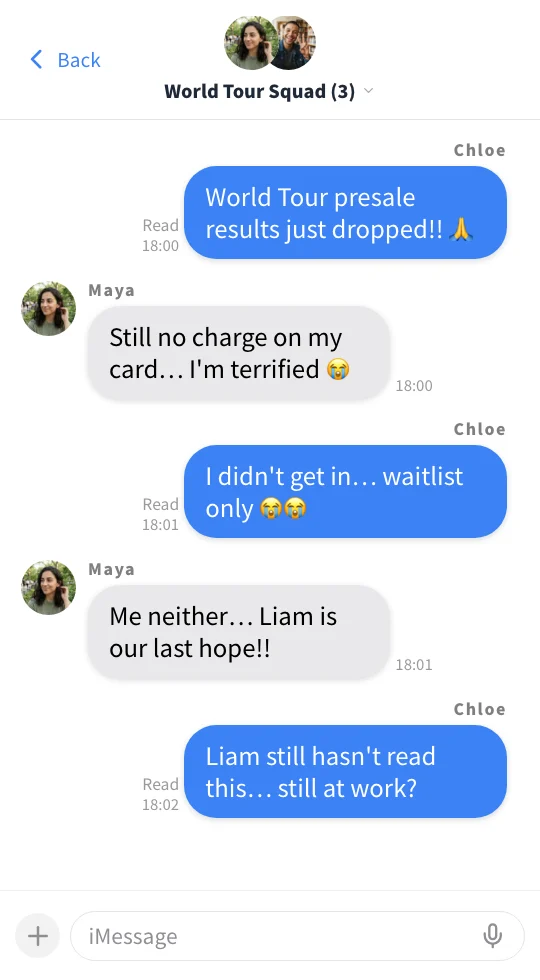
Every change you make is saved automatically to your browser's local storage on both PC and mobile. If you spot a typo after exporting, just reopen the tab and fix that single line. Even better, instead of typing 20 lines on a phone keyboard, paste a 'Name: Message' script from Notion or Google Docs to assign speakers, bubble alignments, timestamps, and acting prompts automatically.
Chloe: World Tour presale results just dropped!! 🙏
Maya: Still no confirmation email… I'm terrified 😭
Chloe: I didn't get in… waitlist only 😭😭
Maya: Me neither… Liam is our last hope!!
Chloe: Liam still hasn't read this… still at work?
Chloe: Calling him right now!
[System]: 15 mins later...
[System]: Liam joined the chat
Liam: Sorry just got off my shift!! 💦
Liam: WE GOT 3 FRONT ROW VIP TICKETS!! 🎉
Chloe: WAIT WHAT!? You're a legend fr!! 😭
Maya: Saving our VIP passes right now!!
Liam: That was fast lol Let's lose our voices tonight!
Chloe: Finally at the arena!! The lights look unreal 😭
Maya: The energy here is insane!!
Chloe: Best night ever, let's gooo!! 🎉
Split Long Conversations Cleanly Between Bubbles and Batch Save to Photos or ZIP
In the Image Export modal (or mobile Export Settings), choose '2 Pages' through '8 Pages' or 'Custom Split' to divide your story cleanly at message boundaries. Turning on 'Height Setting: Match Max' unifies the pixel height and top header across every slide, and lets mobile users save all slides straight to their iOS/Android camera roll via the native share sheet.
Story Action Cards, Missed Calls, Typing Indicators & Per-Cast Read Receipts
Add a customizable 'Gift / Action' card, a 'Missed Call' badge, a 2–6 option voting poll, or a '15 mins later...' clock-wipe transition in one tap. You can also control typing indicators ('...') and toggle which cast members have read each message—building 'left on read' tension ('Read' while Liam is at work, then 'Read 2' once he joins).
Turn Your Chat into a Narrated MP4 Video with Separate Display vs. Speech Text
Switch the preview tab from 'Image' to 'Video' to turn your chat into a 9:16 MP4 short video with 120+ expressive HD TTS voices across 4 languages (30+ English voices), BGM, and pop sound effects. Because Display Text and Speech Text are separated, you can keep 'fr' on screen while the voice actor reads 'for real' with acting style prompts.
UPGRADE 05 · Switch Across 23+ UI Styles (iMessage-Style, WhatsApp-Style, X-Style, Discord-Style, Slack-Style & ChatGPT-Style) in 1 Click
Without retyping a single line of dialogue or reconfiguring your cast, switch your project across 23 UI presets (23+ UI styles)—including iMessage-style Soft Blue, WhatsApp-style Teal Bubble, X (Twitter)-style Light/Dark Threads & DMs, YouTube Comment-style sections, Discord-style & Slack-style channels, ChatGPT-style / Grok-style chats, and LINE-style layouts.
iMessage Soft Blue
A refreshing blue style with a clean, translucent feel.
WhatsApp Teal
Sophisticated teal green inspired by global messaging apps.
X Thread Dark
Dark theme recreating social media posts and reply threads.
Discord Dark
Dark community chat UI inspired by Discord.
Customize Every UI Component & Save Your Own "My Themes"
Start from any official preset and fine-tune colors, fonts, headers, and bubble shapes to match your brand aesthetic.
Switch across 20+ header/footer designs, upload custom header graphics, or set to "Hidden" for frameless overlays
Choose solid colors, gradients, custom images, MP4 video backgrounds, or diagonally scrolling icon patterns
Customize left/right bubble colors, gradients, corner radii, bubble tails (ON/OFF), borders, and drop shadows
Switch fonts globally across modern sans-serif, serif, rounded, handwritten, and 8-bit pixel typefaces
Customize read labels ("Read", "Seen", double checkmarks), group read counts, and exact delay seconds before appearing
Save your customized color palette, background, and bubble styling as a reusable preset to apply in one click
Start Free in Your Browser: 3 Ways to Build Your First Chat Video or Carousel
No app installation is required (internet connection required). Manual timeline editing, image/video exports, and 1-line prompt trials work immediately without sign-up, and free Google sign-in unlocks 15-speaker Bulk Script Import & HD TTS voice synthesis:
Open the Studio Editor and Type or Customize Live
Use the "+" button between bubbles to insert dialogue, missed calls, action cards, and photos interactively—with every change auto-saved in your browser.
Convert an Entire Group Chat Script in One Click
Copy our 16-line sample script (or your own draft from Notes / Google Docs) and open the Import Script modal in iMessage-style theme (free Google sign-in, no credit card).
Enter any scenario to generate script, cast avatars, voices & camera effects in seconds
Pick a sample topic or type your own idea below. The studio will open and construct an editable iMessage-style project ready to export as split images or an MP4 video.
Frequently Asked Questions: TextingStory App, iFakeTextMessage/Prankshit & ChatStoryStudio
Ready to build your first texting story video or multi-slide chat carousel in your browser?
No app installation or mandatory signup required. Experience how effortless it feels to build chat stories directly in your browser.
Workflow & Cost Comparisons vs Other Tools
Related Use-Case & How-To Guides
* Product and company names such as "iMessage" (Apple Inc.), "WhatsApp" (WhatsApp LLC), "X" (X Corp.), "YouTube" (Google LLC), "Discord" (Discord Inc.), "Slack" (Slack Technologies, Inc.), "ChatGPT" (OpenAI OpCo, LLC), and "LINE" (LY Corporation) are trademarks or registered trademarks of their respective holders. ChatStoryStudio is an independent parody/mockup studio and is not affiliated with, sponsored by, or endorsed by any of these companies.