How to Make Fake Tweet Replies, X (Twitter)-Style Thread Videos, Polls & DMs (Free Online)
Single-post generators like Tweetgen or FakeXPost only output one isolated card. Built as a dedicated fake tweet generator with replies, ChatStoryStudio lets you create multi-post fake X (Twitter)-style thread videos, Social Media AU (SMAU) stories, and fake Twitter-style DM scenes with continuous vertical reply lines, 2–6 option polls, Quote Posts, and Blue / Gold / Gray / Custom badges. Toggle Modern X-style and Classic Twitter-style across 23 UI presets (20+ UI styles), add 120+ expressive HD TTS voices across 4 languages (30+ English voices), and export 2–8 auto-split carousel slides (PNG / JPEG) or MP4 / Alpha WebM videos right in your browser.
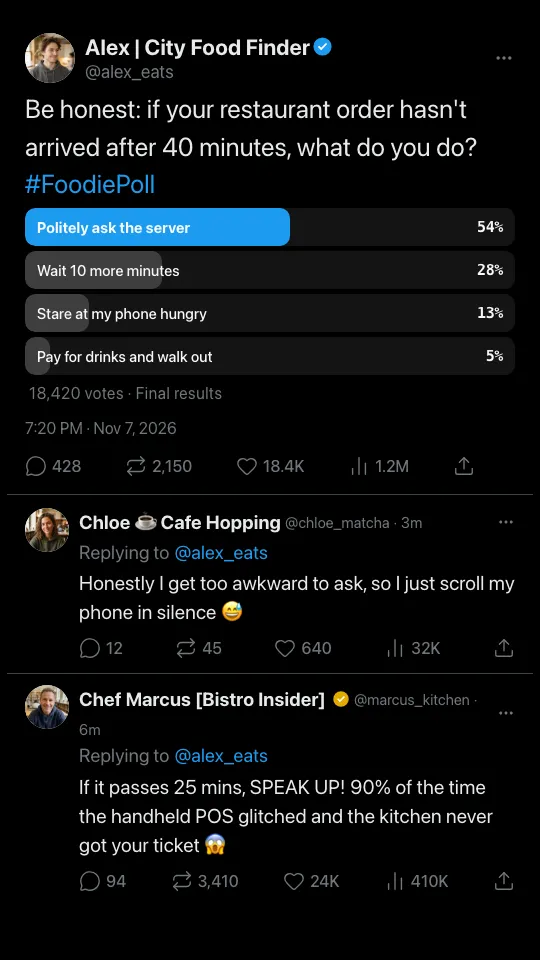
Narrated thread video + Modern X-style & Classic Twitter-style high-res exports (click any image to zoom)
Why Single-Tweet Generators & Manual Cropping Fall Short for Multi-Reply Threads & SMAUs
Whether you need a fake tweet generator with replies for a viral debate or a multi-part Social Media AU (SMAU), static single-card tools stop at one post—and cropping tall threads by hand cuts right through avatars, poll bars, and reply lines.
Static single-tweet makers lack multi-reply chains & SMAU pacing
Single-image makers like Tweetgen or FakeXPost focus on 1 isolated card. Building a 6-post debate or Social Media AU (SMAU) means exporting 6 separate PNGs and aligning vertical reply lines by hand.
Can't toggle Modern X-style vs. Classic Twitter-style or Quote PostsMany mockup tools lock you into one static template without 2–6 option poll bars, nested Quote Post cards, fake Twitter-style DM scenes, or Gold/Gray verified badges.
Keyframing PNGs + TTS audio in CapCut or Canva takes an hourAnd if you accidentally refresh a browser DevTools edit or single-tweet web form, your entire draft disappears. ChatStoryStudio auto-saves locally and exports both 2–8 split images and voiced MP4 video.
Isolated Single Card with No Reply Thread Context
Single-post makers are handy for one standalone joke, but only output one post card at a time. To tell a 5-post reply story or SMAU, you have to build 5 separate images and stitch them manually.
Only 1 isolated post · Empty space below
Slicing a Tall Thread Cuts Through Text & Avatars
When you slice a tall thread screenshot into 9:16 pages manually, post headers, poll bars, or bottom reply lines get chopped in half at the top and bottom borders.
Top & bottom posts are sliced mid-sentence
Clean Post-Boundary Page Splits + Narrated Short Video
Splits cleanly between posts while keeping vertical reply lines connected across pages—and exports the exact same timeline as a vertical video with character TTS voices and animated poll bars.
Export both 2–8 page carousel images & narrated MP4 video
3 Workflows to Create a Fake X (Twitter)-Style Thread Video or SMAU
Whether you want to build post by post in the Chat Timeline editor, bulk-import a Social Media AU script for up to 15 speakers, or start from a 1-line prompt, everything runs right in your browser across 23 UI presets.
Select an X-Style Theme and Add Posts, Replies & Polls Directly
Open the editor, choose Thread (X Style · Dark) or Thread (X Style · Light), and add posts one by one. Check your 2-to-8 page split layout in real time on the right preview panel—or edit on the go from the mobile Lite editor.
Smartphone browsers open the touch-friendly Lite Editor automatically
Every edit auto-saves to your browser's local database (IndexedDB)—no account required to start building or exporting.
Open X-Style Thread Editor (Free)Paste a 'Speaker: Post' Script to Build a Multi-Reply Thread in 1 Click
Already have a thread draft in Notion, Google Docs, or AO3 notes? Click 'Import Script' in the top toolbar and paste lines in 'Name: Post text' format. Up to 15 speakers are automatically registered with distinct icons and voices, and lines prefixed with '[System]: 10 minutes later...' or wrapped in parentheses become scene transition telops.
Alex | City Food Finder: Be honest: if your restaurant order hasn't arrived after 40 minutes, what do you do? #FoodiePoll
Chloe ☕ Cafe Hopping: Honestly I get too awkward to ask, so I just scroll my phone in silence 😅
Chef Marcus [Bistro Insider]: Former restaurant manager here—please let me share a quick PSA!
Chef Marcus [Bistro Insider]: If it passes 25 mins, SPEAK UP! 90% of the time the handheld POS glitched and the kitchen never got your ticket 😱
Alex | City Food Finder: Wait, seriously?! Flagging down our server right now to check 👇
[System]: 10 minutes later...
Alex | City Food Finder: Update: The ticket really DID glitch!! They rushed our food out and comped us this giant chocolate parfait 🎉
Enter a Topic to Draft an X (Twitter)-Style Thread & Expressive TTS Voices
Don't have a script yet? Enter a 1-line premise below (or copy one of the starter prompts) to generate an opening hook post, multi-person reply debate, and character voices from 120+ HD TTS options in Thread (X Style · Dark) mode.
“A viral X poll asking if people tip on takeout orders, followed by a heated reply debate between a barista and a regular customer”
“Two rival esports pros subtweeting each other after a tournament upset while their teammates panic in the quote replies”
“A founder sharing a 5-part breakdown of how fixing one onboarding bug doubled trial conversions, with skeptical developer replies”
4 Dedicated X (Twitter)-Style Features for Multi-Reply Threads, Fake Twitter-Style DMs & SMAUs
When you select an X-style theme, the inspector unlocks purpose-built controls under 'Custom Options for Thread (X Style)'—giving you control over era layouts, thread lines, Quote Posts, polls, 1-on-1 X DM-style switching, and 120+ expressive HD TTS voices.
1-Click Toggle: Modern X-Style vs. Classic Twitter-Style + Blue / Gold / Gray / Custom Badges
Every post in your thread can independently use the Modern X-style footer (Views bar-chart icon inline with Reply, Repost, and Like counts) or the Classic Twitter-style layout (bold Views next to the date, followed by dedicated bordered rows for Retweets, Quotes, and Likes). Assign @handles and Blue, Gold, Gray, or Custom verified badges per speaker or per post.
Set default `@username` handles and badge types (Blue individual, Gold official organization, Gray government/institution, or Custom icon) at the Speaker level, or override them on individual posts.
By default, the first message renders as a large Main Post (with full date/time stamp) and subsequent messages render as compact Replies with relative timestamps (`3m`, `1h`, etc.).
1-Click 'Replying to @handle' Chips & Vertical Thread Lines That Bridge Across Split Pages
Click any cast member chip under 'Replying to' to insert their @handle without typing. Toggle 'Connect with Thread Line' ON or OFF per post to structure solo essay threads, multi-person ratio debates, or multi-tweet Social Media AU compilations—and export across 2 to 8 carousel slides with seamless vertical line continuity.
Click a speaker chip to populate `@handle` in one tap. Leave the Reply Suffix field blank to render clean English `Replying to @username` labels.
Any `#hashtag` or `@mention` in your post text is automatically highlighted in X (Twitter)-style link blue (`#1D9BF0`, customizable with the color picker).
Same speaker + Thread Line ON
Keep the same speaker across consecutive posts with `Connect with Thread Line: ON` to create founder breakdowns, commentary threads, or numbered storytime chains.
Multiple speakers + @handle Reply Chips
Switch speakers on each reply, tap the target speaker chip under `Replying to`, and keep `Connect with Thread Line: ON` to show a connected reply-section debate.
Toggle Thread Line OFF + Main Post mid-timeline
Turn `Connect with Thread Line: OFF` and set `Post Type: Main Post` on any message to start a brand-new standalone post after a `[System]: 10 minutes later...` time skip.
Free-Text Views / Likes / Reposts + 1-Click Quote Posts & Animated Poll Bars
Type any formatted string for Views, Replies, Reposts, Quotes, and Likes (e.g., 1.2M, 18.4K, 2,150). Enable 'Show Quoted Post' and click 'Quote from Existing Message' to embed any earlier post as a nested Quote Card—or attach a 2–6 option Poll widget and up to 4 photos per post.
Instead of retyping a quoted post's name, `@handle`, verified badge, avatar, and text, pick any message from your timeline to populate the embedded Quote Post card automatically.
Set custom choice labels, vote percentages, winning highlight bar, and footer text (`18,420 votes · Final results`), or attach 1 to 4 images per post with rounded X-style media framing.
Switch to 1-on-1 X DM-Style Chat (Dark / Light) + Separate Display Text from Spoken TTS
Need your SMAU characters to move from a public timeline debate into a fake Twitter-style DM? Switch to X DM-style Dark (Minimal Dark) or Light (Minimal Light) in 1 click, and pair lines with 120+ expressive HD TTS voices across 4 languages (30+ English voices) using separate phonetic speech text for slang.
Keep abbreviations, slang, and hashtags on screen (`ngl`, `fr`, `imo`, `1.2M`, `#FoodiePoll`) while entering natural spoken phrasing in the phonetic TTS reading field (`“not gonna lie”`, `“for real”`, `“one point two million”`) and omitting silent `#hashtags` or URLs.
Export Scene 1 in `Thread (X Style · Dark)` and Scene 2 in `X DM Dark (Minimal Dark)` using the exact same cast avatars and TTS voice profiles.
1-Click Restyling Across 20+ UI Themes & Per-Part Customization
Without retyping a single line of dialogue or re-recording audio, restyle your entire conversation across 20+ built-in UI themes—including iMessage-style, WhatsApp-style, X (Twitter)-style, Discord-style, Slack-style, ChatGPT-style, and original themes—in one click.
X Thread Dark
Dark theme recreating social media posts and reply threads.
X Thread Light
Light theme recreating social media posts and reply threads.
X DM Dark
A sleek dark theme emulating social media direct messages.
iMessage Soft Blue
A refreshing blue style with a clean, translucent feel.
Customize Every UI Component & Save Your Own "My Themes"
Start from any official preset and fine-tune colors, fonts, headers, and bubble shapes to match your brand aesthetic.
Switch across 20+ header/footer designs, upload custom header graphics, or set to "Hidden" for frameless overlays
Choose solid colors, gradients, custom images, MP4 video backgrounds, or diagonally scrolling icon patterns
Customize left/right bubble colors, gradients, corner radii, bubble tails (ON/OFF), borders, and drop shadows
Switch fonts globally across modern sans-serif, serif, rounded, handwritten, and 8-bit pixel typefaces
Customize read labels ("Read", "Seen", double checkmarks), group read counts, and exact delay seconds before appearing
Save your customized color palette, background, and bubble styling as a reusable preset to apply in one click
Image & Video Export Specifications by Plan
Every plan—including the Free ($0) plan—supports unlimited manual editing, unlimited video exports (MP4 / WebM), and up to 8-page split image exports (PNG / JPEG + ZIP) with individual creator monetization allowed.
| Feature / Spec | Free ($0) | Lite (9/mo) | Pro (19/mo) | Business (79/mo) |
|---|---|---|---|---|
| Image & Video Export Count | Unlimited (No Login OK) | Unlimited | Unlimited | Unlimited |
| Split Image Export (1 to 8 Pages) | Up to 8 splits (PNG / JPEG + ZIP) | Up to 8 splits (PNG / JPEG + ZIP) | Up to 8 splits (PNG / JPEG + ZIP) | Up to 8 splits (PNG / JPEG + ZIP) |
| Export Resolution | 1.0x FHD (1080×1920) | 1.5x Ultra HD (1620×2880) | 1.5x Ultra HD (1620×2880) | 1.5x Ultra HD (1620×2880) |
| Video Export & Alpha Transparency | MP4 / WebM (Standard) | MP4 / WebM (Standard) | MP4 / WebM + Transparent Alpha WebM & Video BG | MP4 / WebM + Transparent Alpha WebM & Video BG |
| Watermark / Logo | Watermark included | No Watermark | No Watermark | No Watermark |
| TTS Voice Synthesis Quota | 2,000 credits total (~2,000 EN chars w/ free sign-in) | 2,000 credits / month (~2,000 EN chars) | 60,000 credits / month (~60,000 EN chars) | 400,000 credits / month (~400,000 EN chars) |
| Commercial & Monetized Use | Individual Monetization OK (YouTube / TikTok / X) | Individual Monetization OK | Individual & Sole Proprietor Commercial OK | Corporate Marketing & Client Work Included |
How ChatStoryStudio Compares for Fake X (Twitter)-Style Threads, DMs & Video
Compare multi-reply fake X (Twitter)-style threads, SMAUs, and fake Twitter-style DMs against single-tweet image makers like Tweetgen or FakeXPost, general video editors, and browser DevTools.
| Capability | ChatStoryStudio | Single-Tweet Makers (Tweetgen, FakeXPost) | General Editors (CapCut / Canva) | Browser DevTools (Inspect Element) |
|---|---|---|---|---|
| Multi-Reply Thread + Continuous Vertical Line | ◎ Native toggle per reply (bridges across 2–8 split slides) | △ Single post card only (no multi-reply thread chains) | △ Must draw and align lines manually on canvas | ○ Requires editing live DOM nodes manually |
| Modern X-Style ⇔ Classic Twitter-Style + 23 UI Presets | ◎ 1-click toggle + 23 UI presets (20+ UI styles) | △ Usually locked to a single static card template | △ Must rebuild metric rows from scratch | △ Locked to current live X web layout |
| 2–6 Option Poll & 1-Click Quote Post | ◎ Built-in Poll widget (animated bars) + Quote picker | △ Rarely supports 2–6 option polls or nested quote cards | △ Must draw poll bars and quote borders by hand | △ Requires finding a real poll/quote post to edit |
| 2–8 Auto-Split Slides & 120+ Voice MP4 / Alpha WebM Export | ◎ 2–8 split slides (PNG/JPEG) & MP4 / Alpha WebM with 120+ HD voices (30+ English) | △ Single static PNG image only (no video, no voice) | ○ Video supported, but no auto-splitting for threads | △ Manual OS screenshot only |
| 1-Click Switch to 1-on-1 Fake Twitter-Style DM (X DM-Style) | ◎ Switch between X (Twitter)-style thread & X DM-style (Dark/Light) | △ Separate generator required for fake DM chats | △ Complete manual redesign required | △ Requires real DM conversation history |
Frequently Asked Questions About Creating X (Twitter)-Style Threads, Polls & Videos
Build Your First Fake X (Twitter)-Style Thread Video or SMAU Carousel
Start in the Timeline Editor, bulk-import a 15-speaker script, or launch from a 1-line prompt across 23 UI presets and 120+ expressive HD TTS voices—no signup required.
Workflow & Cost Comparisons vs Other Tools
Related Use-Case & How-To Guides
* Product and company names such as "iMessage" (Apple Inc.), "WhatsApp" (WhatsApp LLC), "X" (X Corp.), "YouTube" (Google LLC), "Discord" (Discord Inc.), "Slack" (Slack Technologies, Inc.), "ChatGPT" (OpenAI OpCo, LLC), and "LINE" (LY Corporation) are trademarks or registered trademarks of their respective holders. ChatStoryStudio is an independent parody/mockup studio and is not affiliated with, sponsored by, or endorsed by any of these companies.