CapCut vs ChatStoryStudio: Make Fake Text Story Videos in 3 Min (Stop Manual Keyframing)
CapCut is a powerhouse for editing live-action vlogs, gameplay footage, and dynamic captions—but assembling a 20-message fake text video inside CapCut requires stacking 20+ image tracks, setting Y-axis keyframes for every scroll step, manually syncing 40+ audio and pop SFX clips (60–90 minutes), or fighting green-screen spill when keying green bubbles. ChatStoryStudio automates bubble layout, upward scrolling, 120+ expressive HD TTS voices across 4 languages (30+ English voices), and pop SFX in ~3 minutes across 3 workflows (manual Chat Timeline, 15-speaker bulk script import, and a 1-line prompt starter) and 23+ UI styles—handling everything from 3-line hooks to 100-line stories. Best of all, you can work in hybrid mode: export a 1-track transparent VP9 Alpha WebM overlay straight into CapCut, or finish the entire MP4 inside ChatStoryStudio (Free includes a small watermark, removed in Lite; browser connection required).
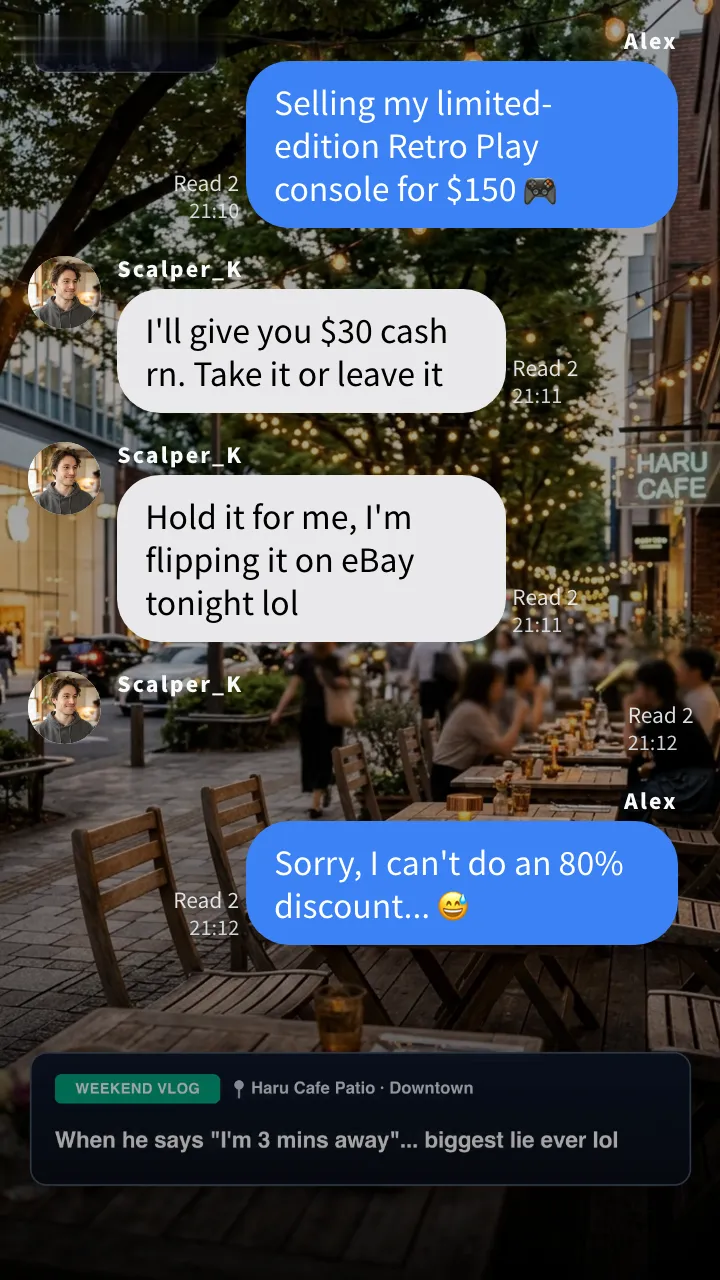
▲ Demo uses green bubbles & a green action button (the hardest colors for CapCut’s #00FF00 Chroma Key) to prove zero green spill with Alpha WebM—plus 1-click restyling to iMessage-style Blue, WhatsApp-style Dark, Discord-style & 23+ UI styles for gameplay or vlog overlays.
Why the Manual CapCut Fake Text Video Workflow Takes 60+ Minutes
CapCut is one of the best video editors in the world for cutting live-action vlogs, syncing beat drops, and auto-captioning talking-head clips. However, because CapCut is built around a general multi-track timeline rather than a conversational layout engine, creating a 20-message texting story from scratch forces you through three structural bottlenecks.
1. The 60-Track Keyframe Bottleneck & the 'Mid-Script Edit Domino Effect'
In a real messaging app, every new reply pushes all previous bubbles upward by the exact pixel height of the new bubble. Replicating that in CapCut means stacking 20+ separate bubble layers, manually placing start and end Y-axis keyframes (◇+) on every visible layer for every single message, and aligning 40+ separate TTS audio clips and pop sound effects by hand.
A 1-line bubble and a 3-line bubble have different heights. Moving all layers up by a fixed distance causes bubbles to overlap or leave awkward gaps, and using CapCut’s Compound Graph can accidentally curve X and Y coordinates together unless edited on separate axes.
If you decide to insert a punchline at Message #4 or fix a typo that wraps onto a second line, every keyframe, TTS voice clip, and pop sound effect from Message #5 to #20 shifts out of alignment and must be redone manually.
ChatStoryStudio calculates bubble heights, upward scroll distances, typing indicators, and voice durations automatically. Insert, delete, or reorder any message at any time—the entire timeline updates in 0 seconds.
2. The Green Screen (#00FF00) Chroma-Key Trap vs. Native Alpha WebM
Many tutorials suggest exporting a chat video on a bright green background (#00FF00) and removing it with CapCut’s Chroma Key tool. However, if your chat uses green sent bubbles (WhatsApp-style, LINE-style, or SMS-style green bubbles) or green action/call buttons, Chroma Key strips the color right out of your bubbles—leaving ghostly, semi-transparent holes and neon green spill around your text.
Green Bubbles & Buttons Turn Semi-Transparent
Increasing Chroma Key intensity in CapCut to hide green fringe eats into green message bubbles and green “Accept” buttons, exposing the background video through the text.
True Pixel Transparency (Header & Footer Hidden)
Set Header and Footer to “Hidden” and export with Transparent Background: Enabled. Every bubble, confetti particle, and soft drop shadow retains 100% true alpha transparency.
Crisp Bubbles Over Any Vlog or Gameplay Clip
Drop the transparent WebM onto a single track above your CapCut footage—or load the background MP4 directly inside ChatStoryStudio—for studio-grade compositing.
CapCut vs. ChatStoryStudio: Which Workflow Fits Your Channel?
You do not have to choose one tool and abandon the other. Depending on whether your video is 100% chat-driven or a hybrid of live-action/gameplay footage and texting overlays, here is the fastest way to structure your workflow.
Live-Action Vlogs, Color Grading & Talking-Head Captions
- •Cutting multi-camera vlogs, beat-synced reels, and speed ramps
- •Adding word-by-word auto captions to a speaker on camera
- •Popping up a single static speech bubble for 2 seconds without scrolling
Use ChatStoryStudio Alone (From 3-Line Clips to 100-Line Stories)
- Create quick 3-line hooks or full 100+ line texting stories in ~3 minutes
- Auto-sync 120+ expressive HD TTS voices (30+ English), pop SFX, photos, polls & action cards
- Load background video/images & BGM directly and export a finished 1080p MP4 (Free includes top-right watermark, removed in Lite)
ChatStoryStudio + CapCut Hybrid (1-Track Transparent Alpha WebM Overlay)
- Auto-scroll the chat + 120+ HD TTS voices + pop SFX in ChatStoryStudio (~3 min)
- Export a frameless Transparent WebM (Desktop) or Magenta MP4 (Mobile)
- Drop onto 1 overlay track in CapCut above Minecraft parkour, GTA, or vlog cuts
| Comparison Axis | ChatStoryStudio (Standalone or CapCut Hybrid) | CapCut Alone (Manual Multi-Track + In-App Templates) |
|---|---|---|
| 1. Core Architecture | ◎ Dedicated Chat Timeline Engine Built specifically for scrolling chat videos & carousels. Works standalone or exports clean overlays for CapCut. | ○ General Multi-Track Video Editor Industry-leading for camera footage and effects, but has no automatic chat scroll or bubble layout engine. |
| 2. Time to Build a 20-Line Video | ◎ Approx. 3–5 Minutes 3 workflows: type on the Chat Timeline, bulk-paste a | △ Approx. 60–90 Minutes Requires stacking 20+ bubble layers, setting Y-axis keyframes for every scroll step, and aligning 40+ audio clips manually. |
| 3. Bubble Layout & Upward Scroll | ◎ 100% Automatic (Zero Keyframes) Automatically wraps text, sizes bubbles, shows typing indicators, and scrolls older messages upward by the exact pixel height. | △ Manual Y-Axis Keyframing (◇+) Every layer must be keyframed upward manually. In-app templates are locked to 3–5 static bubbles and cannot scroll 20+ lines. |
| 4. Editing or Inserting a Line Later | ◎ Instant Auto-Reflow (0 Seconds) Drag or tap ↑↓ to reorder or insert a message anywhere—all downstream scroll positions and frame timings recalculate automatically. | △ Full Downstream Domino Shift Inserting 1 line in the middle invalidates the Y-coordinates and audio timing of every subsequent layer on the timeline. |
| 5. Voice Synthesis (TTS) & Duration Sync | ◎ 120+ Voices (4 Languages) + Auto Silence Trim 1-click Batch TTS across 120+ expressive HD voices (30+ English) trims leading/trailing silence and locks each bubble’s frames to exact voice duration. | ○ Built-In TTS, Manual Track Sync Includes diverse TTS voices, but each generated clip must be trimmed and aligned with bubble keyframes and pop SFX by hand. |
| 6. Transparent Overlay & Green Bubble Preservation | ◎ Native Alpha WebM + Custom Solid Colors Export VP9 alpha-channel WebM (Pro) with zero color spill, frameless transparent PNGs (Free), or custom Magenta ( | △ #00FF00 Chroma Key Bleeds Green Bubbles Keying out a standard green screen strips green WhatsApp-style / LINE-style / SMS-style bubbles and green buttons, leaving semi-transparent holes. |
| 7. UI Styles, Widgets & Chat VFX | ◎ 23+ UI Styles + Interactive Chat Widgets 23 UI presets (iMessage-style, WhatsApp-style, LINE-style, X-style, YouTube comment-style, Discord-style, Slack-style, ChatGPT-style) + Voice/Video Call, Action Card & 2–6 Option Poll widgets. | △ Build From Shapes or Fixed Templates Rich general video transitions, but call screens, story action cards, and multi-platform SNS layouts must be drawn from scratch. |
| 8. Static Screenshots & Multi-Slide Carousels | ◎ 2–8 Auto-Split Slides & Match Max Height Export the exact same project as a single tall PNG or 2–8 auto-split carousel slides with unified pixel height for Instagram, X, and Reddit. | △ Video Frame Freeze Only Can export still frames from the video player, but does not auto-paginate long chats into height-matched multi-slide carousels. |
| 9. Device Support & Installation | ◎ 100% Browser-Based (Desktop + Mobile Lite) No download or login required (internet connection required; no offline mode). Works on Windows, Mac, iOS Safari, and Android Chrome with local IndexedDB auto-save. | ◎ Native Desktop, Mobile & Web Apps Available across iOS, Android, Windows, macOS, and Web (multi-track keyframing on a phone screen requires fine pinch-zooming). |
| 10. Pricing & Commercial Monetization | ◎ Free Plan Commercial OK (Paid from $9/mo) Unlimited free MP4/PNG exports with personal YouTube/TikTok monetization allowed on all tiers. Lite ($9/mo) removes watermark; Pro ($19/mo) unlocks Alpha WebM; Business ($79/mo) covers corporate & client work. | ○ Free & CapCut Pro (Check Per-Asset Terms) Core editing is free, while many in-app templates, voices, and music tracks carry specific commercial vs. non-commercial licensing rules. |
3 Step-by-Step Recipes: CapCut Hybrid Overlays & 1-Stop Video Export
Whether you edit on CapCut Desktop (Mac / Windows), CapCut Mobile (iPhone / Android), or want to finish your entire video inside your browser without opening a second app, follow the recipe that matches your setup.
Native Alpha-Channel WebM (1-Track Overlay, Zero Chroma Key)
The cleanest studio workflow for overlaying scrolling chat bubbles, green buttons, and confetti onto gameplay or vlog timelines in CapCut Desktop, Premiere Pro, or DaVinci Resolve.
- 1In ChatStoryStudio’s Design tab, set Header Design and Footer Design → Design Style: Hidden.
- 2Click Export Video, select Format: WebM, and toggle Transparent Background: Enabled.
- 3Drag the exported
.webmfile onto Track 2 in CapCut Desktop—voiceovers, pop SFX, and soft shadows are already synced in a single clip.
Zero-Bleed Chroma Key Using Magenta (#FF00FF) or Blue (#0000FF)
Because iOS and Android system decoders do not support alpha-channel WebM inside mobile apps, use a contrasting solid background color that never collides with green chat bubbles.
- 1Set Header & Footer to Hidden, then open Basic Background Design → Solid Color and enter
#FF00FF(Magenta) or#0000FF(Blue). - 2Set Bubble Shadow to None (for razor-sharp keying edges) and export as a standard MP4 (available on the Free plan).
- 3In CapCut Mobile, tap Overlay → Remove BG → Chroma Key and pick the Magenta/Blue background—your green bubbles stay 100% opaque.
Direct Background Video & Dimmed Overlay Compositing
If you only need a background gameplay loop, cafe vlog clip, or aesthetic photo behind your chat story, you can complete the entire composite inside ChatStoryStudio.
- 1Open Basic Background Design and select Image Background (Free) or Video Background (Pro, up to 5 MP4 clips with crossfade).
- 2Adjust Overlay Opacity (e.g., black
#000000at 25–35%) so white timestamps, speaker names, and bubbles pop clearly over bright footage. - 3Click Export Video (MP4) to render the complete 30fps short with background video, BGM, TTS voices, and pop SFX in one pass.
5 Dedicated Features That Cut Production Time from 60 Min to 3 Min
Here is a closer look at the actual Desktop and Mobile Lite studio screens—and why creators who used to keyframe chat bubbles in CapCut switch their chat creation step to ChatStoryStudio.
Feature 01. Dedicated Chat Timeline UI & Bulk 'Name: Message' Script Import
Instead of juggling 60 tracks on a horizontal video timeline, edit messages in a vertical Chat Timeline that looks and feels like a real messaging app. Have a script written in Notion, Google Docs, or ChatGPT? Click Import Script in the top toolbar to convert up to 15 speakers into aligned bubbles in 1 second.
Paste into “Import Script” to auto-build the 10-line dialogue timeline & clock-wipe transition in seconds—then attach photos or an Action Card widget in 1 click
Chloe: Hey, do you remember what day it is today? 👀 Liam: Uh... just a normal Friday? Chloe: Are you serious?! It's my birthday!! 💢 Chloe: Whatever, I'm getting dessert by myself!! 🥞 [System]: 30 minutes later... Liam: Open your front door right now!! 🏃♂️💦 Chloe: Wait WHAT?! You're holding flowers and a cake...?! 🎂 Liam: Surprise!! Happy birthday!! 🎉 Liam: Here's for the dessert and your birthday gift! Chloe: Worst actor ever lol, but thank you so much!! 🎉
Feature 02 & 03. 1-Click Batch TTS (120+ Voices) + Action, Call & Poll Widgets
Click Batch TTS to synthesize all messages at once across 120+ expressive HD voices in 4 languages (30+ English voices). Leading and trailing silence is trimmed automatically so conversations flow at a snappy TikTok pace, and you can separate Display Text (with emojis or slang) from Speech Text (clean pronunciation). Plus, attach inline Action Cards, Voice/Video Calls, 2–6 Option Polls, Clock-Wipe Transitions, and Confetti / Screen Shake VFX with a single toggle.
Keep emojis (👀, 💢, 🎂) in the bubble while feeding clean phonetic text and acting style prompts to the voice engine.
Embed customizable story action/gift cards, incoming/missed calls, and multi-option polls—and have the character read the card memo aloud automatically.
Feature 04 & 05. 1-Click Restyling Across 23+ UI Styles + Multi-Slide Image Splitting
Switch your entire conversation between iMessage-style, WhatsApp-style, LINE-style, X (Twitter)-style, YouTube comment-style, Discord-style, Slack-style, ChatGPT-style, and Novel / Headless overlay themes across 23 UI presets in a single click—and export both 9:16 videos and 2–8 auto-split carousel images from the same project.
iMessage Soft Blue
A refreshing blue style with a clean, translucent feel.
WhatsApp Teal
Sophisticated teal green inspired by global messaging apps.
X Thread Dark
Dark theme recreating social media posts and reply threads.
Discord Dark
Dark community chat UI inspired by Discord.
Customize Every UI Component & Save Your Own "My Themes"
Start from any official preset and fine-tune colors, fonts, headers, and bubble shapes to match your brand aesthetic.
Switch across 20+ header/footer designs, upload custom header graphics, or set to "Hidden" for frameless overlays
Choose solid colors, gradients, custom images, MP4 video backgrounds, or diagonally scrolling icon patterns
Customize left/right bubble colors, gradients, corner radii, bubble tails (ON/OFF), borders, and drop shadows
Switch fonts globally across modern sans-serif, serif, rounded, handwritten, and 8-bit pixel typefaces
Customize read labels ("Read", "Seen", double checkmarks), group read counts, and exact delay seconds before appearing
Save your customized color palette, background, and bubble styling as a reusable preset to apply in one click
Start Free in Your Browser: 3 Ways to Build Your First Chat Video
No app download, account registration, or credit card required. Pick whichever starting point matches how you write your scripts:
Type Line by Line & Preview Scroll Physics in Real Time
Open a blank project (or load our interactive sample project), tap speakers to add lines, attach photos or story widgets, and watch the 30fps preview update live.
Paste a “Name: Message” Script & Auto-Build All Bubbles
Copy any dialogue script from your notes (or the 10-line Chloe & Liam script above), click Import Script in the studio, and generate the entire timeline in one click.
Enter a scenario below to draft dialogue, staging effects & BGM in seconds
Type a topic (or pick a genre preset) and click generate. You can test-generate a complete project with dialogue, BGM, and visual staging immediately without logging in, or sign in with Google (free, no credit card) to automatically synthesize all TTS voiceovers on arrival.
Export Specifications & Related Step-by-Step Guides
Review the technical specifications for video, transparent WebM, and multi-slide image exports, or explore our dedicated guides for specific overlay and messaging styles.
9:16 Vertical, 1:1 Square & VP9 Alpha WebM (30fps)
Export H.264 MP4 or VP9 WebM at 30fps across Lite (540×960), Full HD (1080×1920), or Ultra HD (1620×2880 on Lite/Pro+). Enable Transparent Background (WebM) on the Pro plan ($19/mo) to drop clean alpha overlays into CapCut Desktop, Premiere Pro, or DaVinci Resolve.
Frameless Transparent PNGs & 2–8 Auto-Split Slides
Export full-conversation screenshots, frameless transparent PNGs (Free plan and up), or split long threads into 2–8 carousel slides with Match Max height normalization for Instagram, X, and community posts.
Unlimited Local Exports & Monetization Cleared
Video and image rendering runs in your browser via WebCodecs (internet connection required; no offline mode)—exports are unlimited and never consume TTS credits. Personal monetization is allowed on all plans (including Free, which includes a small top-right watermark). Lite ($9/mo) removes the watermark; Business ($79/mo) covers corporate accounts and client work.
Frequently Asked Questions: CapCut vs. ChatStoryStudio & Hybrid Overlays
Ready to replace 60 minutes of manual bubble keyframing with a 3-minute Chat Timeline?
No app installation or mandatory signup required. Experience how effortless it feels to build chat stories directly in your browser.
Workflow & Cost Comparisons vs Other Tools
Related Use-Case & How-To Guides
* Product and company names such as "iMessage" (Apple Inc.), "WhatsApp" (WhatsApp LLC), "X" (X Corp.), "YouTube" (Google LLC), "Discord" (Discord Inc.), "Slack" (Slack Technologies, Inc.), "ChatGPT" (OpenAI OpCo, LLC), and "LINE" (LY Corporation) are trademarks or registered trademarks of their respective holders. ChatStoryStudio is an independent parody/mockup studio and is not affiliated with, sponsored by, or endorsed by any of these companies.