How to Make Fake Discord & Slack-Style Chat Videos & Channel Screenshots Free
Looking for a fake Discord-style chat generator, a Beluga-style Discord skit video maker, or a fake Slack-style message & workplace comedy generator? Skip 2-column SMS bubbles and hour-long screenshot keyframing. With ChatStoryStudio, every speaker aligns in a left-aligned flat-list timeline where consecutive messages auto-group. Toggle 1-click between Modern Dark (Discord-Style) and Corporate Pro (Slack-Style) across 23 UI presets, voice up to 15 speakers with 120+ expressive HD TTS voices across 4 languages (30+ English voices), and export MP4 videos, transparent Alpha WebM overlays, or fake Discord-style channel screenshots (2–8 auto-split slides) right in your browser.
Voiced Discord-style video & 1-click Slack-style theme switch (click images to zoom)
Why Standard Texting Apps & Video Editors Fail at Discord-Style & Slack-Style Videos
Using 2-column SMS tools or manual NLE timelines for a Beluga-style Discord skit, workplace comedy, or fake Discord-style channel screenshot hits three immediate walls
Left/Right SMS Bubbles Ruin Discord-Style & Slack-Style Authenticity
Most mobile texting apps (like TextingStory) force a 1-on-1 left/right speech bubble layout. Authentic Discord-style servers and Slack-style channels use a left-aligned flat-list timeline where everyone stacks on the left and consecutive messages omit repeated avatars.
Cropping & Animating 30 Screenshots in Premiere / CapCut
Making a 45-second Beluga-style skit without a dedicated Beluga-style Discord skit video maker means staging dummy accounts or DOM edits, capturing 30 screenshots, and hand-keyframing every pop-in, scroll, ping SFX, and voice file—and fixing one typo ruins the timeline.
Splitting Long TTRPG or Incident Logs for Social Carousels
Posting a 20-line D&D session log or engineering postmortem on X (Twitter), Reddit, or Instagram requires slicing a tall image into 2–4 slides by hand—often slicing right through a message, poll card, or system notification bar and producing uneven slide heights.
Headers & message boundaries auto-preserved across all slides with unified heights
ChatStoryStudio Automates the Entire Flat-List Channel Workflow in Your Browser
- 1True Left-Aligned Flat Timeline & Auto-Grouping: All up to 15 speakers align cleanly on the left with no speech bubble outlines. Consecutive lines by the same speaker automatically collapse their avatar and username header.
- 2Zero Keyframing—Scroll, SFX & 120+ Voices Sync Automatically: Upward scrolling, typing indicators, pop SFX, and silence-trimmed audio durations across 120+ expressive HD TTS voices across 4 languages (30+ English voices) calculate automatically from your script.
- 31 Project → MP4 Video, Alpha WebM & 2–8 Auto-Split Slides: Export vertical 9:16 or square 1:1 MP4 videos, transparent WebM overlays for gameplay (Pro), or 2–8 cleanly split carousel images with unified slide heights.
3 Workflows for Fake Discord-Style Videos, Slack Comedy & Channel Screenshots
Craft a Beluga-style Discord skit line by line, paste a D&D or Slack-style log (up to 15 speakers), or start from a 1-line prompt—all in your browser
1. Type Line-by-Line on the Visual Channel Timeline (Desktop & Mobile Lite)
Select 'Modern Dark (Discord-Style)' or 'Corporate Pro (Slack-Style)' in the Style tab, then click any speaker button at the bottom of the Timeline panel to add messages. Consecutive lines by the same speaker automatically group together.
▲ Dedicated Mobile Lite Editor for iPhone & Android browsers
2. Bulk-Import Multi-Speaker Scripts, D&D Session Logs, or Slack-Style Threads
Already have a script in Notion, Google Docs, or a tabletop VTT log? Paste up to 15 speakers in 'Name: Message' format (plus '[System]: ...' lines for server joins or dice rolls) to build the entire channel timeline in seconds.
Alex (Jr. Dev): All my tickets for the sprint are done!
Alex (Jr. Dev): I also wiped all the old test tables so the server stays clean!
Sarah (Tech Lead): Wait hold on
Sarah (Tech Lead): You ran that DROP script on PRODUCTION, not staging!!
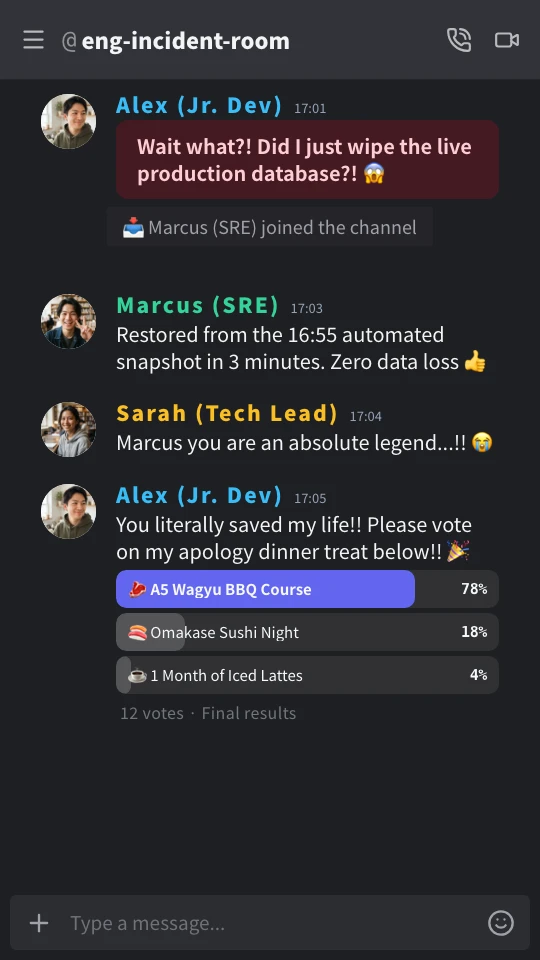
Alex (Jr. Dev): Wait what?! Did I just wipe the live production database?! 😱
[System]: 📥 Marcus (SRE) joined the channel
Marcus (SRE): Restored from the 16:55 automated snapshot in 3 minutes. Zero data loss 👍
Sarah (Tech Lead): Marcus you are an absolute legend... 😭
Alex (Jr. Dev): You literally saved my life!! Please vote on the apology dinner poll below!! 🎉
Free Google sign-in unlocks Bulk Script Import (10 imports on Free, up to 2,000 chars/import) + 2,000 TTS credits. Manual line-by-line editing and prompt scenario generation (up to 3 total drafts) require no login.
Open Bulk Import in Editor3. Draft a Multi-Speaker Channel Skit from a 1-Line Scenario
Type a 1-line premise below (e.g., 'At 4:59 PM on Friday, a junior dev drops the production database in #engineering') to build a multi-speaker Discord-style or Slack-style workplace comedy draft with BGM and effects—sign in with Google for free to include batch TTS voices.
4 Dedicated Features for Discord-Style Skits, Fake Slack-Style Threads & TTRPG Logs
Every visual detail—from consecutive message grouping and role colors to #channel headers, dice-roll system bars, and phonetic TTS pronunciation—is built into our fake Discord-style chat generator and fake Slack-style message & workplace comedy generator
Left-Aligned Flat-List Layout, Automatic Consecutive Grouping & Per-Speaker Role Colors
Unlike standard 2-column chat apps, Modern Dark (Discord-Style) and Corporate Pro (Slack-Style) align all speakers on the left without bubble borders. When the same character speaks twice in a row, ChatStoryStudio automatically omits the second avatar and name header—and lets you assign custom hex role colors (Admin Purple, Mod Cyan, Junior Dev Blue, etc.) to up to 15 cast members.
Why Flat-List Grouping Matters for Pacing
In Beluga-style Discord comedy and rapid-fire Slack threads, characters rarely send a single long paragraph. They rapid-fire 2 or 3 short lines in a row:
Wait hold on
You ran that DROP script on PRODUCTION, not staging!!
ChatStoryStudio detects consecutive messages from the same speaker automatically—saving vertical screen space on 9:16 video canvases and matching the exact look of a real desktop/mobile channel.
Switch Between #Channel & @DM Headers, Plus Slack-Style 2-Tier Formatting Toolbars
Customize the header title (e.g., '#engineering-general', '#dnd-campaign-log', or '@beluga-mod') and toggle between Channel mode (#) and DM mode (@). In Corporate Pro (Slack-Style), the header switches to iconic deep purple (#4A154B) with rounded-square avatars and a 2-tier rich-text formatting footer.
Dark charcoal canvas (#1e1f22), circular avatars, #channel or @Username header (#313338) with call and video icons, and a dark pill message bar with (+) and emoji buttons.
Clean white workspace canvas, deep purple header (#4A154B), rounded-square avatars (rx=8px), and a 2-tier input box with + | B | I | List | @ | Emoji formatting controls.
System Join / Dice-Roll Bars, Highlight Alert Boxes & Interactive 2–6 Option Polls
Break up walls of text with visual accents: insert full-width system bars for server joins ('📥 Marcus joined the channel') or D&D / Call of Cthulhu dice rolls ('🎲 1D100<=75 > 12 > Extreme Success!'), highlight critical lines with colored border boxes, or drop a 2–6 option poll widget into the channel.
Separate Display Text from Phonetic TTS Reading, Plus 2–8 Auto-Split PNG/JPEG Slides
Tech and gaming scripts are full of jargon ('prod DB', 'LGTM', '1d20', 'aggro', 'SRE'). Pair every line with 120+ expressive HD TTS voices across 4 languages (30+ English voices) while keeping exact technical spelling on screen—and export fake Discord-style channel screenshots as 2–8 cleanly split PNG/JPEG slides.
▲ Automatic 2–8 slide splitting cuts cleanly between messages and pads the final page so every slide shares the exact same pixel height for X (Twitter), Reddit, and Instagram carousels.
Switch Across 23 UI Presets in 1 Click—From Discord & Slack-Style to Cyberpunk & 8-Bit RPG
Your timeline data stays 100% intact across 23 UI presets (20+ UI styles). Test your script in Modern Dark (Discord-style), Corporate Pro (Slack-style), Cyberpunk Neon, Retro RPG, or iMessage/WhatsApp-style bubbles instantly.
Discord Dark
Dark community chat UI inspired by Discord.
Slack Corporate
Workspace channel UI inspired by Slack.
Cyberpunk Neon
A futuristic sci-fi style glowing with neon lights.
Retro RPG
Nostalgic pixel art RPG style text box.
Customize Every UI Component & Save Your Own "My Themes"
Start from any official preset and fine-tune colors, fonts, headers, and bubble shapes to match your brand aesthetic.
Switch across 20+ header/footer designs, upload custom header graphics, or set to "Hidden" for frameless overlays
Choose solid colors, gradients, custom images, MP4 video backgrounds, or diagonally scrolling icon patterns
Customize left/right bubble colors, gradients, corner radii, bubble tails (ON/OFF), borders, and drop shadows
Switch fonts globally across modern sans-serif, serif, rounded, handwritten, and 8-bit pixel typefaces
Customize read labels ("Read", "Seen", double checkmarks), group read counts, and exact delay seconds before appearing
Save your customized color palette, background, and bubble styling as a reusable preset to apply in one click
Export Specifications & Comparison vs. Legacy Generators and Video Editors
Choose between MP4 video, frameless Transparent Alpha WebM for gameplay overlays, or 2–8 auto-split PNG/JPEG slides—all rendered locally in your browser
9:16 Vertical / 1:1 Square MP4 & Transparent WebM
Unlimited free MP4 exports (1080×1920 or 1080×1080, up to 1.5x Ultra HD 1620×2880 on Lite+). Need to overlay a Discord-style chat onto Minecraft, Valorant, or GTA gameplay? Export a true Transparent Alpha WebM on the Pro plan ($19/mo) with zero green-screen spill.
Single Tall PNG/JPEG or 2–8 Auto-Split Carousels
Switch the top-right toggle to Image Mode to download a single long vertical screenshot (up to 16,000px) or automatically split long logs into 2–8 numbered PNG/JPEG slides (ZIP) with unified heights and optional page break markers.
Local Browser Auto-Save & Creator Monetization
Projects auto-save to your browser’s IndexedDB (plus portable .csbackup files). Personal YouTube/TikTok monetization is allowed on Free; remove watermarks on Lite ($9/mo), or unlock corporate/client agency licensing on Business ($79/mo).
| Feature / Workflow | ChatStoryStudio (Browser) | Single-Screenshot Fake Discord-Style Tools | Private Server + Tupperbox / Webhooks | Video Editors (CapCut / Premiere Pro) |
|---|---|---|---|---|
| Left-Aligned Flat-List & Auto Consecutive Grouping | ◎ Native (Auto-omits repeated avatars & headers) | △ Message grouping supported, but static single-image only | ◎ Authentic Discord-style UI, but tedious bot token / prefix setup | △ Must align every text layer & avatar manually |
| Discord-Style Dark ⇔ Slack-Style Light Switch & 23 Presets | ◎ 1-Click Switch + 23 UI Presets + Role Colors (Up to 15 Speakers) | ✕ Discord-style only; cannot switch a script into Slack-style UI | ✕ Locked to Discord-style; cannot skin as Slack-style or RPG | ✕ Requires rebuilding entire graphic templates from scratch |
| System Join / Dice-Roll Bars, Alert Boxes & 2–6 Option Polls | ◎ Built-in Timeline Events (1-click insert & voice sync) | ✕ Plain text only; no dice bars, alert boxes, or live polls | △ Requires complex bot commands & real server config | △ Must design & keyframe custom shape layers |
| Bulk Script Import & 120+ Synced TTS Voices | ◎ Paste "Name: Line" Script + 120+ HD Voices across 4 Languages (30+ EN) | ✕ Manual typing only; zero audio synthesis or export | ✕ Static text only; no MP4 video or TTS voiceovers | △ External TTS audio files must be timed by hand |
| 2–8 Auto-Split Carousel Slides & Transparent Alpha WebM | ◎ Auto-Split PNG/JPEG (2–8 Slides) + Alpha WebM (Pro) | ✕ 1 static screen only; no carousel splitting or alpha | ✕ Manual cropping slices through messages & polls | ○ Supports alpha export, but no auto-split image carousels |
| Average Time to Produce a 60-Second 4-Speaker Video / Carousel | ◎ 3–5 Minutes (Auto-save in IndexedDB, edit anytime) | ✕ Video impossible; static screenshot takes 10+ min | ✕ 45–60 Minutes (Bot setup + screen recording + NLE sync) | ✕ 45–90 Minutes (Hand-keyframing 30+ sliced screenshot layers) |
Frequently Asked Questions: Discord & Slack-Style Chat Videos & Screenshots
Build Your First Discord-Style Skit or Fake Slack-Style Comedy Video Free
Try our fake Discord-style chat generator & workplace comedy studio across 23 UI presets and 120+ expressive HD TTS voices—unlimited MP4 / 2–8 split PNG/JPEG exports with no login required.
Workflow & Cost Comparisons vs Other Tools
Related Use-Case & How-To Guides
* Product and company names such as "iMessage" (Apple Inc.), "WhatsApp" (WhatsApp LLC), "X" (X Corp.), "YouTube" (Google LLC), "Discord" (Discord Inc.), "Slack" (Slack Technologies, Inc.), "ChatGPT" (OpenAI OpCo, LLC), and "LINE" (LY Corporation) are trademarks or registered trademarks of their respective holders. ChatStoryStudio is an independent parody/mockup studio and is not affiliated with, sponsored by, or endorsed by any of these companies.