Help & Troubleshooting
Solutions for export issues, recommended environments, and technical specifications.
Q1: Video export stalls or fails midway
This is primarily caused by low browser memory or background timer throttling when the window is minimized. Please keep the window visible (unminimized) during export and close unnecessary browser tabs before retrying.
Q2: Video export (rendering) is slow
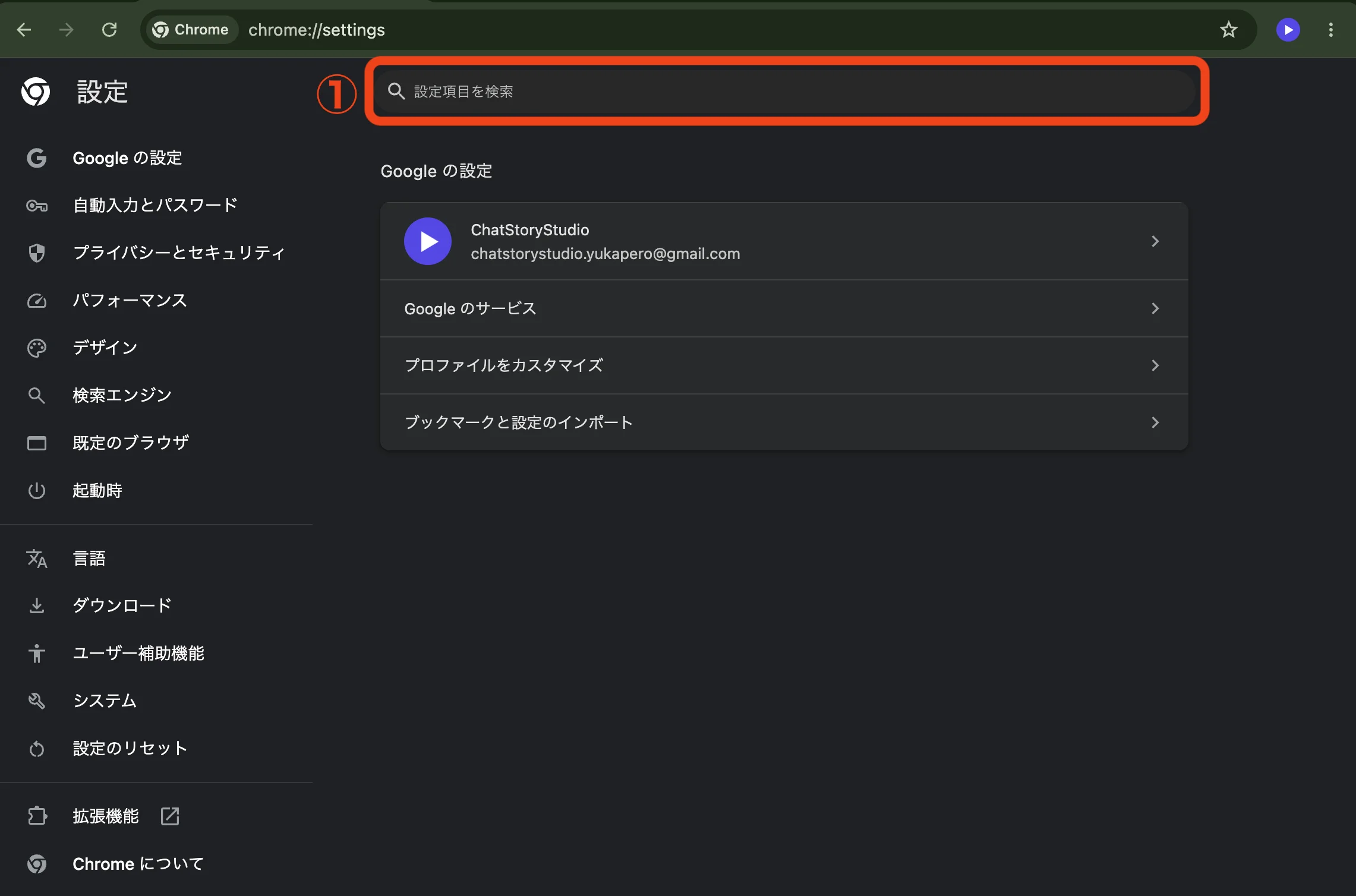
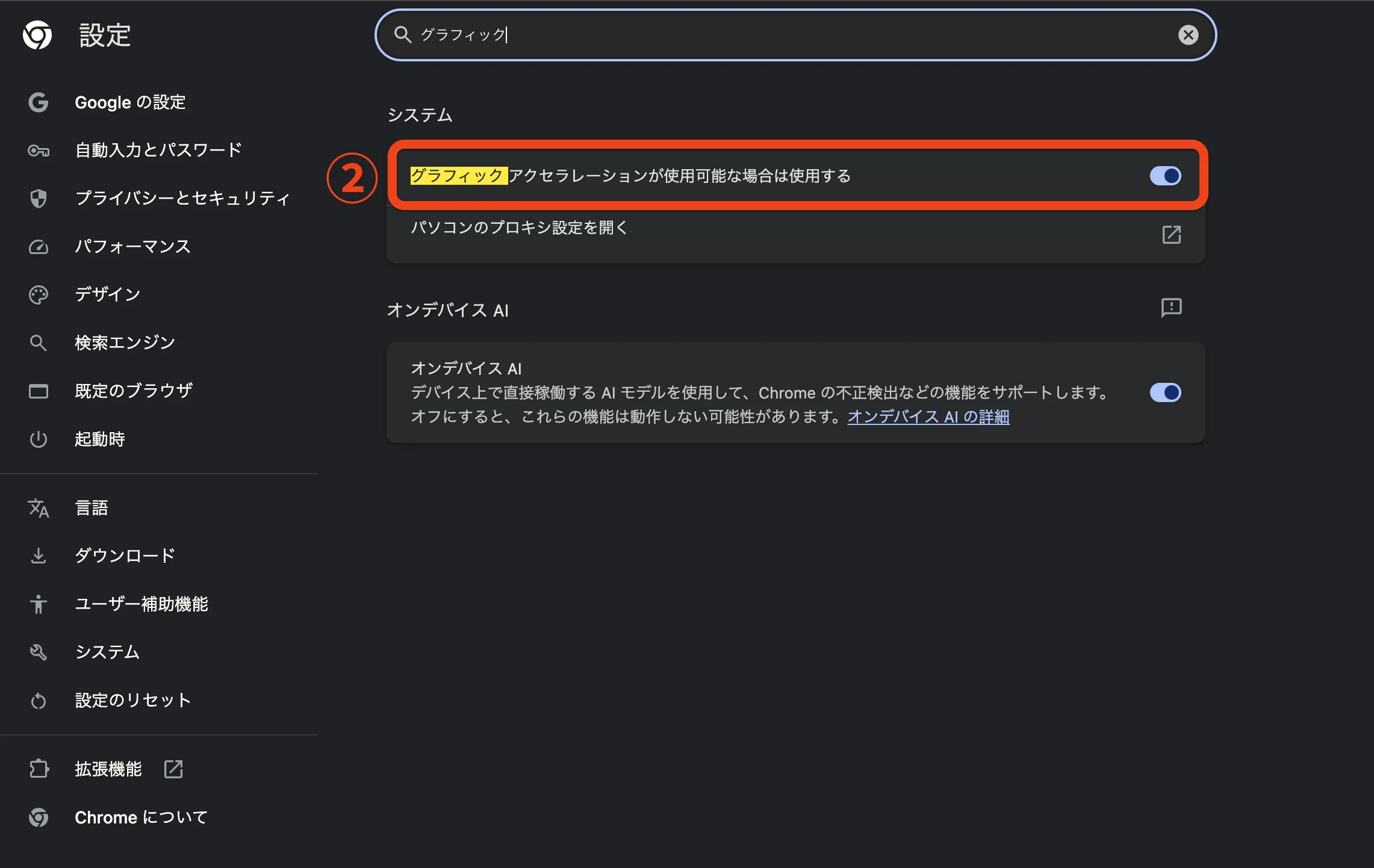
Hardware acceleration (GPU) may be disabled in your browser. Enabling "Use graphics acceleration when available" in Google Chrome settings will significantly improve rendering speed. Furthermore, because Safari imposes strict power-saving limits, we strongly recommend using Google Chrome or Microsoft Edge.
- Type chrome://settings in the browser address bar to open settings.
- Type "graphics" into the search bar at the top of settings.
- Enable "Use graphics acceleration when available".
- Click the "Relaunch" button next to the toggle to restart your browser.
*Configuration steps vary for other browsers such as Microsoft Edge, Firefox, and Safari. Please check your browser's official documentation.
Q3: Preview playback is laggy or stuttering
When many images and visual effects overlap, real-time preview rendering may stutter depending on your device's processing capabilities. Any stuttering during preview does not affect the final exported video (MP4 file).
Q4: Voice synthesis (TTS) fails to play or returns an error
This can happen if text triggers safety filters or contains unsupported special characters. Try removing custom styles or emotions and generating with plain text first to see if the issue is resolved. Furthermore, if audio generation fails due to an error, your voice synthesis credit quota is not consumed.
Q5: If an error occurs during voice synthesis, script import, or project generation from prompt, is my usage quota consumed?
No, it is not consumed. In voice synthesis (TTS), if audio fails to generate due to policy restrictions or API errors, the deducted credit quota is automatically refunded (rolled back). Similarly, for script import and project auto-generation from prompt, your usage quota will not be decremented if an error occurs and the process cannot be completed.
Q6: Custom uploaded images or BGM fail to load or disappeared
This service stores assets inside your browser's local database (IndexedDB). Clearing your browser's browsing data, history, or cookies will delete this stored data. We strongly recommend regularly exporting backups (.csbackup) from the editor and saving them locally.
Q7: Will my data be lost if I close the browser? (About auto-save)
Edits are automatically saved to your browser in real time, so your work is preserved even if you accidentally close a tab. However, as noted above, please be careful when clearing your browser cache.
Q8: Are there differences between the mobile and desktop versions?
Project data is fully shared, but the mobile version (Lite version) is tailored for streamlined, touch-first creation and omits certain advanced effect parameters. You can easily sketch drafts on mobile and polish details on desktop.
Q9: Can I use generated videos and images commercially?
Videos and images created with ChatStoryStudio can be used commercially, including monetization on YouTube, TikTok, and social media. However, you must adhere to the copyright terms of any assets you upload yourself as well as third-party TTS service terms.
Q10: Recommended system requirements and supported browsers
PC: Google Chrome / Microsoft Edge (latest version) with 8GB+ RAM recommended. Mobile: iOS Safari (iOS 16+) / Android Chrome (latest version) supported.
Q11: Where can I review the Terms of Service, Privacy Policy, and Commercial Disclosure?
You can review each legal document via the links in the footer.
Q12: Where can I find information about the service operator and developers?
For information about ChatStoryStudio's operations and development team, please visit the About Us page below.
Still Need Help?
If you have questions or encountered an issue, please feel free to reach out via our .