Fake YouTube Comment-Style Generator: Nested Reply Thread Videos & Screenshots
Looking for a fake YouTube comment-style generator for fake YouTube comment thread videos, viewer debate Shorts, or transparent Alpha WebM overlays? Single-comment PNG sticker makers only export one static image, while keyframing a scrolling reply tree in CapCut or Premiere takes an hour. With ChatStoryStudio, build nested multi-reply threads with parent & L-shaped reply tree lines, Top/Newest/Trending tabs, up to 15 commenters, and 120+ expressive HD TTS voices across 4 languages (30+ English voices)—then export MP4 videos, transparent Alpha WebM overlays, or 2–8 auto-split PNG/JPEG slides across 23 UI presets right in your browser.
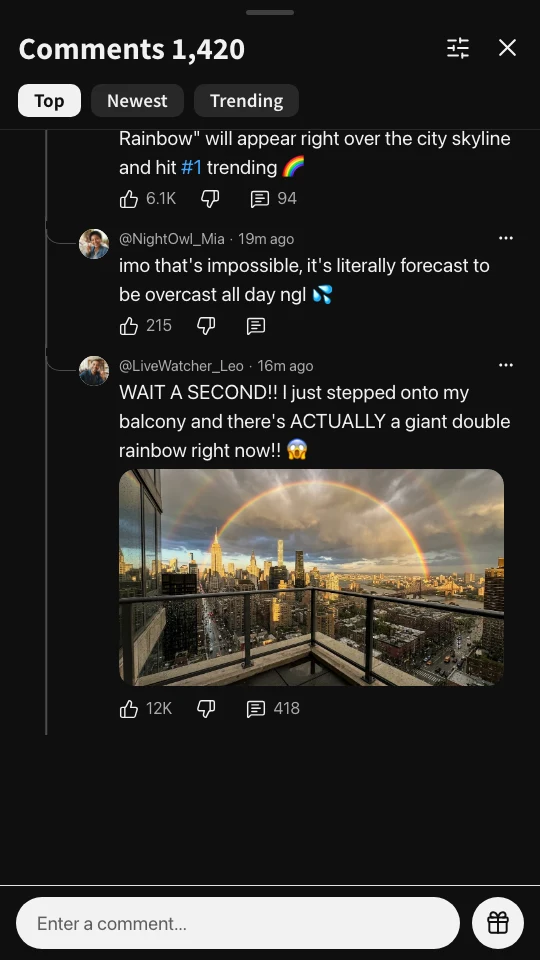
Voiced scrolling thread video + Dark & Light mode high-res exports (click images to zoom)
Why Fake YouTube Comment Thread Videos Take 60 Minutes by Hand (And How ChatStoryStudio Solves It)
Static single-comment PNG sticker generators stop at one isolated bubble, while building a scrolling nested thread in CapCut or Premiere takes an hour. Here is how a dedicated fake YouTube comment-style generator fixes all three bottlenecks.
Single-Comment PNG Sticker Generators Can't Build Reply Trees
Basic single-comment PNG sticker makers only export one static bubble. They cannot render scrolling nested threads, L-shaped reply tree lines, or the YouTube comment-style header with sort tabs.
Manual Alignment & Scroll Keyframing in CapCut / Premiere
Stacking 10 comment PNGs on a multi-track timeline means manually aligning X/Y coordinates, drawing vertical and L-shaped lines, and recalculating every upward scroll keyframe whenever a single line of text changes.
Juggling External TTS Files for Up to 15 Different Commenters
A realistic comment section skit needs distinct voices for the OP, skeptics, and hype replies—plus natural pronunciation for internet slang like “ngl”, “imo”, “fr”, or “2050”.
Export the exact same thread as 2–8 auto-split PNG/JPEG slides with continuous trunk lines across pages
3 Workflows for Fake YouTube Comment Thread Videos & Transparent Overlays
Craft every reply in the manual Chat Timeline editor, paste a script for up to 15 commenters, or start from a 1-line prompt—all sharing the same non-destructive studio.
1. Intuitive Manual Timeline Editing (Desktop Full Studio & Mobile Lite)
Type comments just like posting on social media. Every comment's reply tree line, like count, relative timestamp, photo attachment, and TTS voice can be edited individually—and your project auto-saves locally in your browser.
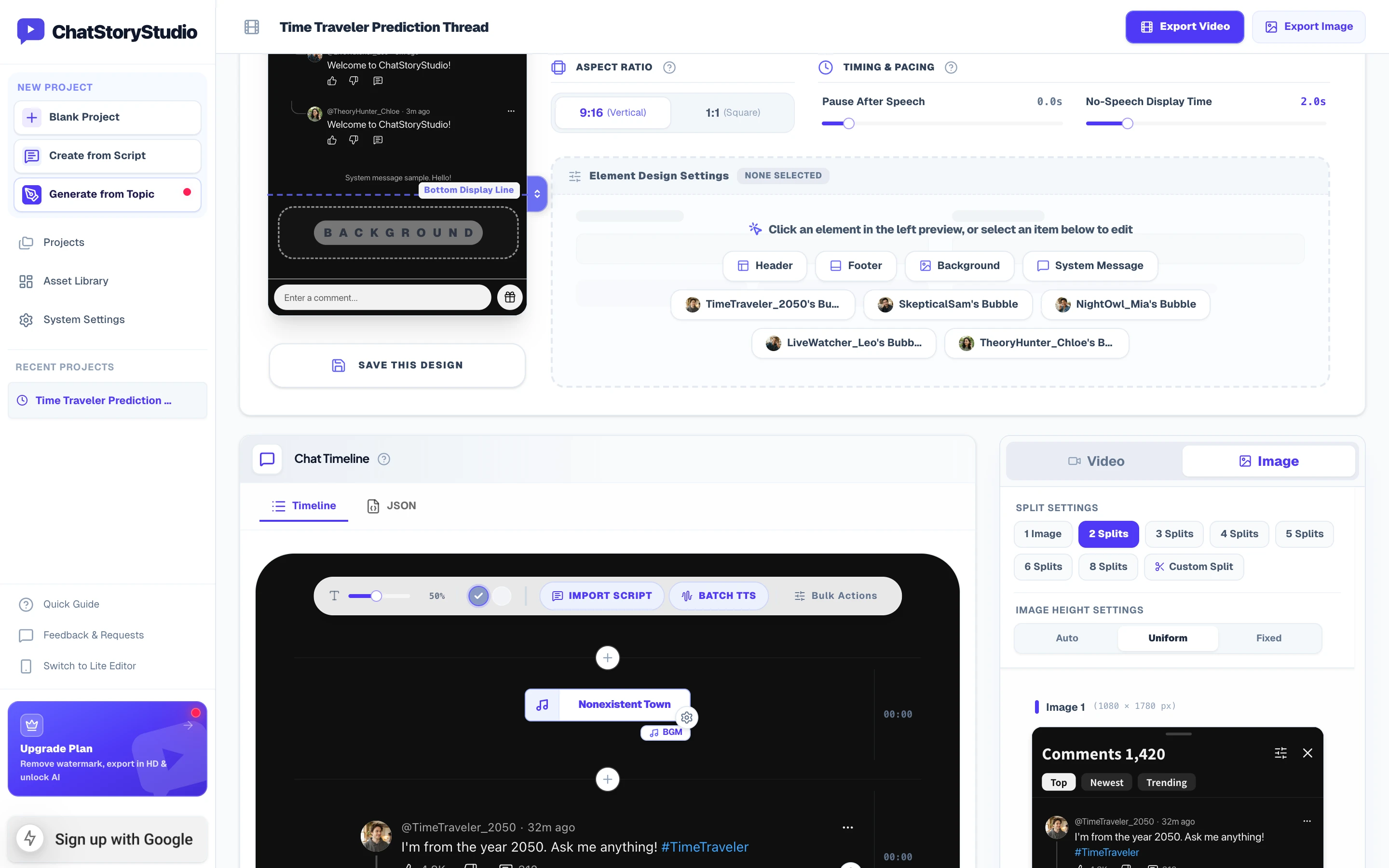
Desktop Full Studio: Edit comments on the center timeline while previewing video playback or 2–8 split carousel slides in real time on the right.
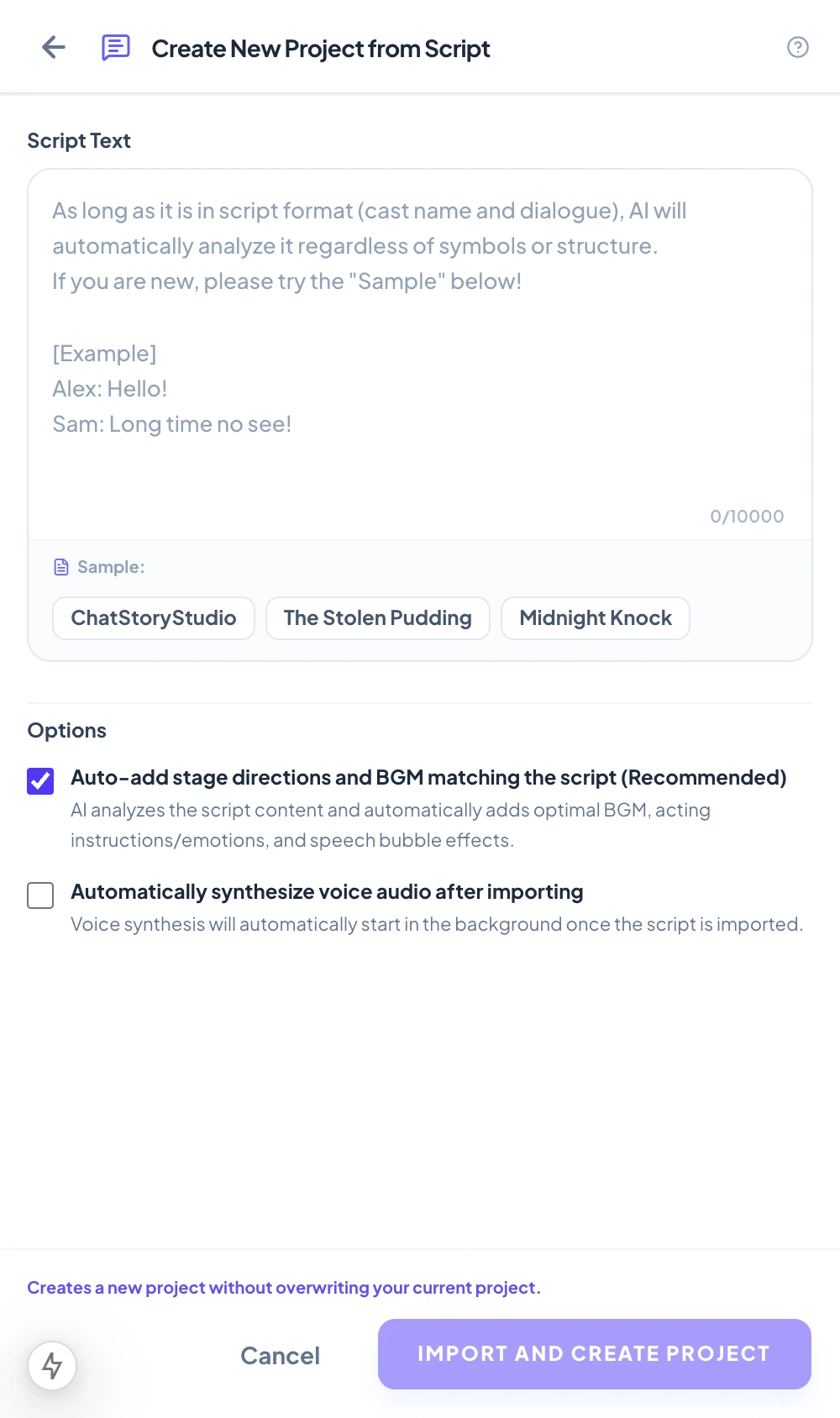
Mobile Lite UI (iOS/Android): Tap-optimized interface for editing comments and exporting on the go.
2. Bulk Script Import: Paste Text to Auto-Extract Up to 15 Commenters
Already have a comment thread written in Notes, Google Docs, or ChatGPT? Paste it in 'Name: Comment' format. ChatStoryStudio automatically extracts up to 15 unique commenters, assigns distinct avatars and TTS voices, converts [System] lines into scene transitions, and formats the entire reply tree.
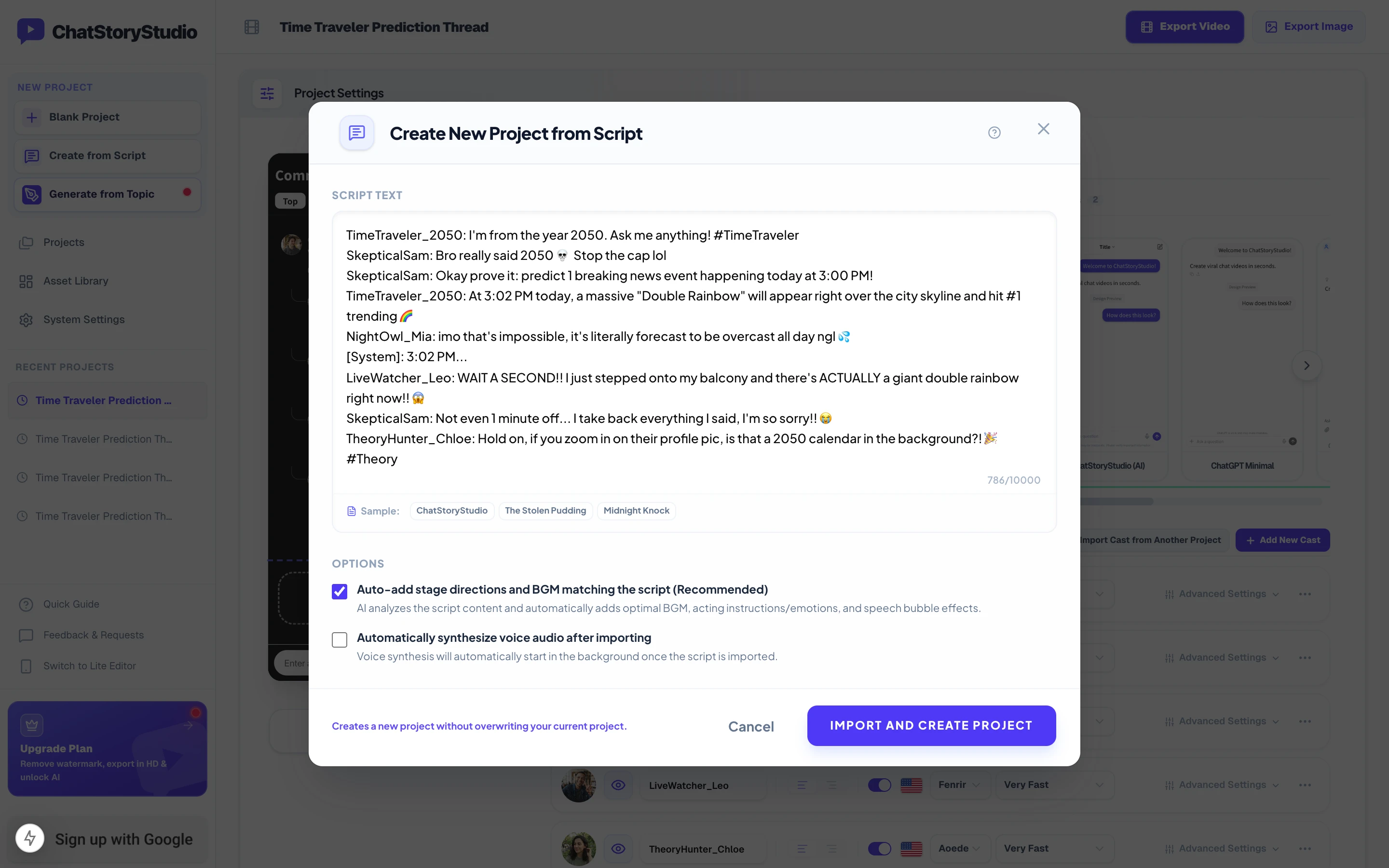
Check “Auto-add stage directions and BGM matching the script (Recommended)” and “Automatically synthesize voice audio after importing” to build a complete voiced video in one step.
TimeTraveler_2050: I'm from the year 2050. Ask me anything! #TimeTraveler
SkepticalSam: Bro really said 2050 💀 Stop the cap lol
SkepticalSam: Okay prove it: predict 1 breaking news event happening today at 3:00 PM!
TimeTraveler_2050: At 3:02 PM today, a massive "Double Rainbow" will appear right over the city skyline and hit #1 trending 🌈
NightOwl_Mia: imo that's impossible, it's literally forecast to be overcast all day ngl 💦
[System]: 3:02 PM...
LiveWatcher_Leo: WAIT A SECOND!! I just stepped onto my balcony and there's ACTUALLY a giant double rainbow right now!! 😱
SkepticalSam: Not even 1 minute off... I take back everything I said, I'm so sorry!! 😭
TheoryHunter_Chloe: Hold on, if you zoom in on their profile pic, is that a 2050 calendar in the background?! 🎉 #Theory
Open Script Import Modal in Editor
3. Draft a YouTube Comment-Style Thread from a 1-Line Prompt
Don't have a script yet? Enter a 1-line premise below (or click a genre chip). ChatStoryStudio generates a complete comment thread with plot twist, BGM, sound effects, and emotional voice acting directions—ready to customize in the editor.
4 Built-In Features That Make YouTube Comment-Style Threads Look & Sound Real
Every detail of the YouTube Comments preset is engineered for short-form retention—from L-shaped reply tree toggles and custom like counters to phonetic slang readings and multi-slide carousel splitting.
Combine 84px Parent Comments & 60px L-Shaped Replies—Start a New Parent Thread Anytime
In the YouTube Comment-style preset, the first message in a scene automatically renders as a top-level Parent Comment (84px avatar), while subsequent messages default to “Set as Reply Comment (Thread Line)” ON (60px avatar) with a vertical trunk line and curved L-shaped branch connector.
- 1-Click New Parent Comment: Turn
Set as Reply Comment (Thread Line)OFF on any comment mid-timeline (like@TheoryHunter_Chloeat the bottom) to immediately break out of the reply tree and start a new 84px top-level Parent Comment. - Auto @handle & Blue Highlights: Cast names automatically display with a leading
@, and any@mentionor#hashtagin the comment body is highlighted in YouTube comment-style link blue (#3EA6FFin dark mode).
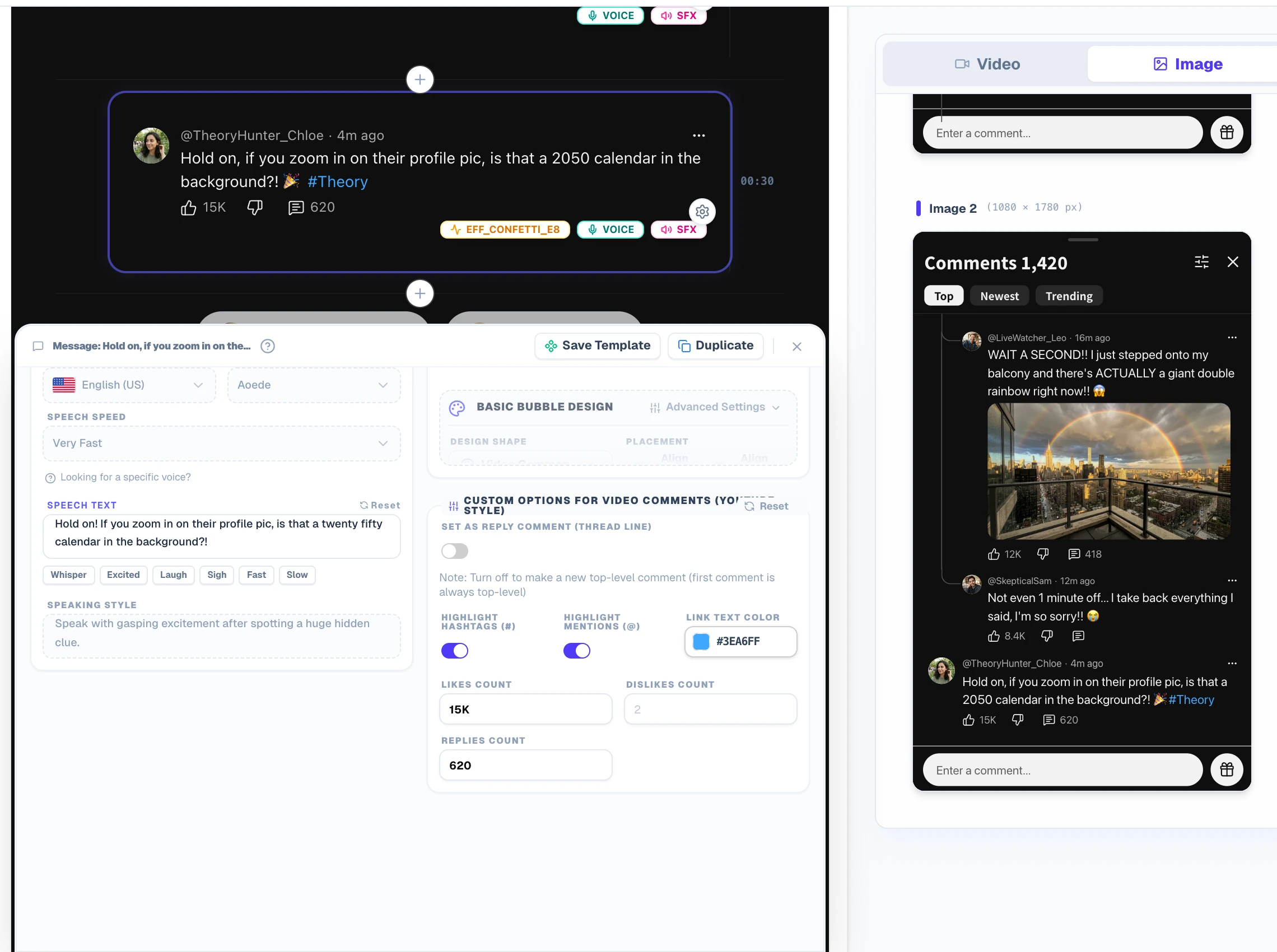
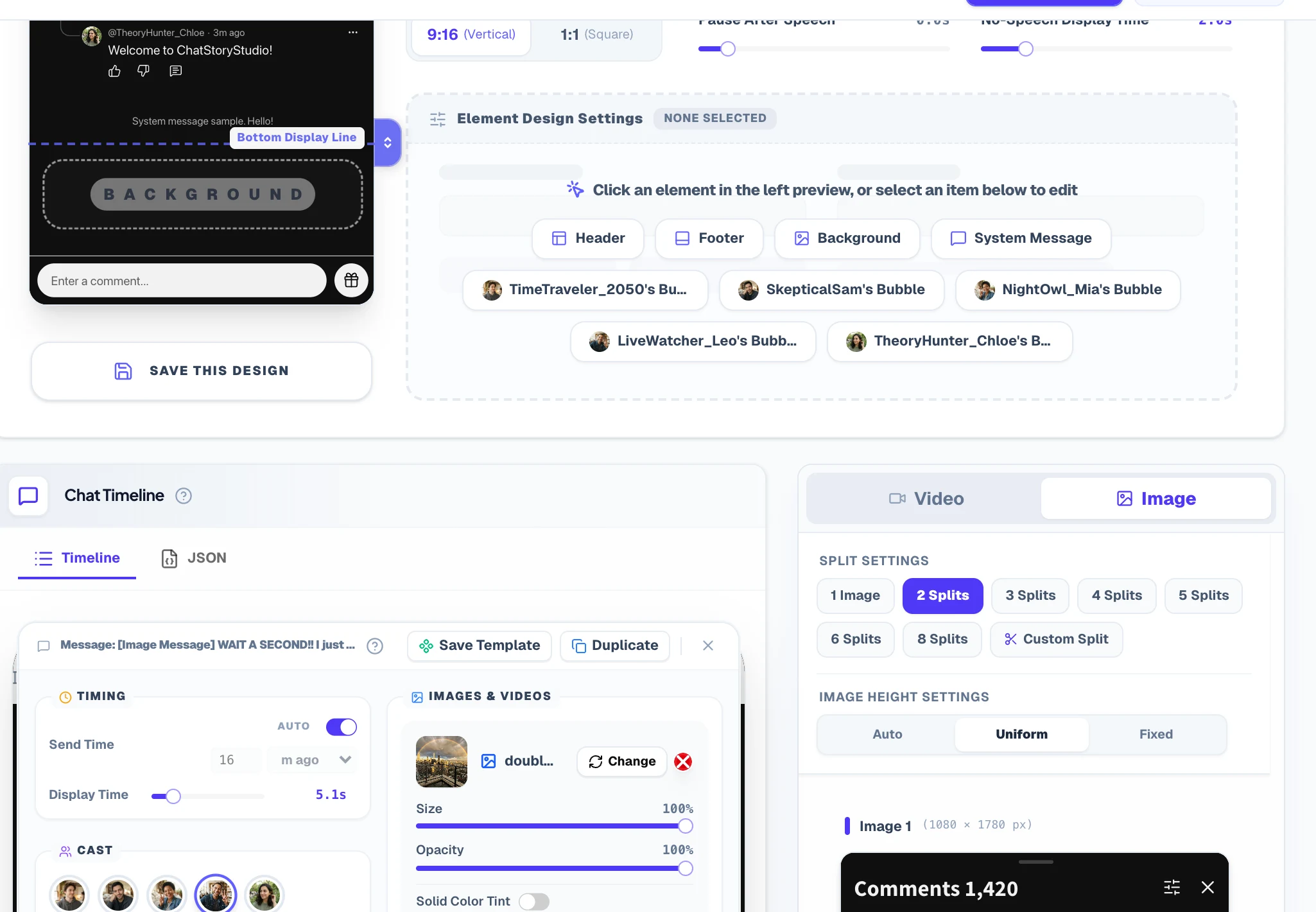
Top/Newest Sort Tabs, Relative Timestamps (“32m ago” / “16m ago”), Custom Likes (“12K”) & Inline Photos
Build dramatic progression in your comment thread by controlling exact relative timestamps, viral engagement numbers, Dark/Light sheet modes, and visual proof attachments.
- Auto or Manual Relative Time: Let ChatStoryStudio auto-calculate backwards from the newest comment, or set exact values (
1–999×m ago / h ago / d ago / w ago / mo ago / y ago) to show a time jump before a prediction comes true. - Free-Text Likes & Photo Proof: Enter any string such as
4.8K,12K, or418per comment, and attach inline photos/videos with screen-shake or confetti effects.
Separate Display Text from Phonetic Speech Text (“ngl”, “imo”, “2050”) + Acting Directives
Standard TTS tools ruin the comedic timing of comment sections by spelling out abbreviations letter-by-letter or reading skull emojis literally.
- Keep Authentic Slang on Screen: Display
Bro really said 2050 💀 Stop the cap lolorimo ... nglin the comment bubble while feedingtwenty fiftyandnot gonna liein the Speech Text field. - Natural-Language Speaking Style: Direct each voice with delivery tones like “Speak in a sarcastic, laughing, dismissive internet commenter tone”—with automatic leading/trailing silence trimming for snappy Shorts pacing.
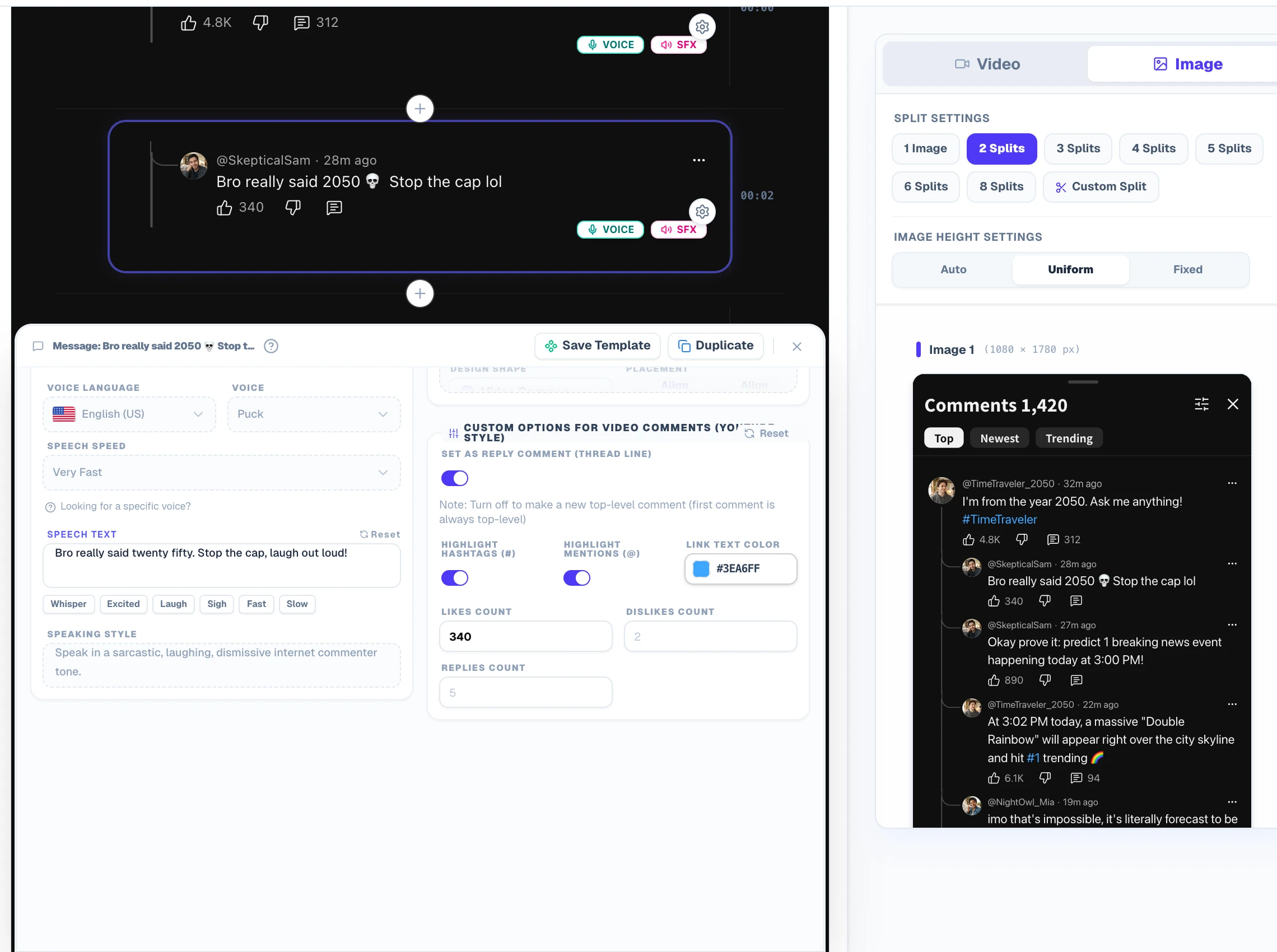
Export 2–8 Carousel Slides with Continuous L-Shaped Trunk Lines Across Pages
Want to post your comment thread on TikTok Photo Mode, Instagram Carousels, YouTube Community posts, or X 4-image posts? Switch to Image Mode and select 2 to 8 Splits.
- Continuous Reply Trunk Line: Look at the top-left of Slide 2—even when a reply thread spans across multiple slides, ChatStoryStudio automatically draws the vertical trunk line from the top edge so viewers immediately know it continues from the parent comment on Slide 1.
- Uniform Slide Heights & Persistent Headers: Every slide maintains the exact same pixel dimensions (
Uniformheight mode) with theComments 1,420header and footer bar intact.
Restyle the Same Comment Thread into X (Twitter)-Style, Discord-Style, or iMessage-Style in 1 Click
Want to cross-post your YouTube comment-style skit as an X (Twitter)-style reply thread, a Discord-style server debate, or an iMessage-style group chat? Switch across 23 built-in UI presets (20+ UI styles) in one click without retyping dialogue or regenerating TTS audio.
YouTube Comments Dark
Dark theme recreating video platform comment sections.
YouTube Comments Light
Light theme recreating video platform comment sections.
X Thread Dark
Dark theme recreating social media posts and reply threads.
Discord Dark
Dark community chat UI inspired by Discord.
Customize Every UI Component & Save Your Own "My Themes"
Start from any official preset and fine-tune colors, fonts, headers, and bubble shapes to match your brand aesthetic.
Switch across 20+ header/footer designs, upload custom header graphics, or set to "Hidden" for frameless overlays
Choose solid colors, gradients, custom images, MP4 video backgrounds, or diagonally scrolling icon patterns
Customize left/right bubble colors, gradients, corner radii, bubble tails (ON/OFF), borders, and drop shadows
Switch fonts globally across modern sans-serif, serif, rounded, handwritten, and 8-bit pixel typefaces
Customize read labels ("Read", "Seen", double checkmarks), group read counts, and exact delay seconds before appearing
Save your customized color palette, background, and bubble styling as a reusable preset to apply in one click
Export MP4, Transparent Alpha WebM Overlays & 2–8 Slides vs. Other Tools
Compare our fake YouTube comment-style generator against static single-comment PNG sticker makers, mobile texting story apps, and manual CapCut / Premiere Pro editing.
9:16 Vertical & 1:1 Square MP4 Video
Render unlimited 1080×1920 Full HD (or 1620×2880 1.5x Ultra HD on Lite+) MP4 videos directly in your browser—with zero duration caps, from 15-second Shorts to 30-minute compilations.
Frameless Transparent Video Overlay
Hide the header/footer for Frameless Mode and export true Alpha-Channel WebM video (Pro, $19/mo) to overlay scrolling comments onto Minecraft parkour, GTA gameplay, or reaction vlogs in CapCut & Premiere Pro—or load MP4 gameplay directly inside the editor.
2–8 Auto-Split Carousel Slides & Long PNG
Export a single long vertical screenshot (up to 16,000px) or 2–8 auto-split carousel slides with unified page heights and batch ZIP download for TikTok Photo Mode, Instagram, and X.
| Feature / Criteria | ChatStoryStudio (This Studio) | Single-Comment PNG Sticker Makers | Texting Story Mobile Apps | CapCut / Premiere Pro (Manual) |
|---|---|---|---|---|
| Creation Workflows | 3 workflows: Manual Chat Timeline, Bulk Script Paste (up to 15 commenters), or 1-Line Prompt Starter | Type 1 isolated comment sticker at a time (no multi-reply thread) | Manual typing only (1-on-1 SMS layout, no comment tree) | 100% manual shape drawing, text layers, and keyframing |
| YouTube Comment-Style UI & Sort Tabs | 1-click Dark (#0f0f0f) & Light (#ffffff) modes, editable "Comments 1,420" header, "Top / Newest / Trending" sort tabs, and footer input bar | Single cropped comment box only (no sheet header or sort tabs) | Not supported (SMS/chat bubbles only) | Must recreate header, sort pills, and icons from scratch |
| Nested L-Shaped Reply Tree & Multi-Parent Threads | Auto 84px Parent Comment + 60px indented replies with L-shaped branch lines. Toggle OFF mid-timeline to start a new Parent Comment anytime | Not supported (cannot connect parent and reply comments) | Not supported | Manual X/Y pixel indentation and line drawing per reply |
| @handle Usernames, Blue Links & Relative Timestamps | Auto-prefixes @ to Cast names, highlights @mentions & #hashtags in blue (#3ea6ff / #065fd4), custom likes (e.g., 14K), and auto/manual relative time (3h ago) | Manual static text entry for one comment only | Not supported | Manual per-word color overrides and thumb icon placement |
| Multi-Character TTS Voices & Internet Slang Pronunciation | 120+ expressive HD TTS voices across 4 languages (30+ English voices) with 1-click batch synthesis for up to 15 commenters, emotional acting prompts, and separate phonetic Speech Text for slang ("ngl", "imo", "2050") | No audio support (static PNG sticker only) | Basic robotic TTS or no multi-speaker acting direction | Limited voices or requires importing external audio files one by one |
| Auto-Split Carousel Slides (2–8 Pages) | Auto-splits into 2–8 PNG/JPEG slides between comments with Uniform heights and continuous L-shaped trunk lines across pages | Single comment PNG only | Video only (no multi-slide carousel splitter) | Must manually crop and export frame by frame |
| Transparent Alpha WebM Overlays & Video Backgrounds | Frameless mode + True Alpha-Channel WebM transparent overlay export (Pro) & direct in-editor MP4 gameplay/vlog video backgrounds (Pro) | Static PNG sticker only (no scrolling thread animation) | Opaque background only (no alpha WebM) | Requires green-screen chroma key (causes green edge spill on text) |
| Supported Devices & Data Persistence | 100% browser-based on Windows, Mac, iOS & Android (Desktop Full Studio + Mobile Lite UI) with automatic local browser save & project backup file export | Browser form wipes everything on page reload | Mobile app only (cannot edit across PC & phone) | Heavy desktop software or complex mobile multi-track timeline |
| Pricing & Monthly Plans (USD) | Free ($0, unlimited 1080p MP4/PNG exports) / Lite ($9/mo, no watermark & 1.5x Ultra HD) / Pro ($19/mo, Alpha WebM & video BG) / Business ($79/mo) | Free with ads or paid watermark removal per download | Weekly/monthly subscription required for core features | Free tier or $10–$23+/mo subscription |
| Commercial Monetization & Client Work Rights | Personal channel monetization (YouTube Partner Program, TikTok, Reels) allowed on ALL plans including Free ($0). Client delivery & agency work unlocked on Business ($79/mo) | Varies by site (often unclear terms) | Often restricted on free tiers | Commercial TTS/stock rights vary by asset license |
Frequently Asked Questions About YouTube Comment Section-Style Videos
Build Your First Fake YouTube Comment Thread Video or Transparent Overlay Free
No app download or credit card required. Choose YouTube comment-style Dark or Light presets, batch-voice up to 15 commenters across 120+ HD TTS voices, or switch among 23 UI presets right in your browser.
Workflow & Cost Comparisons vs Other Tools
Related Use-Case & How-To Guides
* Product and company names such as "iMessage" (Apple Inc.), "WhatsApp" (WhatsApp LLC), "X" (X Corp.), "YouTube" (Google LLC), "Discord" (Discord Inc.), "Slack" (Slack Technologies, Inc.), "ChatGPT" (OpenAI OpCo, LLC), and "LINE" (LY Corporation) are trademarks or registered trademarks of their respective holders. ChatStoryStudio is an independent parody/mockup studio and is not affiliated with, sponsored by, or endorsed by any of these companies.