Canva Fake Text Message Templates vs ChatStoryStudio: Multi-Slide Carousels & Video Guide
Canva is the go-to graphic design tool for social media banners, YouTube thumbnails, and Instagram infographics. However, building an iMessage-style, WhatsApp-style, or X-style conversation inside a Canva fake text message template means manually grouping rounded rectangles, tails, text boxes, and read receipts—and shifting every lower bubble whenever you insert one line. ChatStoryStudio handles both quick 3-line screenshots and full multi-slide/voiced productions: build 2–8 auto-split fake chat carousels and voiced MP4 videos in 3 minutes, or export frameless PNGs and transparent Alpha WebM overlays straight into Canva.
▲ Publish standalone 2–8 split carousel images and voiced MP4 videos (left), or export frameless PNGs / transparent WebM overlays (right) to drop directly onto your Canva thumbnails, carousels, and Reels.
Why Building Fake Text Carousels & Videos in Canva Templates Takes So Long
Canva excels at freeform graphic design, but because it lacks a dedicated chronological chat layout engine, building a 10–15 message conversation out of static template shapes creates three structural bottlenecks.
Manually grouping rounded rectangles, tails, text boxes, and timestamps
Canva text message templates do not auto-resize speech bubbles when text wraps to a second line. Every single message requires aligning a rounded rectangle, tail shape, avatar frame, timestamp, and read receipt—meaning 10 exchanges require managing 40+ separate elements.
Inserting or editing 1 line mid-conversation breaks every bubble below it
The moment you decide to insert a punchline after message #3 or expand a 1-line reply into 2 lines, you must manually lasso-select every single bubble, avatar, and read label below that point and drag them downward without breaking vertical spacing.
Duplicating 15+ pages and manually dragging slide timings to match audio
To animate a scrolling chat video in Canva, you have to duplicate your page 15 times (adding one new bubble per slide) and manually drag each page’s duration on the timeline to match external voiceover clips and pop sound effects.
Aligning 40+ shapes by hand—and shifting everything below on every edit
Every time wording changes, you have to stretch the bubble rectangle vertically, reposition the tail, and realign the "Read" and "15:00" labels by eye.
Type or paste a script to auto-align bubbles, then export 4-slide carousels, alpha WebM, or frameless PNGs
Bubble widths, line wraps, read receipts, and story action cards align 100% automatically. Inserting a line mid-chat recalculates the entire timeline in milliseconds—ready to export as height-unified 2–8 carousel slides or frameless PNG / transparent WebM assets for Canva.
1-Click Restyling Across 23+ UI Styles: iMessage-Style, WhatsApp-Style, X-Style, Discord-Style & ChatGPT-Style
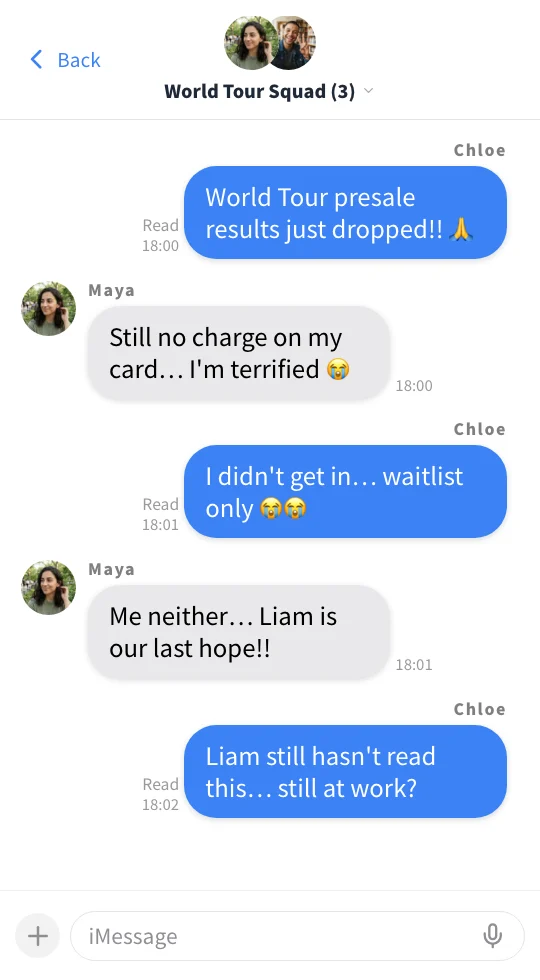
The group chat example above uses our vertical messenger style to demonstrate multi-member read progression, but you can switch your entire conversation across 23 built-in UI presets (23+ UI styles) in one click—from iMessage-style (Soft Blue) and WhatsApp-style (Teal Bubble) to X (Twitter)-style threads & DMs, ChatGPT-style / Grok-style dialogues, Discord-style / Slack-style channels, and YouTube comment-style sections—ready to export as standalone content or frameless Canva design assets.
iMessage Soft Blue
A refreshing blue style with a clean, translucent feel.
WhatsApp Teal
Sophisticated teal green inspired by global messaging apps.
X Thread Dark
Dark theme recreating social media posts and reply threads.
ChatGPT Minimal
A minimal design reproducing conversations with an AI chat assistant.
Customize Every UI Component & Save Your Own "My Themes"
Start from any official preset and fine-tune colors, fonts, headers, and bubble shapes to match your brand aesthetic.
Switch across 20+ header/footer designs, upload custom header graphics, or set to "Hidden" for frameless overlays
Choose solid colors, gradients, custom images, MP4 video backgrounds, or diagonally scrolling icon patterns
Customize left/right bubble colors, gradients, corner radii, bubble tails (ON/OFF), borders, and drop shadows
Switch fonts globally across modern sans-serif, serif, rounded, handwritten, and 8-bit pixel typefaces
Customize read labels ("Read", "Seen", double checkmarks), group read counts, and exact delay seconds before appearing
Save your customized color palette, background, and bubble styling as a reusable preset to apply in one click
Canva Fake Text Templates vs ChatStoryStudio: Verdict & 10-Point Comparison
Canva and ChatStoryStudio work best together. Combining Canva’s graphic design canvas with ChatStoryStudio’s automated chat layout, 2–8 split carousels, and Alpha WebM exports cuts production time dramatically.
Designing freeform social banners, YouTube thumbnails, infographics, and presentation decks
- •Designing promotional banners, Instagram infographic slides, YouTube thumbnails, or ad creatives that combine stock photography, decorative typography, illustrations, and charts
- •Placing 1 or 2 decorative comic speech-bubble stickers over a photo rather than simulating a realistic messaging app interface
- •Managing shared Brand Kits, print flyers, and multi-user presentation templates across a design team
From quick 3-line chat screenshots to frameless Canva assets, 2–8 split carousels, and voiced videos
- •Generating clean chat assets for your Canva designs in 3 minutes—exporting frameless PNGs or transparent alpha-channel WebM overlays to drop straight onto Canva thumbnails, carousels, or Reels
- •Creating quick 3-line screenshots or long multi-slide stories where inserting a line automatically reflows every bubble, complete with story staging widgets, missed calls, 23+ UI styles (iMessage-style, WhatsApp-style, X-style, ChatGPT-style), and 2–8 auto-split fake chat carousel slides with unified heights
- •Turning the exact same chat into a voiced 9:16 MP4 video with 120+ expressive HD TTS voices (30+ English voices), pop SFX, and BGM in one click—without duplicating slides (Free exports include a top-right watermark, removed in Lite)
| Comparison Criteria | ChatStoryStudio (Standalone & Canva Hybrid) | Canva Fake Text Templates (Manual Layout) |
|---|---|---|
| 1. Primary Design Purpose | Purpose-built for automated messaging & social chat UIs (chat screenshots, 2–8 split carousels, voiced MP4 videos, and transparent overlays) | General-purpose graphic design for social banners, YouTube thumbnails, infographics, flyers, and presentations |
| 2. Bubble, Read Receipt & Timestamp Layout | 100% automatic—just type dialogue and bubble width, line wrapping, tails, avatars, read counts, and timestamps align automatically | Manual—requires placing, resizing, and grouping rounded rectangles, tails, text boxes, and timestamp labels for every message |
| 3. Inserting or Editing a Line Mid-Chat | Instant reflow—click "+" between any bubbles (or drag to reorder) and all subsequent bubbles and timestamps recalculate in milliseconds | Manual "Domino Shift"—requires selecting every bubble, avatar, and label below the insertion point and dragging them downward by hand |
| 4. 15-Speaker Script Import & Prompt Starter | Built-in—paste a multi-speaker "Name: Message" script (up to 15 speakers) to build dozens of bubbles at once, or start from a 1-line prompt | Requires double-clicking each text box to paste lines one by one (Canva Bulk Create requires Canva Pro and only fills fixed template slots) |
| 5. 2–8 Auto-Split Fake Chat Carousels | 1-click "2 Pages" to "8 Pages" auto-split ("2 Splits" to "8 Splits" in the right panel, plus custom Page Breaks) and "Match Max" ("Uniform") height setting to export uniform sequential slides | Requires manually duplicating slides and distributing message bubbles across pages by hand |
| 6. Expressive TTS & Scrolling Video Sync | 1-click batch TTS across 120+ HD voices in 4 languages (30+ English voices) with phonetic overrides & acting style prompts; bubbles & scrolling auto-sync to audio | Requires duplicating 15+ pages (one new bubble per page) and manually dragging each slide’s duration on the timeline to match audio clips |
| 7. Hybrid Asset Export into Canva | Set Header/Footer to "Hidden" to export frameless high-res PNGs or transparent alpha-channel WebM video overlays (Pro+) that drop straight into Canva | Natively supports uploading external PNG/JPEG images and transparent WebM/MP4 videos onto any Canva canvas (transparent PNG export requires Canva Pro) |
| 8. Interactive Widgets & 23+ UI Styles | 1-tap action/gift cards, missed call logs, 2–6 option polls, and clock-wipe transitions; 1-click restyling across 23 UI presets (iMessage-style, WhatsApp-style, X-style, Discord-style, ChatGPT-style) | Action cards, call logs, polls, or alternative app UIs must be drawn from scratch using basic rectangles, circles, and icons |
| 9. Account Requirement & Connectivity | No signup required to edit and export. Desktop & mobile browsers (ChatStoryStudio Lite) with IndexedDB auto-save (internet connection required; no offline mode) | Requires free account registration and login before creating designs (supports desktop browsers and iOS/Android apps with cloud storage) |
| 10. Pricing & Commercial Use (2026) | Free forever (unlimited exports, personal monetization OK, includes top-right watermark). Lite ($9/mo) removes watermark & unlocks 1.5x HD; Pro ($19/mo) unlocks alpha WebM; Business ($79/mo) covers corporate & client work | Canva Free ($0) and Canva Pro (~$15/mo or $120/yr). Original designs combining Free/Pro elements are allowed for commercial use (standalone redistribution of unedited templates is prohibited) |
5 Dedicated Features That Cut Canva Chat Design & Social Content Time by 90%
Cut chat layout time from an hour to 3 minutes—whether you publish standalone carousels and Shorts or export clean chat assets into Canva.
Set Header & Footer to "Hidden" and Drop Clean Chat Assets Straight onto Your Canva Canvas
When you want to embed a realistic chat conversation inside a Canva YouTube thumbnail, Instagram carousel slide, or promotional banner, click the header or footer on the canvas to open Header Design Settings (or Footer Design Settings) and set Design Style to "Hidden". This strips away the top and bottom app bars, leaving only crisp speech bubbles and avatars. Export as a high-res PNG matched to your Canva background color (or use Canva Pro’s 1-click Background Remover), or export with Format set to "WebM" and "Transparent Background: Enabled" (Pro+) to drop a true alpha-channel animated chat overlay onto a Canva Reel.
Zero Manual Shifting When Inserting a Line—Plus Bulk "Name: Message" Script Import
Bubble dimensions, line wrapping, and read receipt positions are calculated automatically. Inserting a new line, photo, or action card in the middle of a conversation never requires dragging lower bubbles by hand. Even better, you can paste a plain-text "Name: Message" script from Google Docs or Notes to build a multi-speaker chat timeline in seconds.
Chloe: How should we design the promo banner for next week's new pancakes? 🥞
Manager: Just finished shooting the test batch! Sending the photo now 📸
Chloe: Whoa, that looks incredible!! The cross-section is so glossy 😭
Chloe: Grouping chat bubbles one by one in Canva always takes me an hour though 💦
Chloe: Let me ask Mia for help!
[System]: 10 mins later...
[System]: Mia joined the chat
Mia: Sorry, was at the register! We can build the chat part in 3 minutes!
Mia: Export a frameless PNG or transparent WebM and drop it on Canva 🎉
Chloe: Wait really?! It auto-shifts every bubble when we edit a line too 😭
Manager: You two are lifesavers! Sending coffee vouchers for the team ☕️
Mia: Best boss ever!! I'll export the multi-slide carousel and Reel right now!
Chloe: Dropped it onto our Canva photo—banner finished in 5 minutes flat!
Manager: Getting a voiced Reel video from the exact same chat is wild…!
Chloe: Let's post both to Instagram and YouTube Shorts tonight at 7 PM!! 🎉
Export Uniform Sequential Slides for Instagram Carousels, TikTok Photo Mode & X 4-Image Posts
When turning a longer conversation into a swipeable multi-slide post, you don’t need to duplicate Canva pages and distribute bubbles manually. In the Export Image dialog, simply select "2 Pages" through "8 Pages" ("2 Splits" to "8 Splits" in the right-hand Image panel, or "Custom Split" with manual Page Break dividers for exact cliffhanger control) and set Height Setting to "Match Max" ("Uniform" in the right panel). ChatStoryStudio splits cleanly between message bubbles and unifies the exact pixel height across every slide.
1-Tap Action Cards, Missed Call Logs, Polls & Dynamic Read Counts
Skip drawing complex UI cards out of basic shapes in Canva. Insert customizable action/gift cards (custom memos, tags, and accent colors), missed voice/video call logs, 2–6 option interactive polls, and clock-wipe transitions in one tap—plus per-member group read receipt toggles (e.g., "Read" → "Read 2" as members join).
Auto-Sync Scrolling & Bubbles to 120+ Expressive HD TTS Voices in 1 Click
Turn the exact same chat screen you built for a 2–8 slide carousel or Canva graphic into a voiced MP4 short video without duplicating a single slide. Choose from 120+ expressive HD TTS voices across 4 languages (including 30+ natural English voices), add acting style prompts (like whispering or panicked), and set phonetic pronunciation overrides separately from displayed text.
No Signup Required: 3 Ways to Build Chat Carousels, Canva Assets & Videos Right Now
No account registration or app download required. Choose the workflow that fits your project and jump straight into the browser editor.
Open the editor and type bubble-by-bubble with full creative control
Tap the "+" button between bubbles to add dialogue, missed calls, action cards, polls, or photos. Ideal if you want to hide the header/footer and export a frameless PNG for Canva right away.
Copy & paste a "Name: Message" script to build dozens of lines at once
Already drafted your dialogue in Google Docs, Notion, or Notes? Copy the sample script below (or your own text) and click "Open Script Importer" to launch the paste modal directly.
Enter a scenario below to build dialogue, staging effects & BGM in seconds
Type a topic (e.g., "A cafe marketing team planning a new menu launch with a surprise coffee voucher gift" or "A 2-person Q&A thread explaining 3 common SaaS pricing mistakes") or select a genre chip below. You can test-generate a complete project immediately without logging in, or choose free Google sign-in (no credit card required) to automatically synthesize expressive voiceovers too.
Frequently Asked Questions: Canva vs ChatStoryStudio & Hybrid Workflows
Ready to Build Your First Chat Carousel, Canva Overlay, or Voiced Video in 3 Minutes?
No app installation or mandatory signup required. Experience how effortless it feels to build chat stories directly in your browser.
Workflow & Cost Comparisons vs Other Tools
Related Use-Case & How-To Guides
* Product and company names such as "iMessage" (Apple Inc.), "WhatsApp" (WhatsApp LLC), "X" (X Corp.), "YouTube" (Google LLC), "Discord" (Discord Inc.), "Slack" (Slack Technologies, Inc.), "ChatGPT" (OpenAI OpCo, LLC), and "LINE" (LY Corporation) are trademarks or registered trademarks of their respective holders. ChatStoryStudio is an independent parody/mockup studio and is not affiliated with, sponsored by, or endorsed by any of these companies.