Fake Text Message & Multi-Slide Chat Screenshot Generator (Free Online)
Need a free fake text message generator or fake group chat generator that does more than one disposable PNG? Build iMessage-style, WhatsApp-style, and X DM-style conversations for up to 15 speakers—and automatically split long threads into 2 to 8 height-matched PNG/JPEG slides for TikTok Photo Mode, Instagram Carousels, X (Twitter) 4-image posts, and Social Media AUs (SMAUs). Auto-saved locally in IndexedDB, with 1-click MP4 video conversion across 120+ expressive HD TTS voices.
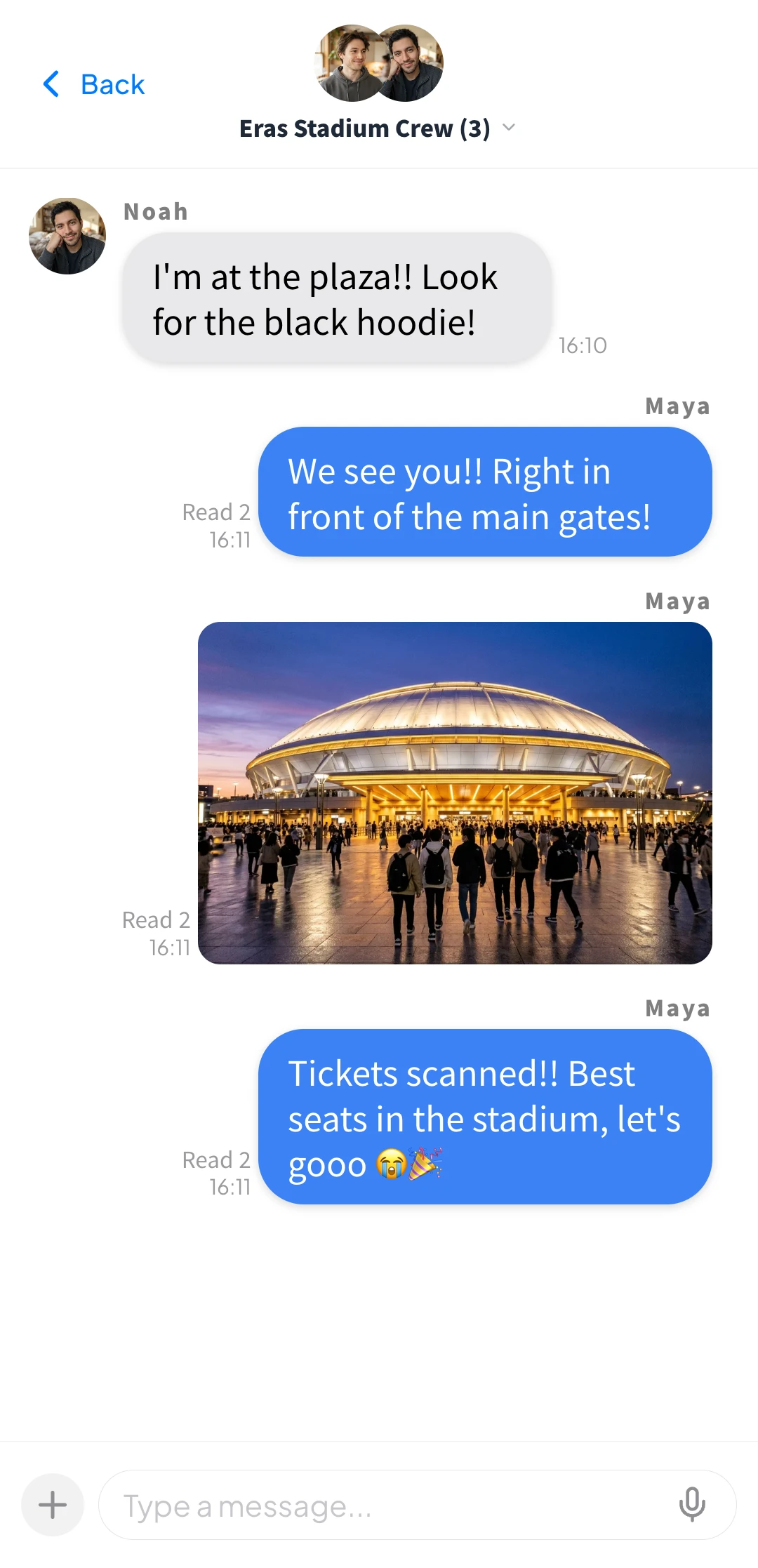
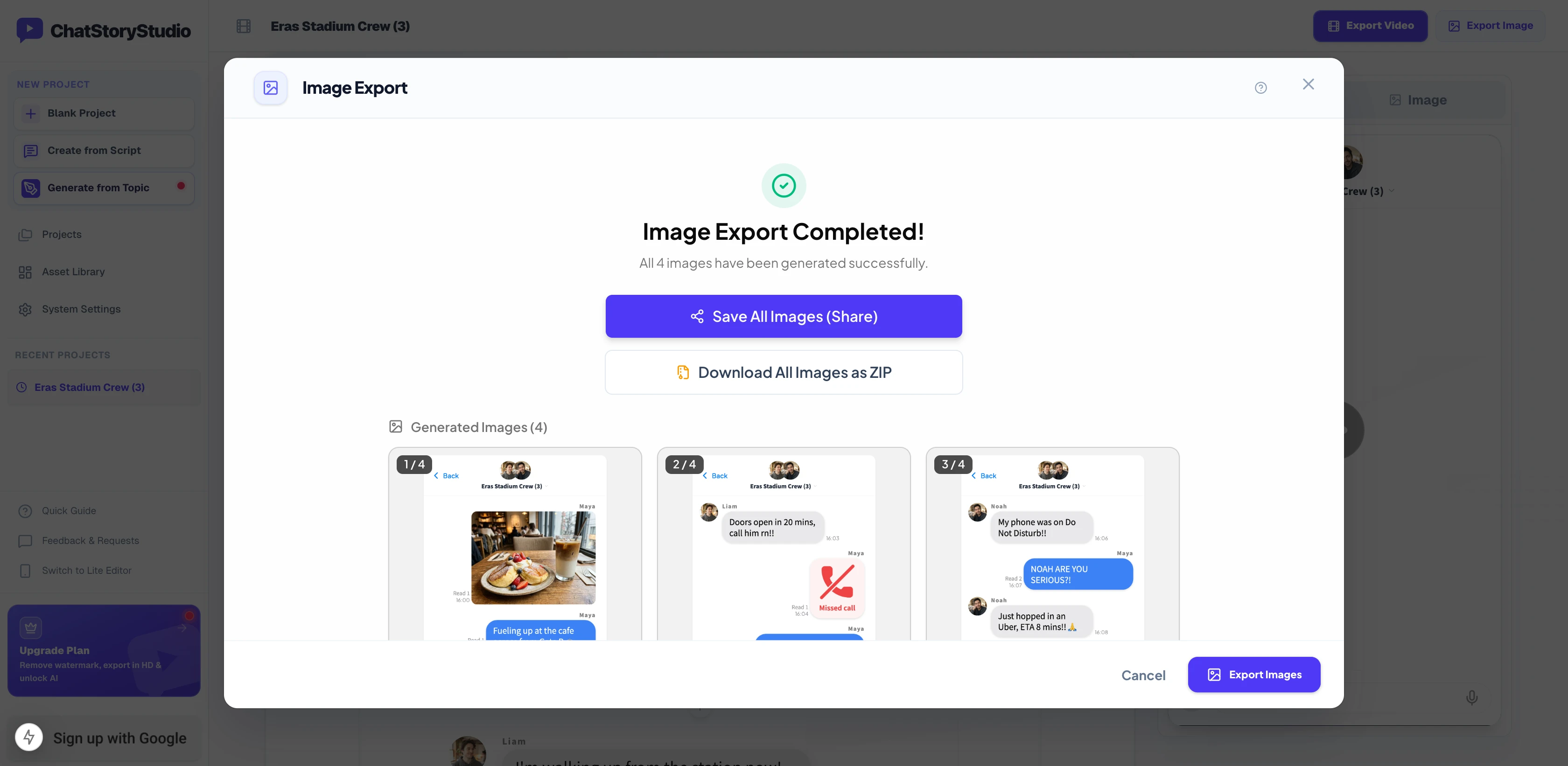
Actual 3-slide output (1080×2233px uniform height • click any slide to zoom)
Why Single-Image Fake Text Generators Break on Long Stories (And How 2–8 Auto-Split Fixes It)
Traditional single-screen fake text tools like iFakeTextMessage, Prankshit, Zeoob, and FauxTalks are handy for quick one-screen gags. But as soon as you build a 15-message fake group chat for TikTok Photo Mode, Instagram Carousels, X (Twitter) 4-image posts, or AO3 / Wattpad SMAUs, three practical bottlenecks appear:
Single-image exports turn 15+ fake texts into tiny, unreadable strips
Exporting a full conversation as one vertical PNG creates a 2,500px+ strip that social feeds compress into microscopic text. Cropping it by hand slices speech bubbles in half and removes the top chat header on slides 2–4.
Accidentally refreshing the tab erases your entire fake chat
Many single-image mockup sites keep inputs only in temporary memory. If you spot a typo after saving—or want to write Part 2 of your SMAU tomorrow—you have to re-upload avatars and retype every line from scratch.
.csbackup file export lets you fix typos anytime.Typing bubbles 1-by-1 with no group chat or video conversion
Single-screen generators mostly limit you to 2-person form boxes, lack group read counts or Missed Call / Action widgets, and cannot turn your finished story into a voiced TikTok/Reels MP4.
Tiny Long Strips vs. Awkward Manual Crops
Fitting 18 messages into a single screenshot makes text too small to read on mobile feeds, while cropping manually slices through bubbles and loses the chat header.
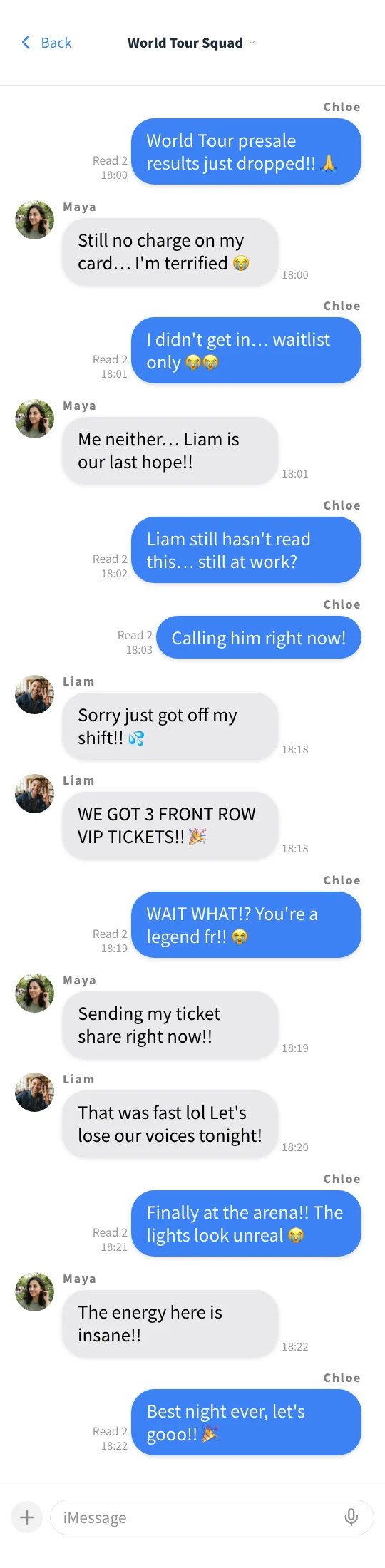
Text shrinks to an unreadable size when posted to X, Instagram, or TikTok.
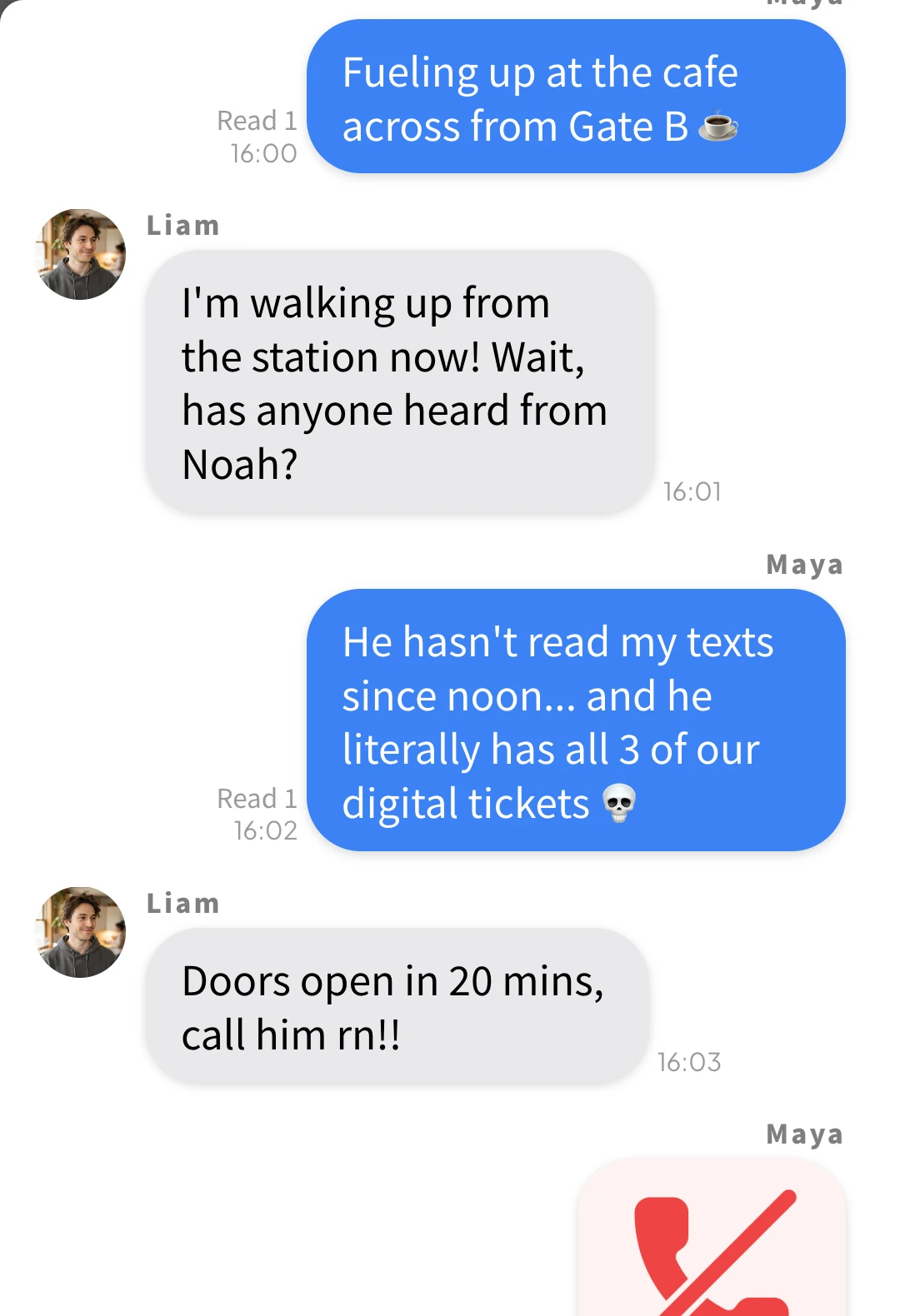
Top & bottom bubbles get sliced mid-sentence and Slide 2 loses the chat header.
Clean Bubble Boundaries, Persistent Headers & Rich Widgets
Select 2 to 8 pages in the export screen to split cleanly between bubbles (or insert optional Page Breaks at exact cliffhangers). Every slide keeps the top group header and bottom input bar, and matches the tallest slide's height (1080×2233px) so swiping on TikTok or Instagram feels completely native.
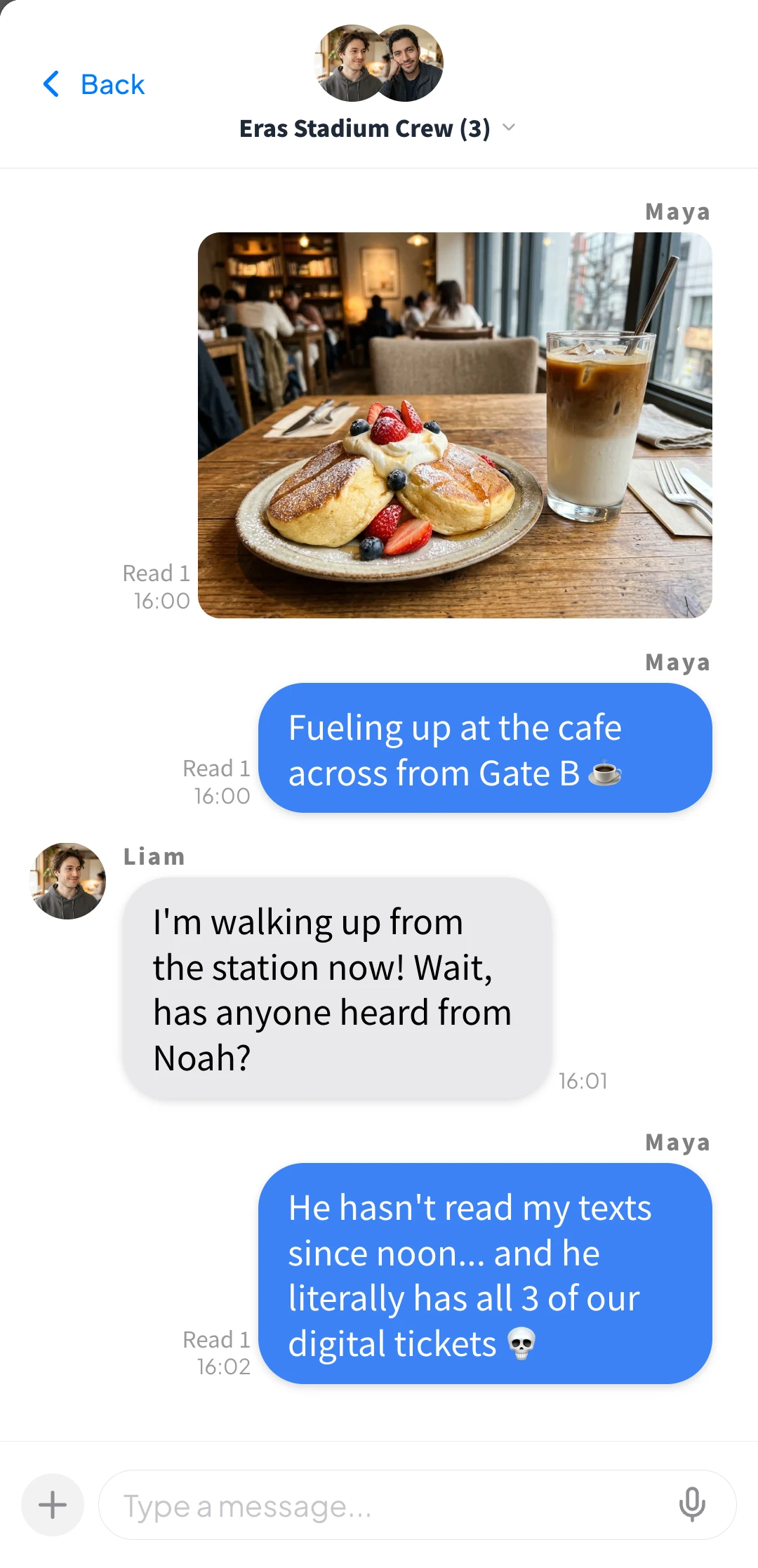
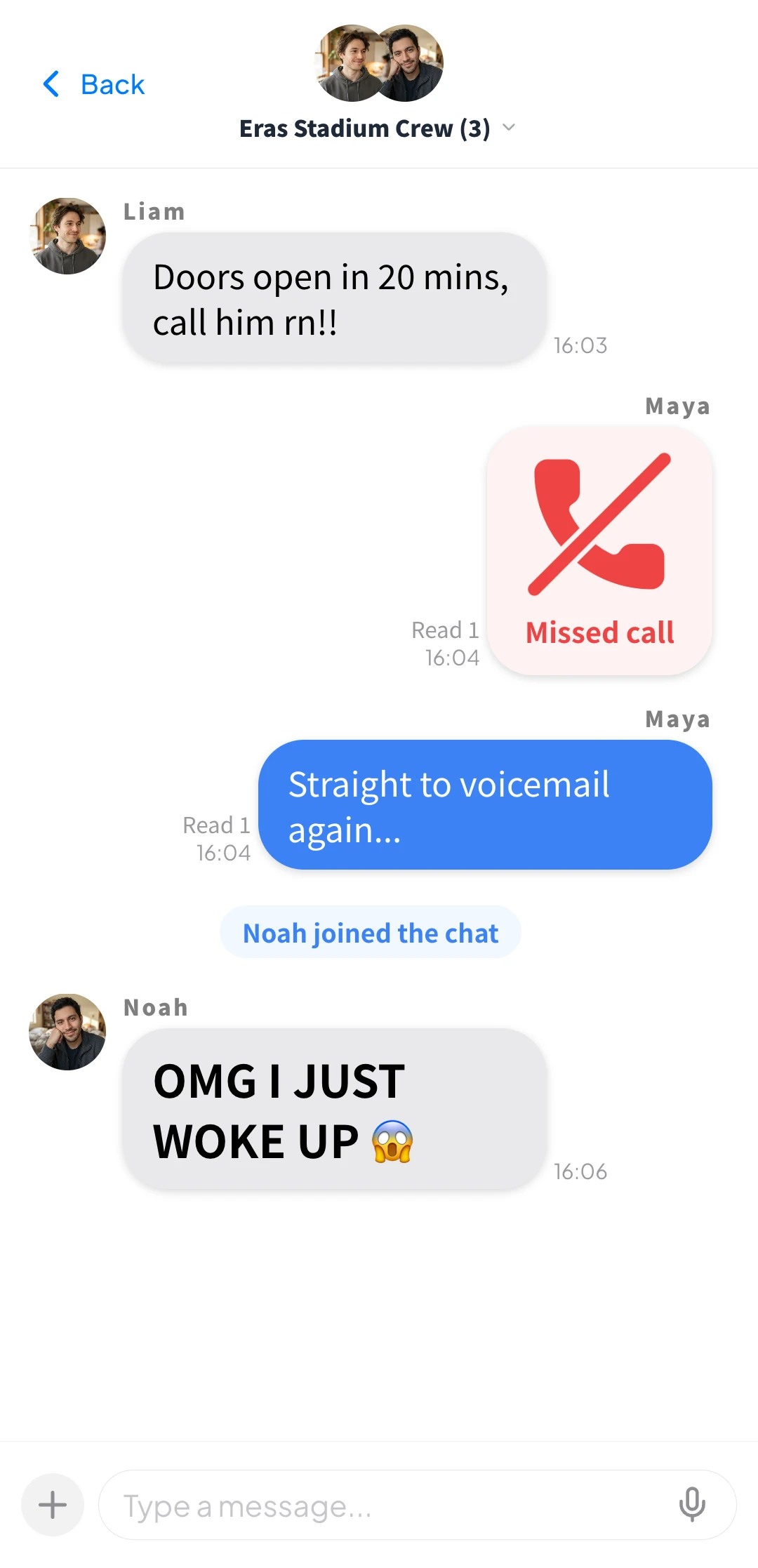
3 Ways to Build Fake Text Screenshots & Group Chat Carousels
Whether you want to hand-craft every bubble on your phone, paste a 1,500-word fanfic script from Google Docs, or generate a starter chat from a 1-line idea, all three workflows land in the exact same timeline editor.
Visual Timeline Editor with Auto-Split & Optional Page Breaks (Desktop & Mobile)
Type messages directly while watching the live iMessage-style or WhatsApp-style preview. When exporting, simply pick 2 to 8 Pages to auto-split cleanly between bubbles—or click the + divider between any two messages to insert an optional Page Break if you want to customize exact cliffhanger cut points.
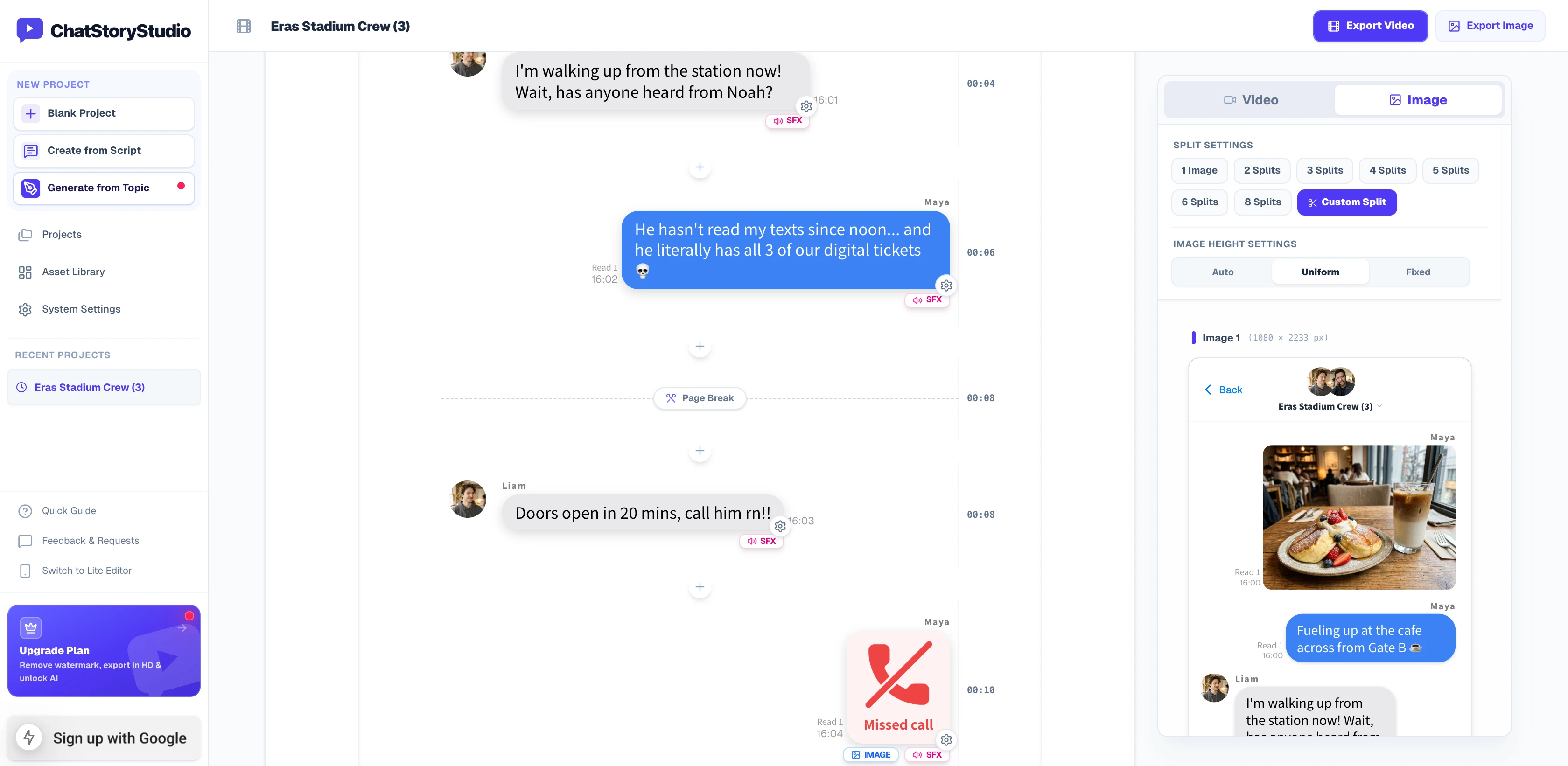
Desktop 3-Pane Studio: Check 2–8 Auto-Split or optional Page Break positions in real time on the right-hand Image preview tab.
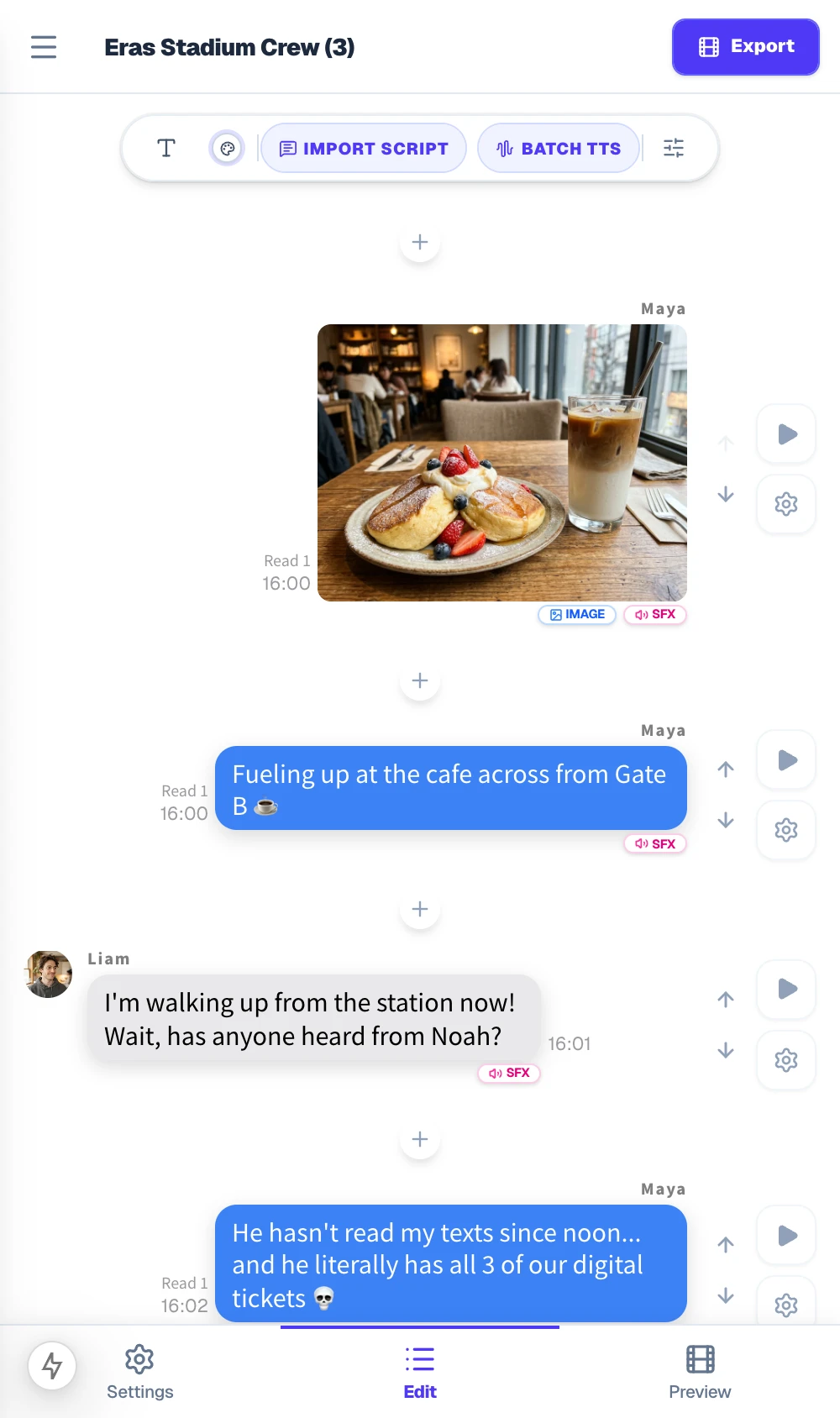
Mobile Lite Editor: Create, split, and save multi-slide fake chat carousels directly to iOS Photos or Android Gallery.
Bulk Script Import (Convert "Name: Message" Text in 1 Click)
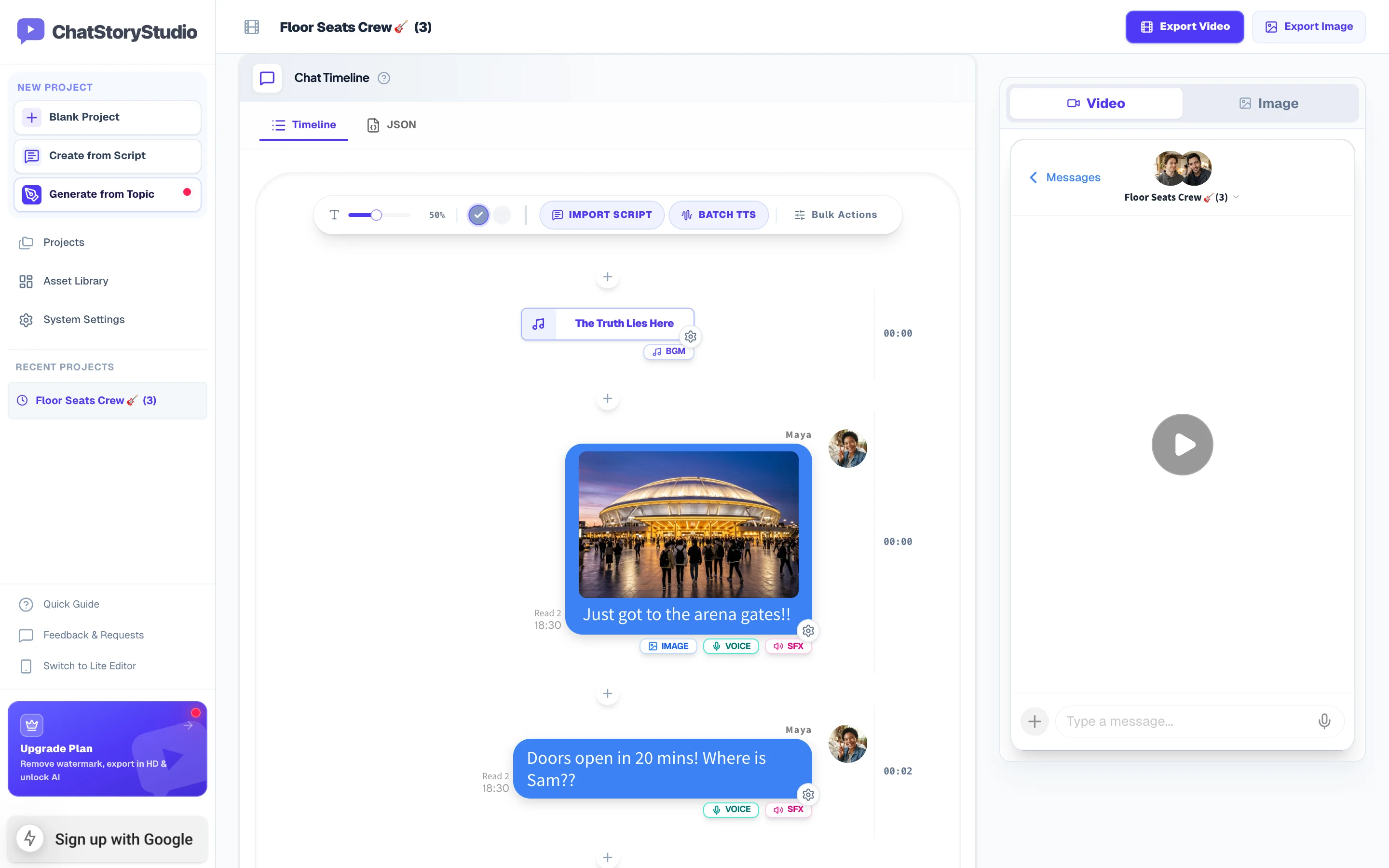
Already wrote your dialogue in Apple Notes, Google Docs, or AO3? Click Import Script and paste your entire Speaker: Message transcript. ChatStoryStudio automatically detects up to 15 speakers for realistic fake group chats, assigns avatars, and converts --- text or [System]: text lines into centered system pills.
Maya: Just got to the stadium gates! Where are you guys?
Liam: Walking out of the subway exit right now!
Maya: Did Noah text you back yet?
Maya: He hasn't even read my texts since last night...
--- Noah joined the chat
Noah: OMG I JUST WOKE UP 😱 On my way in an Uber!!
Maya: Finally all 3 of us made it! Best night ever!
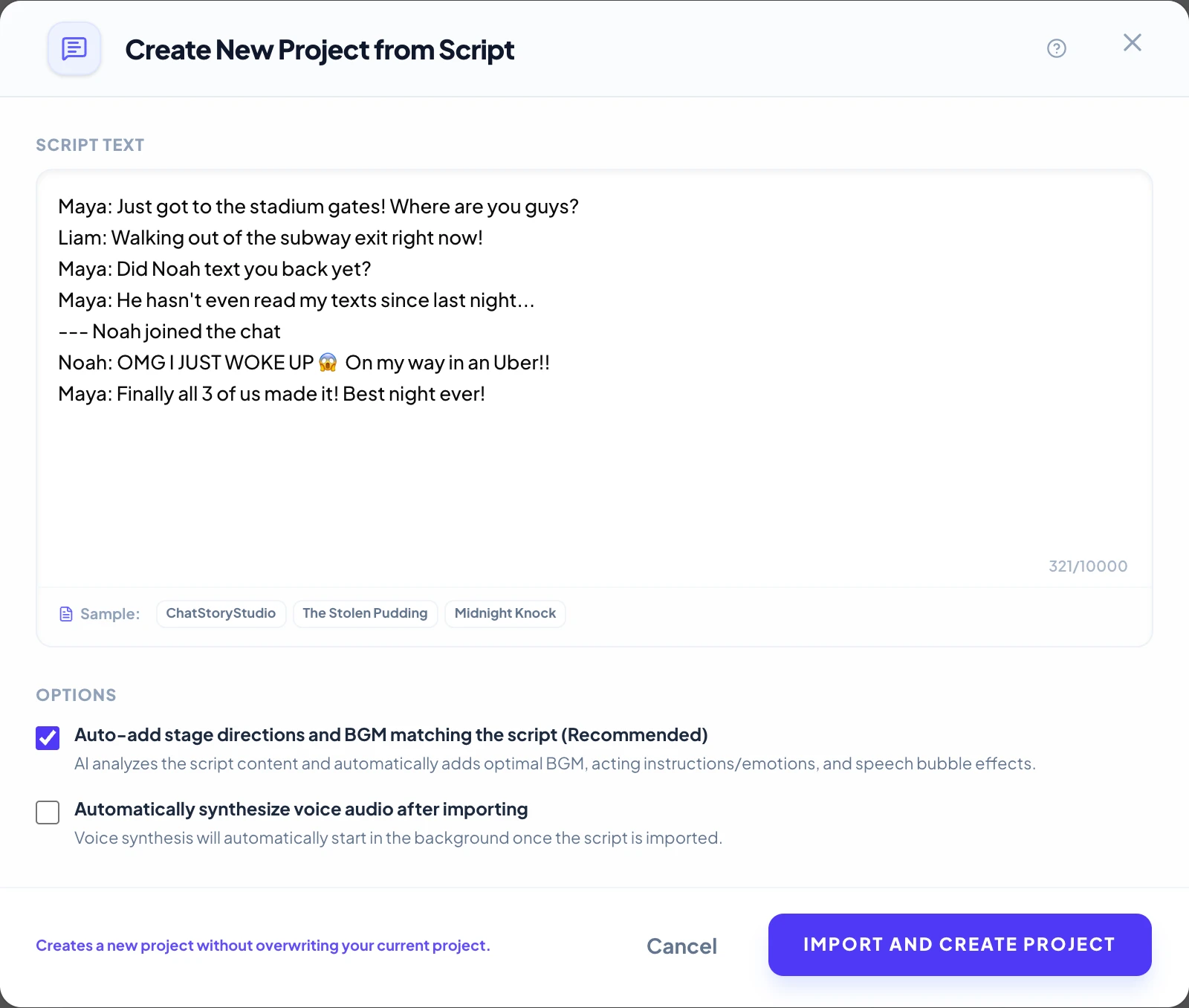
Paste up to 2,000 characters at once on Free/Lite (up to 10,000 characters on Pro)—speaker names, left/right bubble alignment, and system join alerts are parsed automatically.
Generate a Multi-Person Fake Text Story from a 1-Line Prompt
Need a fast starting draft for a texting skit or comedic thread? Pick a starter prompt below or type your own 1-line premise—a complete multi-character conversation will be generated on the timeline, ready for you to tweak lines or split into 2–8 carousel slides.
4 Studio Features That Make Fake Chat Carousels Look Authentic
Go beyond flat text boxes. Control exact slide heights for TikTok Photo Mode and Instagram Carousels, embed Missed Call logs and Gift / Action Cards, customize per-member read receipts, and save directly to your camera roll.
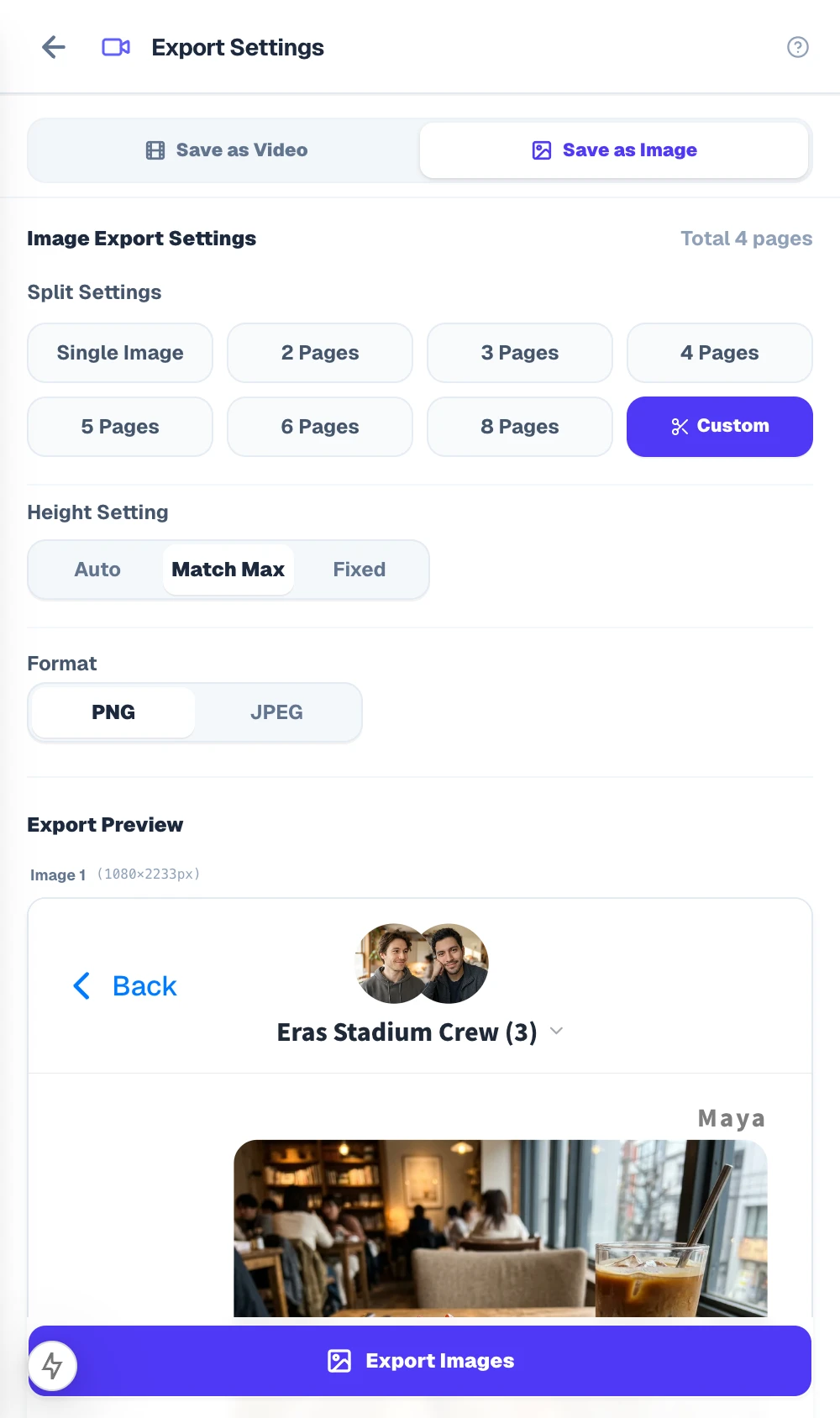
1-Click 2–8 Page Auto-Split (Plus Optional Custom Page Breaks) & “Match Max” Uniform Heights
By default, simply select 2 to 8 Pages in the Image Export settings to automatically divide your chat cleanly between bubbles (or choose Custom Split / Custom if you placed manual Page Break dividers). To prevent TikTok Photo Mode, Instagram Carousels, or X (Twitter) from cropping mismatched slides, choose from three height modes:
- Match Max (Uniform): Automatically pads all slides to match the tallest page so every swipe stays locked at the exact same aspect ratio.
- Auto Height: Fits each image tightly to its message count (from
1080×1080up to1080×16000px). - Fixed (9:16 / 1:1): Locks every slide to strict
1080×1920vertical or1080×1080square dimensions.
Missed Calls, Gift / Action Cards, Polls & System Alerts in 1 Click
Real group chats aren't just walls of plain text. Open the Templates picker on any message to insert visual turning points that hook readers as they swipe:
- Call History Widgets: Missed Call (red icon), Canceled Call, and Call Duration logs (e.g.,
0:02). - Gift & Action Cards: Customize fictional story elements (event passes, gift boxes, club invites), memo notes, and button labels.
- Polls, System Pills & Frameless Photos: Add 2–6 option voting bars, “Noah joined the chat” badges, or unframed photos.
Control Who Left Who on “Read” (or Blue Double Checkmarks)
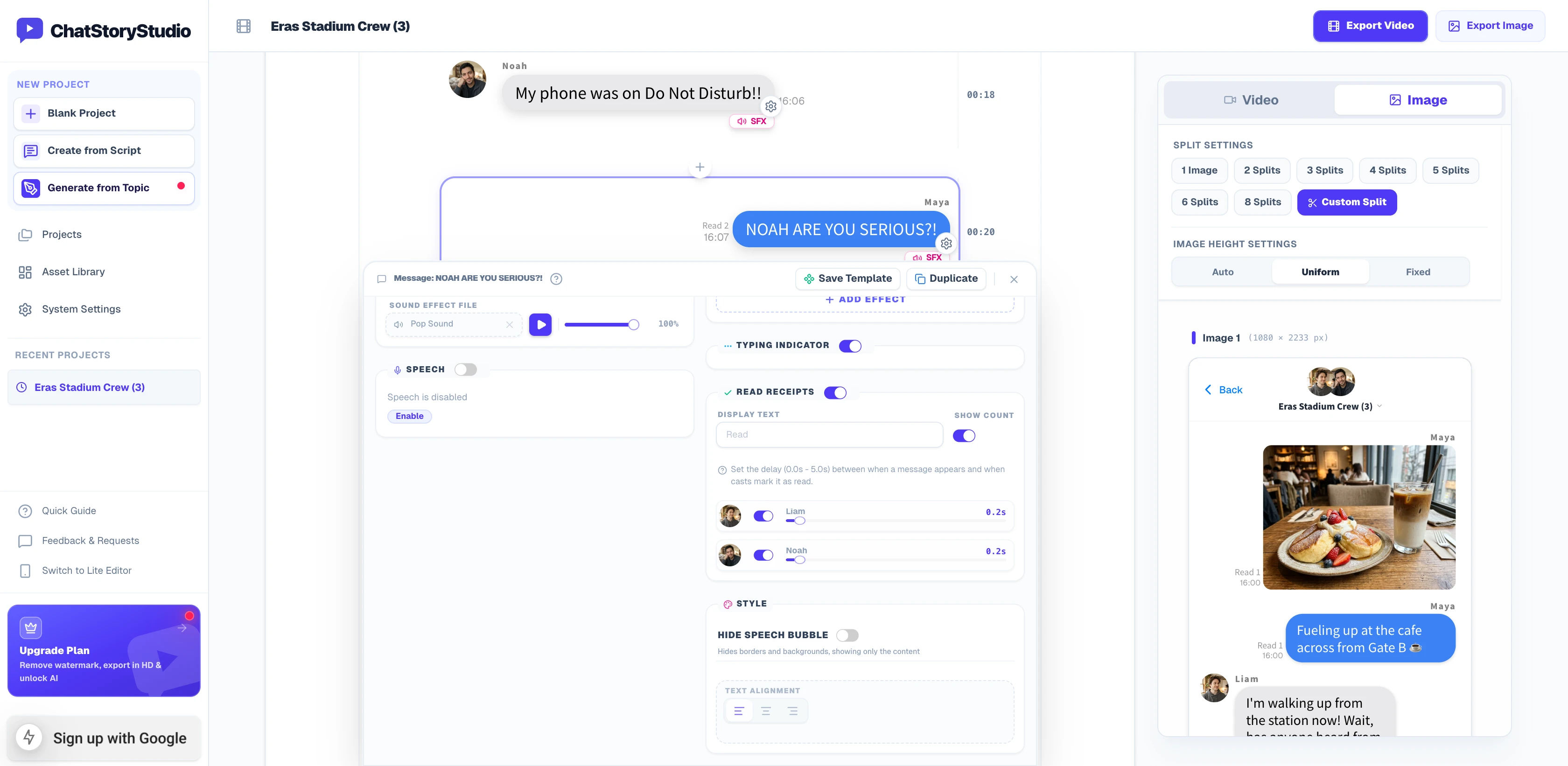
In a 3-person fake group chat, showing Read 1 while one friend is asleep—and jumping to Read 2 the moment they wake up—adds instant comedic realism.
- Per-Speaker Read Toggles: Toggle read status for each cast member on any individual message.
- Custom Read Labels & Checkmarks: Rewrite the label to
Read,Delivered,Seen, or switch to WhatsApp-style blue double checkmarks. - Frameless Crop Mode: Hide the top header and bottom input bar anytime to export clean bubble-only graphics for blog embeds or thumbnails.
Never Lose Progress on Reload + Save All Slides via iOS Share or ZIP
Every edit is saved automatically in your browser's private IndexedDB storage. When your carousel is ready, export all slides in one batch:
- Save All Images (Share) on iPhone/Android: Uses the native Web Share sheet so you can save all 2–8 slides straight to iOS Photos in one tap.
- 1-Click ZIP Archive on Desktop: Download sequentially numbered PNG or JPEG files (
01.png,02.png...) in a single ZIP. - Portable .csbackup Files: Export your project file to move seamlessly between your phone and PC.
Switch Across 23+ UI Styles (iMessage-Style, WhatsApp-Style, X DM-Style) in 1 Click
Need the same fake text story in iMessage-style blue bubbles for US TikTok and WhatsApp-style teal bubbles with double checkmarks for global Instagram Reels—or X DM-style, Discord-style, and Slack-style? Switch across all 23 UI presets in one click without retyping a single message.
iMessage Soft Blue
A refreshing blue style with a clean, translucent feel.
WhatsApp Teal
Sophisticated teal green inspired by global messaging apps.
X DM Dark
A sleek dark theme emulating social media direct messages.
Smart Green (LINE)
Ideal for everyday chat conversations and friendly casual stories. Simple white and green color scheme.
Customize Every UI Component & Save Your Own "My Themes"
Start from any official preset and fine-tune colors, fonts, headers, and bubble shapes to match your brand aesthetic.
Switch across 20+ header/footer designs, upload custom header graphics, or set to "Hidden" for frameless overlays
Choose solid colors, gradients, custom images, MP4 video backgrounds, or diagonally scrolling icon patterns
Customize left/right bubble colors, gradients, corner radii, bubble tails (ON/OFF), borders, and drop shadows
Switch fonts globally across modern sans-serif, serif, rounded, handwritten, and 8-bit pixel typefaces
Customize read labels ("Read", "Seen", double checkmarks), group read counts, and exact delay seconds before appearing
Save your customized color palette, background, and bubble styling as a reusable preset to apply in one click
Image Export Specs, 1-Click MP4 Video Conversion & Generator Comparison
See how ChatStoryStudio compares against single-image fake text generators (iFakeTextMessage, Prankshit, Zeoob, FauxTalks), general design tools, and manual phone screenshots.
Crystal-Clear 1080px Standard & 1620px (1.5x Ultra HD)
- Formats & Splitting: Lossless PNG or lightweight JPEG; Single Long Image (up to
16,000pxtall), Auto-Split (2, 3, 4, 5, 6, or 8 pages), or Custom Split via Page Breaks. - Free Plan ($0): Unlimited
1080pxwidth exports (includes a small watermark; personal creator monetization permitted). - Lite ($9/mo) & Pro ($19/mo): Removes the watermark completely and unlocks 1.5x Ultra HD (1620px width) exports so small timestamps and read receipts stay razor-sharp even when pinched-to-zoom.
Turn Any Fake Text Carousel into a Voiced MP4 Video in 1 Click
Did your 4-slide TikTok Photo Mode post go viral? Because ChatStoryStudio shares the exact same project timeline for images and video, you can switch the preview tab to Video, batch-generate 120+ expressive HD TTS voices across 4 languages (30+ English voices), and export a Full HD (1080p, 30fps) MP4 video without rebuilding anything.
| Feature / Workflow | ChatStoryStudio (This Studio) | Single-Image Fake Text Sites(iFakeTextMessage, Prankshit, Zeoob, FauxTalks) | Design Tools & Manual Crops(Canva, Photoshop, Real Phones) |
|---|---|---|---|
| Multi-Slide Auto-Split (2–8 Pages) | ◎ 1-click Auto-Split (2–8) & optional Page Breaks with Match Max (Uniform) height | ✗ Single image only (long chats shrink or require manual cropping) | △ Manual artboard slicing & header duplication per slide |
| IndexedDB Auto-Save & Re-Editing | ◎ Automatic IndexedDB browser storage + .csbackup files | ✗ Wiped on browser refresh; must retype from scratch to fix typos | ○ Saved in project files, but tedious to reflow bubble spacing |
| Group Chats (15 Speakers) & Creation Speed | ◎ Bulk script paste (up to 15 speakers), 1-line prompt, or timeline typing | △ 1-by-1 form entry only (typically limited to 2 speakers) | ✗ Manual box alignment for every single message and timestamp |
| In-Chat Widgets & Read Counts | ◎ Missed calls, Gift / Action Cards, polls, “Read 2” & blue checkmarks | △ Basic text & static status bar icons only | △ Must design every widget and checkmark icon from scratch |
| UI Style Switching (23+ UI Styles) | ◎ 1-click switch across iMessage-style, WhatsApp-style, X-style, Discord-style, Slack-style & ChatGPT-style | ✗ Separate websites per app; requires retyping your entire chat | ✗ Requires rebuilding the entire template from scratch |
| Convert to Voiced MP4 Video | ◎ 1-click switch to Full HD (1080p, 30fps) MP4/WebM video with 120+ HD TTS voices & SFX | ✗ Static image only (no video or audio export) | △ Requires manual keyframing in CapCut or Premiere Pro |
| Pricing, Free Tier & Watermark | ◎ Free ($0, 1080px with small watermark, creator monetization OK); Lite ($9/mo) & Pro ($19/mo) remove watermark & unlock 1.5x Ultra HD (1620px) | ○ Free (ad-supported), but low resolution & unclear commercial rights | △ Requires paid design subscriptions ($13–$23/mo) and high manual labor |
Frequently Asked Questions About Fake Text Message Screenshots & Carousels
Ready to Create & Split Your First Fake Text Screenshot Carousel?
No app installation or mandatory signup required. Experience how effortless it feels to build chat stories directly in your browser.
Workflow & Cost Comparisons vs Other Tools
Related Use-Case & How-To Guides
* Product and company names such as "iMessage" (Apple Inc.), "WhatsApp" (WhatsApp LLC), "X" (X Corp.), "YouTube" (Google LLC), "Discord" (Discord Inc.), "Slack" (Slack Technologies, Inc.), "ChatGPT" (OpenAI OpCo, LLC), and "LINE" (LY Corporation) are trademarks or registered trademarks of their respective holders. ChatStoryStudio is an independent parody/mockup studio and is not affiliated with, sponsored by, or endorsed by any of these companies.